1 Welcome
You are now in charge of a hotel.
Not a fictional one — for the next several weeks, this is your hotel. You'll set its room prices every day. You'll decide which guest amenities to install. You'll pick which booking channels to sell on, which marketing campaigns to run, and whether to bid on corporate contracts that show up. At the end of every period, you'll see exactly how many rooms you sold, how much money you made, and how you stack up against your competitors.
This manual is your operating guide.
What you're playing
The simulator is a hotel revenue strategy game. You and your classmates each run a hotel in the same city, all chasing the same pool of guests. Every period (typically one month of in-game time) you submit a set of decisions. Once everyone has submitted, your professor runs the period. Demand gets allocated across hotels based on what each of you decided. You get results. You learn. You adjust. You go again.
There is no single "winning strategy." A luxury hotel in a downtown business district plays a completely different game from a budget property near the highway. What matters is:
- Understanding what kind of hotel you have
- Reading what the market is doing right now
- Making decisions that line up with both
What you control
You have decisions in five areas:
- Pricing — what you charge per room, per day
- Inventory — how many rooms you make available (you can hold some back)
- Your hotel itself — what amenities you offer, which loyalty program (or brand) you affiliate with
- Distribution — which third-party channels (OTAs, your own website, GDS) you sell through
- Marketing — campaigns that lift awareness, boost direct bookings, or build long-term brand
You also respond to RFPs — Request-for-Proposals from corporate clients and tour operators asking for blocks of rooms at a discounted rate.
What you do NOT control
You do not set the size of your hotel. You do not pick your hotel type (luxury, midscale, budget). You do not control the city's overall demand, the events happening in town, or what your competitors are doing.
You also can't undo past decisions. Once a period is published, it's history. That's the point — revenue strategy is about making good decisions under uncertainty, and then living with them.
How a period works
Each period follows the same rhythm:
- Period opens. You can edit your decisions for the upcoming month.
- You make decisions. You set prices, adjust inventory, activate marketing, bid on RFPs, configure your hotel.
- You submit. Pressing "Submit Final" tells the engine your decisions are locked in.
- The professor runs the period. Demand is allocated, bookings are made, money changes hands.
- Results publish. You see your KPIs, your competitors' indices, your updated cash position.
- Next period opens. Repeat.
Some simulations use pace mode, where the period is run in several smaller passes through the month instead of one big run. In pace mode you'll see partial results mid-month, and you may get the chance to adjust your prices for the remaining days. We cover this in Chapter 7.
How long this manual is
About 13 chapters. The fastest way to use it:
- Read Chapters 1–3 before your first decision period. They cover the basics.
- Read Chapters 4–6 before you start setting prices.
- Read Chapter 7 only if your simulation uses pace mode (your professor will tell you).
- Read Chapter 8 the first time an RFP appears.
- Read Chapters 9–11 after your first published results, when the numbers will mean more to you.
- Use Chapter 13 (FAQ) as a reference whenever something is confusing.
💡 You're going to make mistakes in the first period. Everyone does. The simulator is designed to let you learn from them — your professor isn't grading the first period as harshly as the fifth.
Next
→ Chapter 2: Getting Started
2 Getting Started
This chapter gets you from "I have a login link" to "I can read every part of the screen."
Logging in
Your professor will give you three things:
| Where to type it | |
|---|---|
| Simulation ID | The "Simulation ID" field |
| Hotel name | The "Hotel Name" field — exact spelling, capitalization matters |
| Password | The "Password" field |
Open the simulator URL, click Hotel Team on the landing page, and enter those three values.
 The hotel-team login. Three fields — that's it.
If your hotel name or password is wrong, the form will tell you. If the simulation ID is wrong, you'll be sent back to the landing page.
Where you land
After login you arrive at your Results Dashboard. The first time you log in there won't be much here yet — no periods have run. That's normal.
 The top bar — your hotel's vital signs at a glance.
The top bar is the most important strip of pixels in the simulator. From left to right:
| Element | What it means |
|---|---|
| Hotel name | Your hotel |
| Type pill | Luxury / Upscale / Midscale / Budget — your hotel's category |
| Star rating | Industry-style 1–5 stars, based on amenities and brand |
| Service score pill | A measure of your hotel's operational quality, built from the amenities you've installed and your brand affiliation. Higher is better. |
| Reputation pill | Your long-term word-of-mouth. Higher is better. |
| Period N | The period currently open for editing |
| Cash pill | How much money you have to spend |
If you've made decisions that haven't been run yet but will change your reputation or service score, the pill will show a small projection arrow (e.g. Rep 64 → 78). That's the engine telling you "after this period runs, expect this." It's a preview, not a guarantee.
Switching language (EN / ES)
In the top-right of the hotel header, next to Logout, are two small pills — EN and ES. They toggle the language of the interface. English is the base language; pick ES and the interface is translated into Spanish. You can switch anytime.
One thing stays English on purpose: revenue-management vocabulary (Revenue, RevPAR, ADR, OTB, pace, forecast, Retail, Advance Purchase). That's the industry standard you're here to learn, so it reads the same in both languages.
💡 Your choice is remembered for your hotel, and it also sets the language of the downloadable Excel workbook (Chapter 5). Switch it once and everything follows.
The six tabs
Below the top bar are six horizontal tabs:
 The tabs you'll live in.
| Tab | What you do here |
|---|---|
| Results | Read what happened last period (P&L, daily breakdown, occupancy, ADR) |
| Decisions | Set prices and inventory for the next month, commit your forecast |
| Leaderboard | Compare your performance to competitors (you see indices, not their dollar numbers) |
| RFPs | View open corporate / group bid requests and place bids |
| My Hotel | Configure your hotel itself — amenities, loyalty / brand, channels, marketing |
| 📬 Comunicaciones | Read official briefings from your professor — announcements, market context, results commentary |
You will spend the most time in My Hotel (especially in early periods) and Decisions (every period).
💡 When there are briefings you haven't read yet, the 📬 Comunicaciones tab shows a red badge with the number of unread briefings. Make checking it part of your start-of-period routine — briefings often contain context that should shape your decisions.
The two-stage workflow every period
This is the single most important habit:
First set up your hotel in My Hotel. Then set prices and submit in Decisions.
Here's why: things you change in My Hotel — like installing a spa, joining a loyalty program, or activating a marketing campaign — affect how guests perceive your hotel, which affects who books with you and at what price. If you set prices before deciding to install a spa, your pricing strategy may be off.
The Decisions tab has a reminder banner about this:
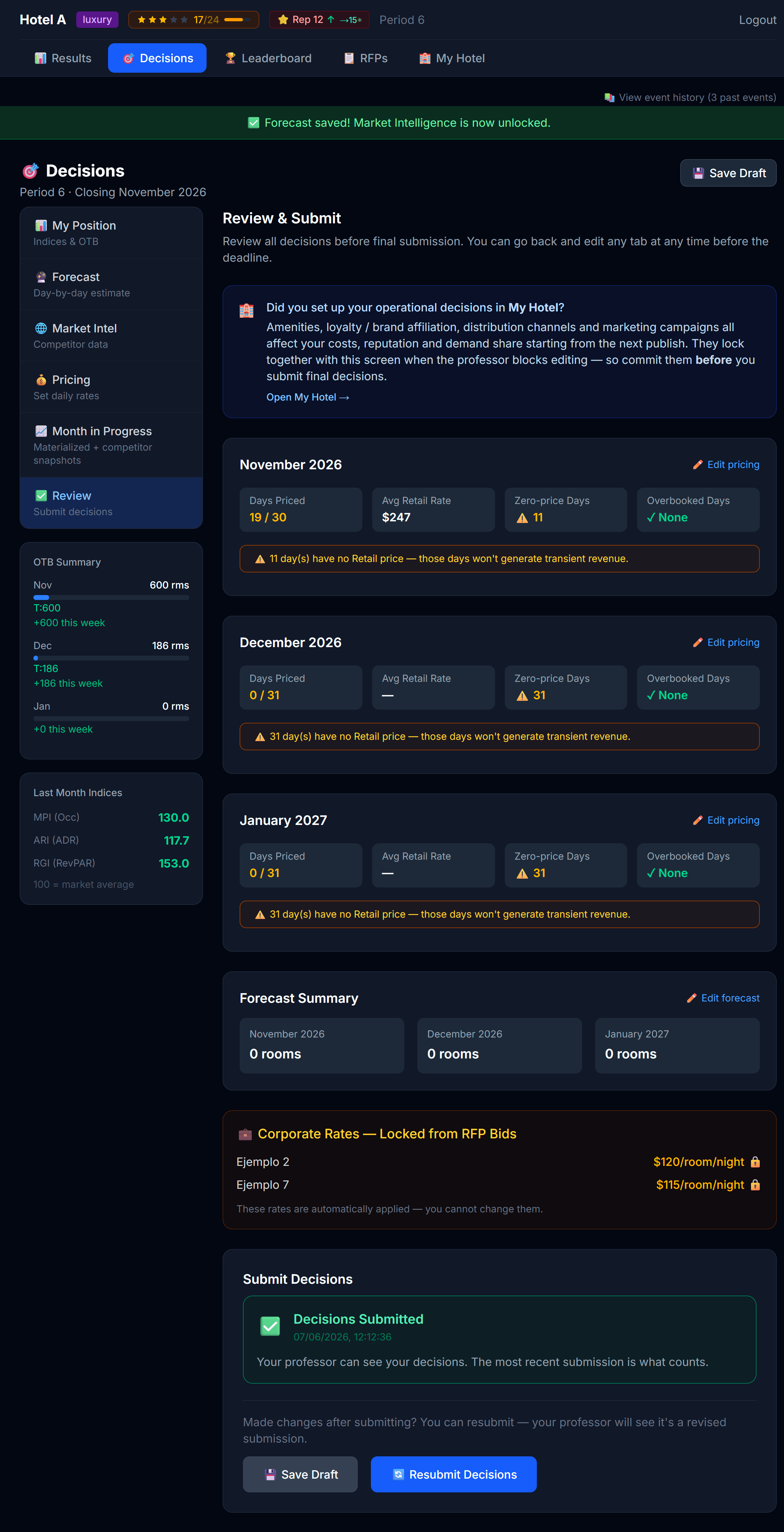 The "Did you set up My Hotel?" banner appears in Review & Submit. It's there for a reason.
When you can't edit
Your professor controls when you can make changes. Two things can lock you out:
- The period is closed. No editing once the professor has run and published the period.
- The professor locks editing. Even with the period open, the professor can lock editing — usually right before they run the period so nobody changes anything mid-run.
When either is true, you'll see a 🔒 banner at the top of any editable page, and the inputs go gray:
 Locked state. You can still read everything; you just can't change anything.
Logging out
Top-right corner. There's no "auto-save" warning — anything you typed but didn't save is gone, so always click Save on each tab before logging out.
Next
→ Chapter 3: Setting Up Your Hotel (My Hotel tab)
3 Setting Up Your Hotel
The My Hotel tab is where your hotel becomes yours. You'll spend significant time here in the first 2–3 periods, then return only occasionally once your hotel is dialed in.
There are up to six sub-tabs across the top: Info, Amenities, Loyalty, Channels, Marketing, and — when your professor sells competitive intelligence — Market Research (3.6). Some of these only appear when your professor has turned the matching feature on.
Concept primer: why this tab matters
Two hotels can charge the same price per night and get very different demand. Why? Because guests don't just compare prices — they compare the whole package:
- Does this hotel have a pool? A spa? A fitness center? → Amenities
- Will I earn points I can use later? → Loyalty
- Can I even find this hotel on Booking.com / Expedia / through my company travel agent? → Channels
- Have I heard of this hotel? Is it trending right now? → Marketing
- Does the place feel well-run? → Service score (driven by your amenity mix and your brand affiliation)
Each lever you pull in My Hotel shapes the "package" guests are comparing. Stronger package = more demand at any given price. The exact magnitude of the effect is hidden from you on purpose — figuring it out through experimentation is part of the simulation.
3.1 Info — your hotel's identity at a glance
The Info sub-tab is your hotel's profile page. It's mostly read-only — a place to confirm who you are and how much you have to spend.
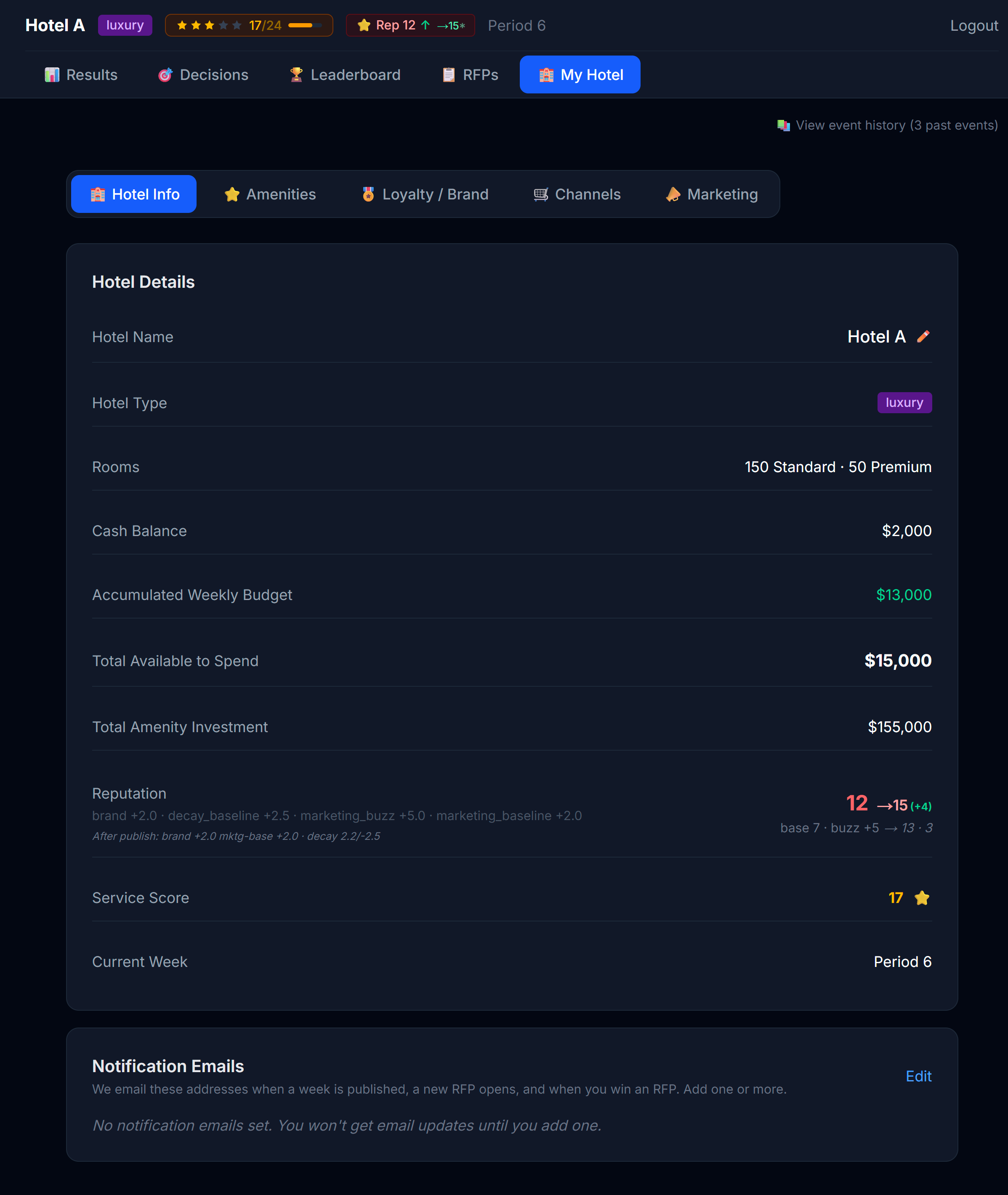 The Info tab. Identity on top, financial summary below.
What's shown:
| Field | What it tells you |
|---|---|
| Hotel name | Editable — click ✏️ to rename your hotel (see the note below before you do) |
| Hotel type | Read-only — Economic / Premium / Luxury, earned by the amenities you build (see 3.2) |
| Rooms | Standard count + Premium count |
| Cash balance | Your operating cash — pays day-to-day costs |
| Accumulated Weekly Budget | Extra cash drip-fed from operations, available to invest |
| Total Available to Spend | Your investable funds — your accumulated weekly budget plus your FF&E reserve, combined. This is your full spending power for amenities and other investments right now. |
| Total Amenity Investment | How much CapEx you've sunk into amenities so far |
No decisions are made here. The Info tab is a dashboard, not a control panel. The "decisions" that shape your hotel happen on the other four sub-tabs (Amenities, Loyalty, Channels, Marketing).
⚠️ Renaming changes your login. Your hotel name is also the name you type at login. If you rename the hotel, every member of your team must sign in with the new name from then on — typed exactly as written, capitalization included. Tell everyone before you change it.
The Team Password card
The Info tab also has a Team Password card, where your team can change its own password:
- You must enter your current password to confirm the change.
- The new password must be at least 8 characters.
- There is one shared login per hotel, so the new password applies to the whole team. The old one stops working immediately — tell every member right away.
If your team loses the password entirely, use "Forgot password?" on the login page. Your professor is notified and will respond with your credentials — nothing is reset automatically, so allow some time for the reply.
💡 Service score and reputation aren't directly editable from any tab. They're outcomes of decisions you make elsewhere — primarily through Amenities and Loyalty. See Chapter 10 for how they're built.
3.2 Amenities — the physical product
Amenities are the things your guests can use: a pool, a spa, a restaurant, a fitness center, a business center, a kids' club, etc. Each amenity is grouped into a category, and each category has a ladder of tiers:
F&B:    None → Café → Restaurant → Restaurant + Bar → Fine Dining
Spa:    None → Basic Spa → Full Wellness Center
Pool:   None → Outdoor Pool → Rooftop Pool with Bar
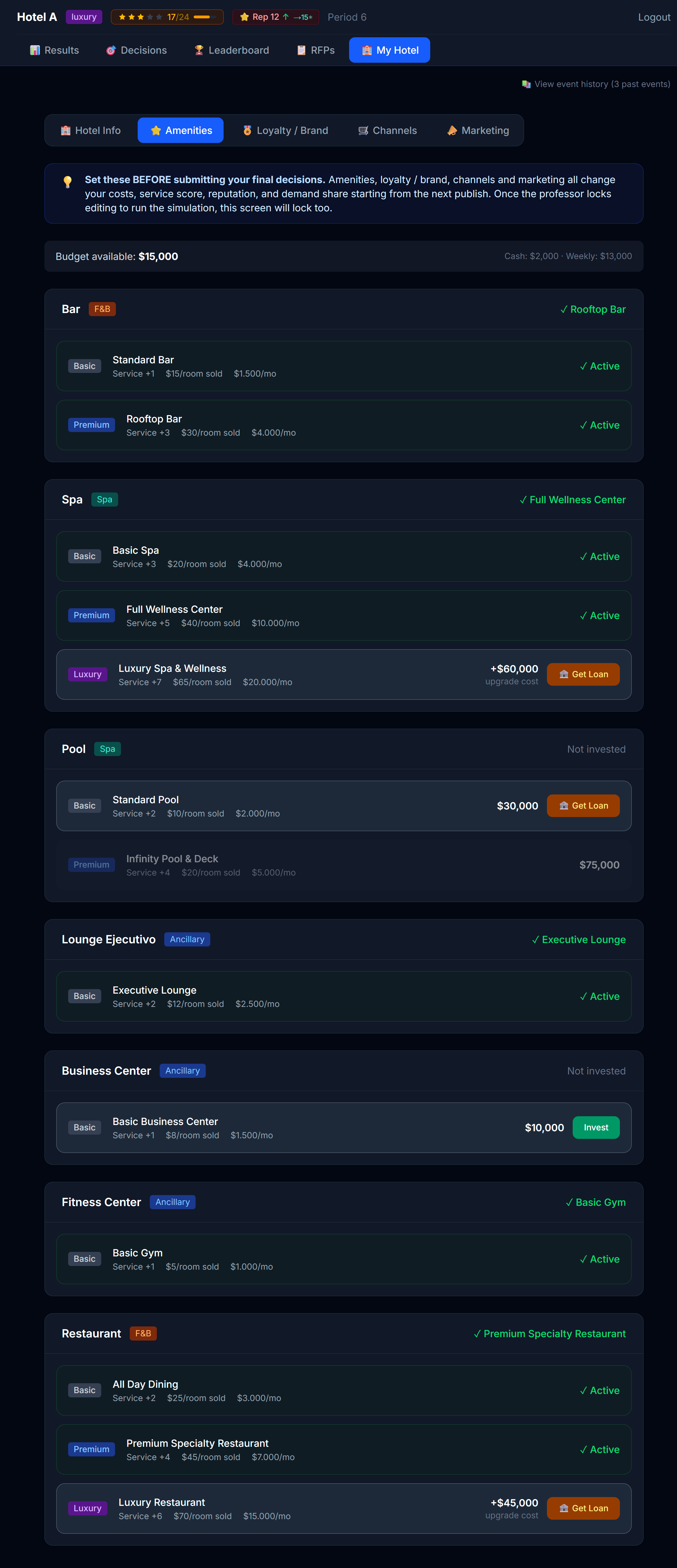 Amenities categories with current tier highlighted.
Your amenities decide your hotel class
Your hotel class — Economic, Premium, or Luxury — isn't assigned to you. You earn it by building the right amenities. A higher class unlocks stronger brand flags (3.3) and lets you charge more.
At the top of the Amenities tab a "Path to [next class]" panel shows exactly what you still need to reach the next class up:
- A checklist with one line per category — e.g. Spa — needs Basic Spa or higher — each marked ✓ (met) or ○ (still missing), plus an "X of Y requirements met" counter.
- A higher tier in a category also counts: if a requirement asks for a Basic Spa and you own a Full Wellness Center, that requirement is already met.
- Each amenity row also carries a "Required for Premium / Luxury" badge, so while you shop you can see which investments move you up a class.
Your class updates automatically as soon as you own every required amenity — there's nothing to submit. (The operating benefit of those amenities, such as service score and revenue, starts counting per the activation timing below.) Once you reach Luxury (the top class), the panel simply confirms it.
Investing vs operating
Amenities come with two kinds of cost:
| What it is | When you pay it | |
|---|---|---|
| CapEx (capital expenditure) | One-time cost to install or upgrade | Once, at the moment you commit |
| OpEx (operating expenditure) | Ongoing monthly cost to run | Every period the amenity is active |
The Amenities tab shows you both before you commit.
⚠️ Money you spend here comes out of your investment cash pool, not your operating cash. Marketing and channel costs come from operating cash. Don't confuse the two.
When your investment takes effect
An amenity doesn't pay off the exact instant you buy it. Its benefit (service score, the amenity's revenue, and its OpEx) starts counting like this (your professor can tune these timings in the configuration):
| Investment type | When it activates (default) | Why |
|---|---|---|
| Initial setup | Immediately | Your hotel opens with its initial build. |
| New install (first tier in a category) | The next period | Building a restaurant or spa from scratch takes time before it opens. |
| Upgrade (raising the tier of something you already run) | The same period (instant) | Renovating what you already have is quick. |
Plan around it: if you want a new amenity to land in a specific month, install it the period before. An upgrade, by contrast, pays off the same month.
Upgrading is cleaner than installing
That's why upgrading is usually more efficient than installing from scratch: an upgrade comes online right away (by default), and even if your professor sets a delay, the old tier keeps producing revenue until the new one takes over. There's never a "gap month" where you lose spa revenue.
When you should invest
Amenities are most useful when they match what your guest mix wants. A business hotel doesn't need a kids' club. A resort needs a pool. Check the Demand Factors panel (you'll learn about it from your results) for clues about what your current guests value.
3.3 Loyalty / Brand — joining a brand or staying independent
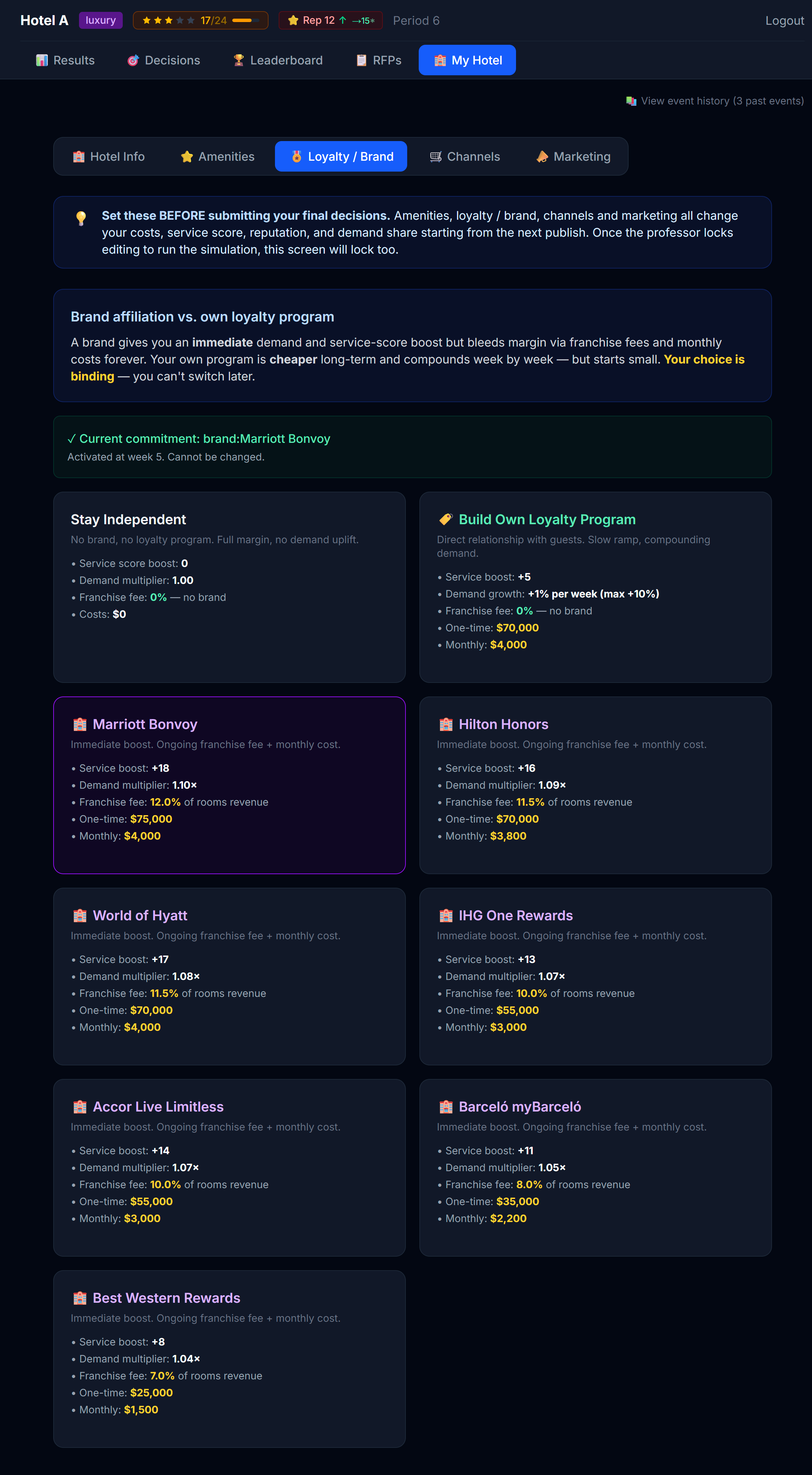 Three paths: independent, your own program, or a major brand flag.
| Path | What it is |
|---|---|
| Independent | No program. Maximum flexibility, lowest fixed cost, but no loyalty-driven repeat demand. |
| Own program | You build your own. Moderate cost, slow build-up, you keep all the upside. |
| Major brand | You fly a well-known flag. Ongoing franchise fee + monthly cost, but you tap into a global loyalty program and a prestigious brand from day one. |
Two things drive how much demand a brand brings you, and you'll see both on each card as simple ratings:
- Program reach — how big the parent loyalty program's membership base is (shared by all of that program's hotels).
- Brand prestige — how strong that specific flag is in the market.
A stronger program and a stronger flag mean more demand — but usually a higher franchise fee. That trade-off is the decision.
Brands are limited — you pitch for them
Brands aren't first-come-first-served:
- One hotel per flag. Only a single hotel in the market can fly each flag.
- Class-locked. You only see the flags that fit your hotel's class (economic, premium, or luxury).
- You pitch. Choose a flag, write a short pitch (why your hotel deserves it), and submit. If you're the only one who wants it, it's granted. If another team wants the same flag, your professor decides who gets it — your pitch is what they read.
- If you're not awarded a flag, pick another available one. Once a flag is awarded to you it's binding for the rest of the simulation.
💡 Loyalty pays off over time, not instantly. Don't expect your first month with a new brand to be transformative — the advantage compounds over several periods. And don't wait too long to pitch: the best flags get claimed.
3.4 Channels — where you sell
Your rooms have to be visible somewhere for guests to book them. The Channels tab shows you all the distribution channels available in your simulation, split into:
- Active — channels you're selling on right now
- Available — channels you could activate
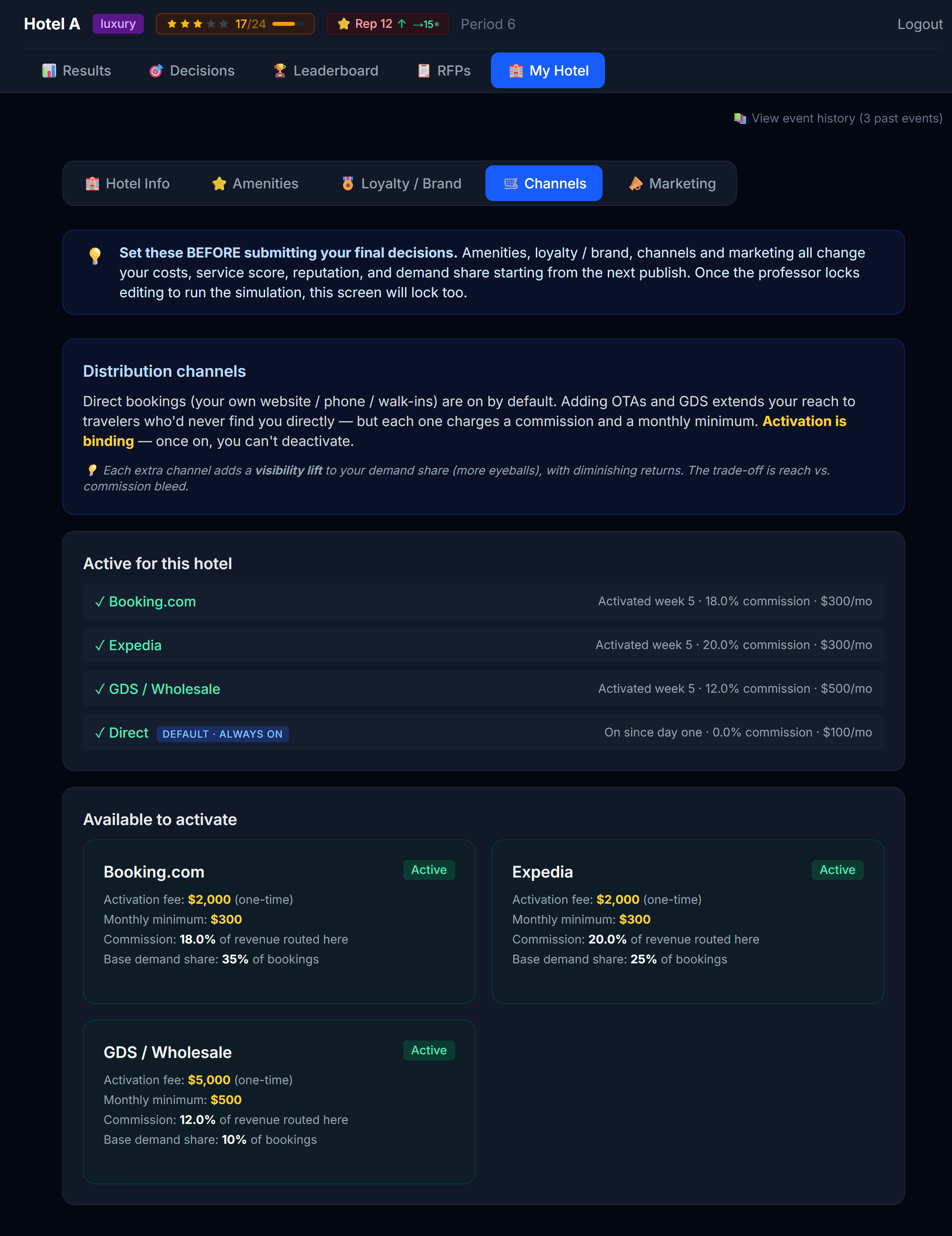 Active list on top, available list below. Direct is always on.
Direct is free and always on
Your own website ("Direct" channel) is always active and never costs commission. Treat it as your home base.
Adding OTAs gets you visibility, but...
Activating Booking.com or Expedia puts you in front of millions of guests — but every booking through that channel takes a commission cut. You're trading margin for volume.
There's another subtlety: each additional channel you activate gives you less extra visibility than the last one. The second OTA helps a lot. The fourth one barely moves the needle. The first OTA, on the other hand, often pays for itself.
This is a "diminishing returns" curve. You can see it on the channel cards — each one has a "visibility lift" badge that shows how much it would add to your visibility if activated, given everything else you have on.
Commission tiers
Channels often have commission rates that depend on volume. The "Standard" tier is what you pay until your monthly booking volume on that channel crosses a threshold; after that you pay the "Premium" (lower) rate. The tab shows you both rates and the threshold.
3.5 Marketing — buzz and baseline
The Marketing tab is the most underused part of My Hotel for first-time players. It shouldn't be.
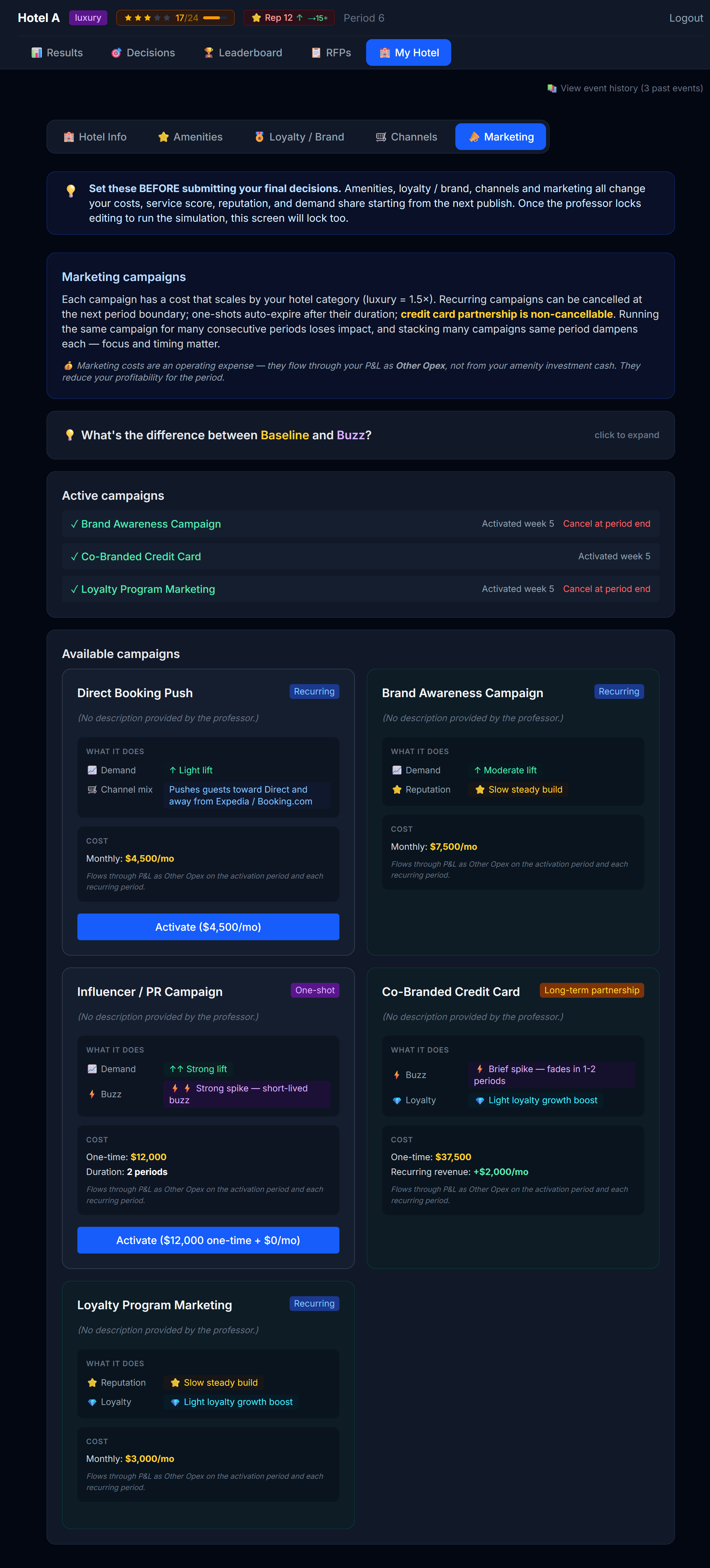 Campaigns with their categories: Buzz vs Baseline, ongoing vs one-shot.
Concept: Buzz vs Baseline
Marketing campaigns fall into two big buckets:
| Bucket | What it does | When the effect arrives |
|---|---|---|
| Buzz | Short-term spike in demand or visibility — promo codes, flash sales, influencer pushes | This month or next |
| Baseline | Long-term brand-building — corporate sponsorships, magazine features, sustainability certifications | Slowly, over many months — but it sticks |
A healthy marketing plan mixes both. Buzz handles immediate booking gaps; Baseline grows the floor under your hotel's demand permanently.
There's also a distinction between ongoing campaigns (paid for monthly while active) and one-shot campaigns (single payment, single boost).
Loyalty-powered campaigns (need a program)
Two campaigns only unlock once you have a loyalty program:
- Co-Branded Credit Card — you partner with a bank and sell points/miles onto a card. It's a big upfront deal with a small monthly servicing cost, but it pays recurring miles revenue every month (scaled to your hotel's size and class) and steadily grows your loyalty base. It's permanent — it cannot be cancelled. Requires your own loyalty program (a brand runs its own card, so branded hotels don't launch a second one).
- Loyalty Program Marketing — promotions to your members that speed up enrollment. Requires a loyalty program (your own, or a brand).
This is why building your own program can be powerful: it's slow and costly at first, but it lets you capture the credit-card economics and compound your demand over the simulation — with no franchise fees.
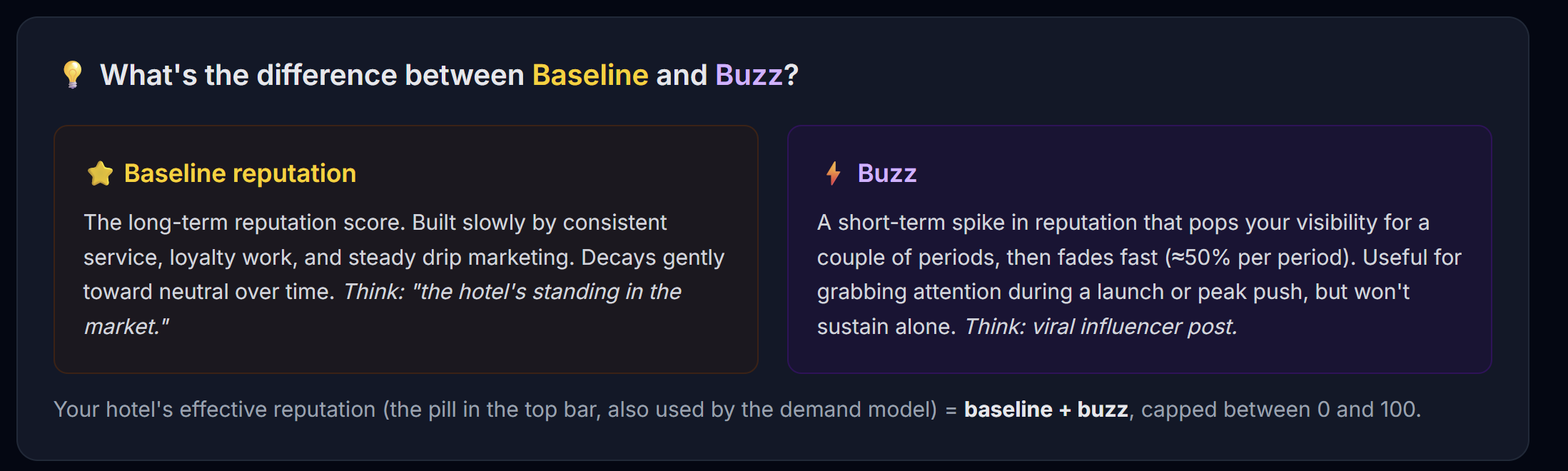 The expandable explainer at the top of the Marketing tab walks through the buckets in more detail.
Activating a campaign
Click Activate. You'll get a confirmation modal that summarizes:
- Total cost (one-time + recurring)
- Which bucket it belongs to
- When the effect kicks in
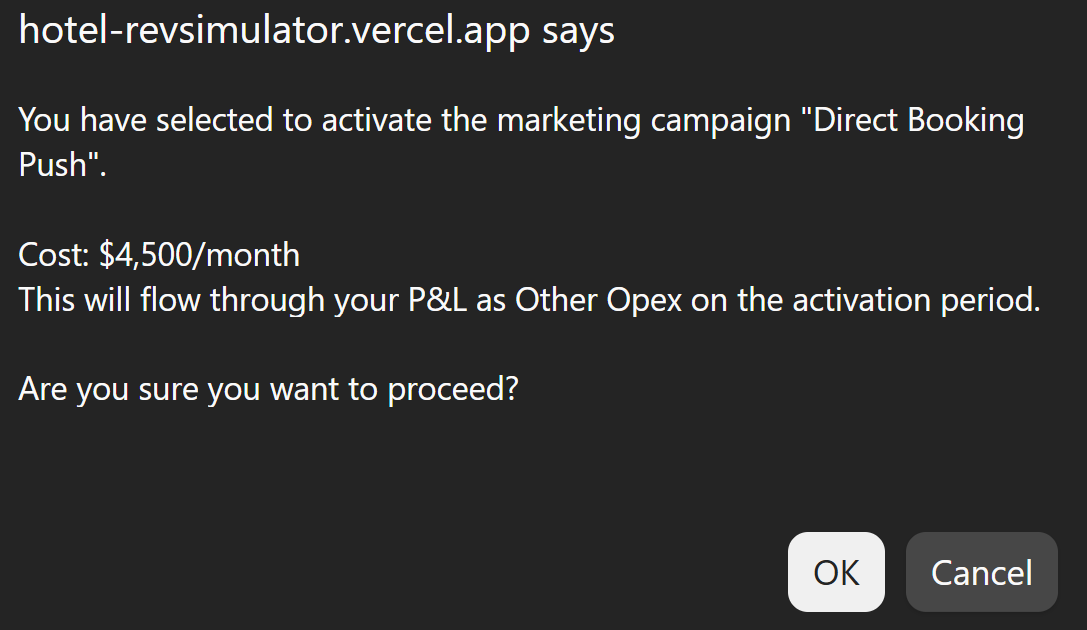 Every campaign activation goes through a confirmation step. Read it before clicking Yes.
⚠️ Campaign costs come from your operating cash, not investment cash. They reduce your operating profit each period.
3.6 Market Research — buying competitive intelligence
This sub-tab appears only when your professor sells Market Research. It's where you buy the Compset — intelligence about every other hotel in your market. (What each tier reveals, and how to use it, is covered in Chapter 4.4.)
The page shows your current level and three cumulative tiers, each with what it unlocks and its cost:
- Level 1 — competitors' star ratings and category
- Level 2 — adds reputation band and the distribution channels they run
- Level 3 — adds their amenities and the marketing campaigns they've launched
Each purchase is a one-time unlock that keeps updating every period, plus a small monthly update subscription. You can only upgrade to a higher tier, and you can Cancel anytime (access runs to the end of the current period).
⚠️ Like marketing, Market Research is an operating cost — it flows through your P&L on the Marketing line as a Market Research sub-line, not from your investment cash. What you unlock shows up in the Market Intel compset on both your Decisions and Results screens.
3.7 Strategic investments (if your professor enables this)
This section only applies if your professor enables it — usually only in the final period. When it's on, a Strategic investments card appears in My Hotel. When it's off, you won't see it at all.
Strategic investments let you spend your investable cash on one big move to reshape your hotel for the home stretch. You pick one of:
| Move | What it does |
|---|---|
| Light renovation | Boosts your service score and reputation. Takes effect from the next pace pass. |
| Deep renovation | A bigger boost to service and reputation — but a slice of your rooms is out of service during construction, so you sell fewer rooms while it happens. |
| Expansion | Builds more Standard and/or Premium rooms — permanent extra capacity. Especially valuable heading into a high-demand month, where the constraint is how many rooms you have to sell. |
| Standard→Premium conversion | Shifts your room mix toward Premium, moving capacity into the higher-ADR room type. |
⚠️ The decision window closes once the first pace pass of the period runs — so decide early. It's also a final decision and asks for double confirmation; once you commit, you can't undo it.
💡 Timing depends on how the month runs. When the period runs in pace phases, renovations and conversion take effect from the next pass, deep renovation and expansion from the second, and deep renovation puts rooms out of sale during the first phase (construction). When the period runs in a single pass (the whole month at once), every move takes effect immediately for the full month and deep renovation has no construction downtime. The card always shows the wording that applies to the current period, so trust what it says on screen.
How to think about it
The two families of move do different jobs, and the point is to choose deliberately:
- Renovations lift your product. A higher service score and reputation raise the demand you get at a given price — guests value the hotel more, so you can hold rate or fill more rooms without cutting it.
- Expansion lifts your capacity. More rooms only pays off when demand would otherwise overflow your room count — a peak month where you'd sell out. In a soft month, extra empty rooms just add cost.
- Conversion re-mixes what you already have toward the higher-ADR room type.
You should be able to justify the expected return on whichever move you pick — or your reasoned choice not to invest at all. That justification is the exercise. Spending investable cash on capacity you can't fill, or on product polish in a hotel that's already excellent, is how you lose the return.
When you're done
When you've adjusted everything you want on the My Hotel tab, click Save on each sub-tab you changed. Then go to the Decisions tab — you're ready to start thinking about prices.
Next
→ Chapter 4: Reading the Market (Decisions tab — Position, Forecast, Market Intel)
4 Reading the Market
Pricing without first reading the market is gambling. The first three sub-tabs of the Decisions page exist to make sure you don't gamble.
Concept: the market distinguishes customer types
Before you open any of the three sub-tabs, hold onto one idea: the market isn't one undifferentiated pool of demand. It's made of different customer types, and each one shops for a hotel room differently:
- Advance Purchase guests chase rate. They booked early specifically because they found a good price, and price is the main thing moving them.
- Retail guests weigh quality, brand, and reputation. Price still matters, but a stronger amenity mix, a recognized flag, and a solid reputation can win them over even at a higher rate.
- Corporate guests travel on per diem. Their company sets a budget ceiling per night, so they're shopping inside a band, not chasing the single cheapest room in town.
That means your price positioning per segment matters as much as your overall level. A price that's a smart move for Advance Purchase demand might be the wrong move for Retail demand, and a per diem-driven corporate traveler doesn't respond to either lever the way the other two do.
There's a second, sharper implication: the market is no longer fully captive. If every hotel in the market overprices at once, part of the demand simply doesn't buy that day — those guests walk away rather than accept a bad deal, the same way real travelers do. You can't assume that raising your price just reshuffles who books where; if the whole market gets greedy, total demand can shrink.
| Sub-tab | What it tells you |
|---|---|
| Position | What just happened — your last period's results and how you compared |
| Forecast | What YOU think will happen — your day-by-day prediction of how much transient demand you'll capture, at what rate. Saving this also unlocks Market Intel. |
| Market Intel | What your competitors are charging — competitor pricing across the upcoming month |
Open these in order. Don't skip to Pricing without looking.
4.1 Position — what just happened
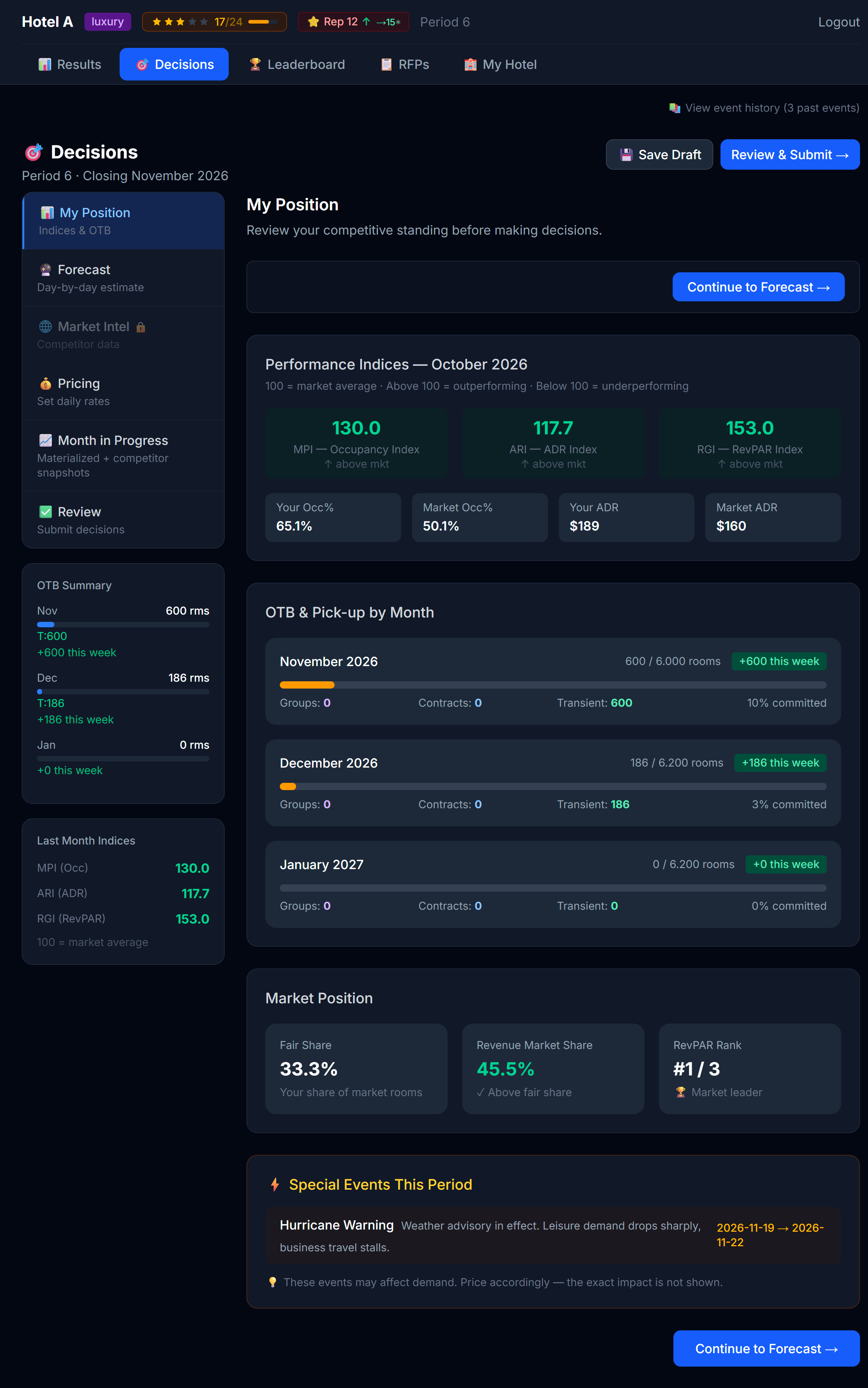 The Position tab is your debriefing room.
Position shows you the last published period through several lenses:
- Your KPIs — occupancy, ADR (average daily rate), RevPAR (revenue per available room), total revenue
- Leaderboard snippet — where you ranked vs competitors on the headline KPIs
- Competitive intel notes — who pushed prices up, who discounted, who hit/missed occupancy
Reading this sub-tab is not optional. The strongest pricing decisions are reactions to recent market behavior, not abstract theory.
Questions to ask while reading Position
- Did I sell out any nights? If yes, I priced too low on those nights.
- Did I have ≥20% rooms empty? If yes, I priced too high — or my product (amenities/marketing) is too weak for that price.
- Did competitors at my type get higher occupancy than me? What were they charging?
- Did the leader at my type clearly win on a specific strategy (high price + high occupancy = strong brand; low price + max occupancy = aggressive discounter)?
4.2 Forecast — what YOU think will happen
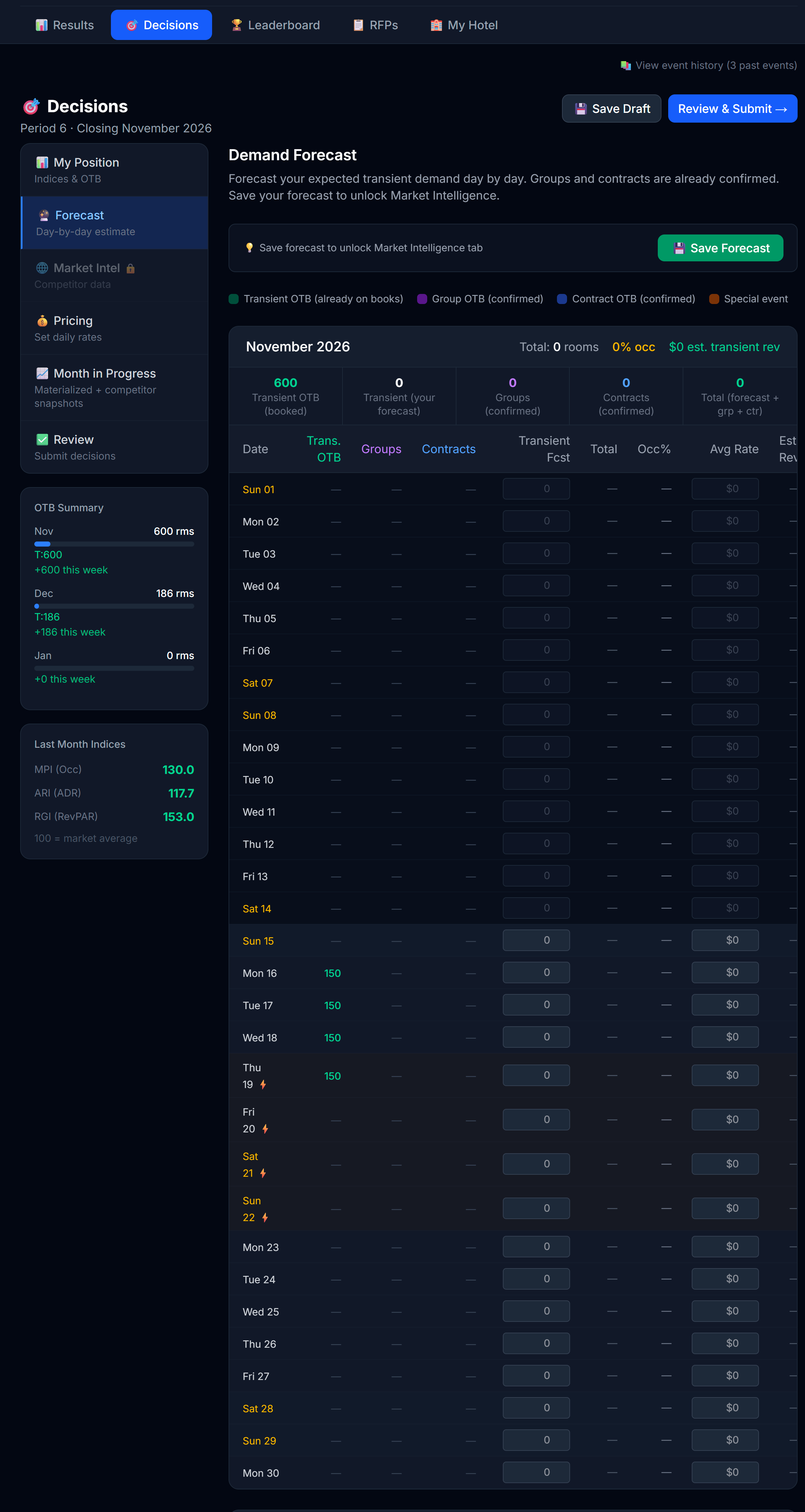 The Forecast tab. Day-by-day cells where you commit to how many transient rooms you expect to sell, at what rate.
The Forecast tab is not a place where the simulator tells you the future. It's the opposite — it's where you predict your own performance, day by day, for the upcoming month.
For each day you enter two numbers:
| Input | What it means |
|---|---|
| Expected transient rooms | How many rooms you expect to sell that day to walk-in / OTA / direct guests (i.e., not group or contract bookings) |
| Expected rate | The average daily rate you expect to capture on those rooms |
The tab also shows you context you can use while forecasting:
- Transient OTB — bookings already on the books from past advance-purchase guests
- Group OTB — confirmed group blocks already on those days
- Contract OTB — confirmed corporate contract room-nights already committed
- Special events — any events your professor flagged for that period
You don't have to forecast groups and contracts — they're already confirmed. You only forecast the transient piece, because that's the part you control with pricing and distribution.
Why this matters
Three reasons forecasting is a real skill (and why your professor makes you do it):
- It forces you to commit a view. Setting prices without first writing down "I expect to sell X rooms at $Y" is gambling. Forecasting makes you think.
- It unlocks Market Intelligence. Once you save your forecast, the Market Intel tab opens up so you can see what competitors are charging. This is intentional: you commit your view first, then test it against the market.
- Your accuracy is measured. After the period publishes, the simulator computes how close your forecast was to reality (a MAPE — Mean Absolute Percentage Error). Forecast accuracy is a real KPI in revenue strategy.
How to forecast well
Use the OTB and event context plus what you learned in Position (4.1) to anchor your numbers. Useful questions:
- What did this hotel do on a similar day last month? (Position tab)
- Is this day a weekend, weekday, holiday? Weekend rates and demand typically run higher.
- Is there a special event flagged? If so, expect a demand bump (size depends on the event).
- How much transient demand do I have OTB already? That's your floor — the rest is what you expect to layer on at pricing.
- What rate did I average for the same day pattern previously? Use it as a starting anchor.
Peak vs trough days — read them from your OWN forecast
After you've filled in the grid, scan it. The days where your forecasted transient is highest are your expected peaks; the days where it's lowest are your expected troughs.
- Your expected peaks → consider raising prices, holding back premium inventory, not discount-marketing
- Your expected troughs → consider lowering prices, fully releasing inventory, leaning into Buzz marketing
💡 If your forecast says "I'll sell 80 rooms at $200 on Saturday" but your pricing says $150 — something's off. Either you under-priced (and should raise) or you over-forecasted (and should re-think). The two views need to agree.
4.3 Market Intel — what competitors are charging
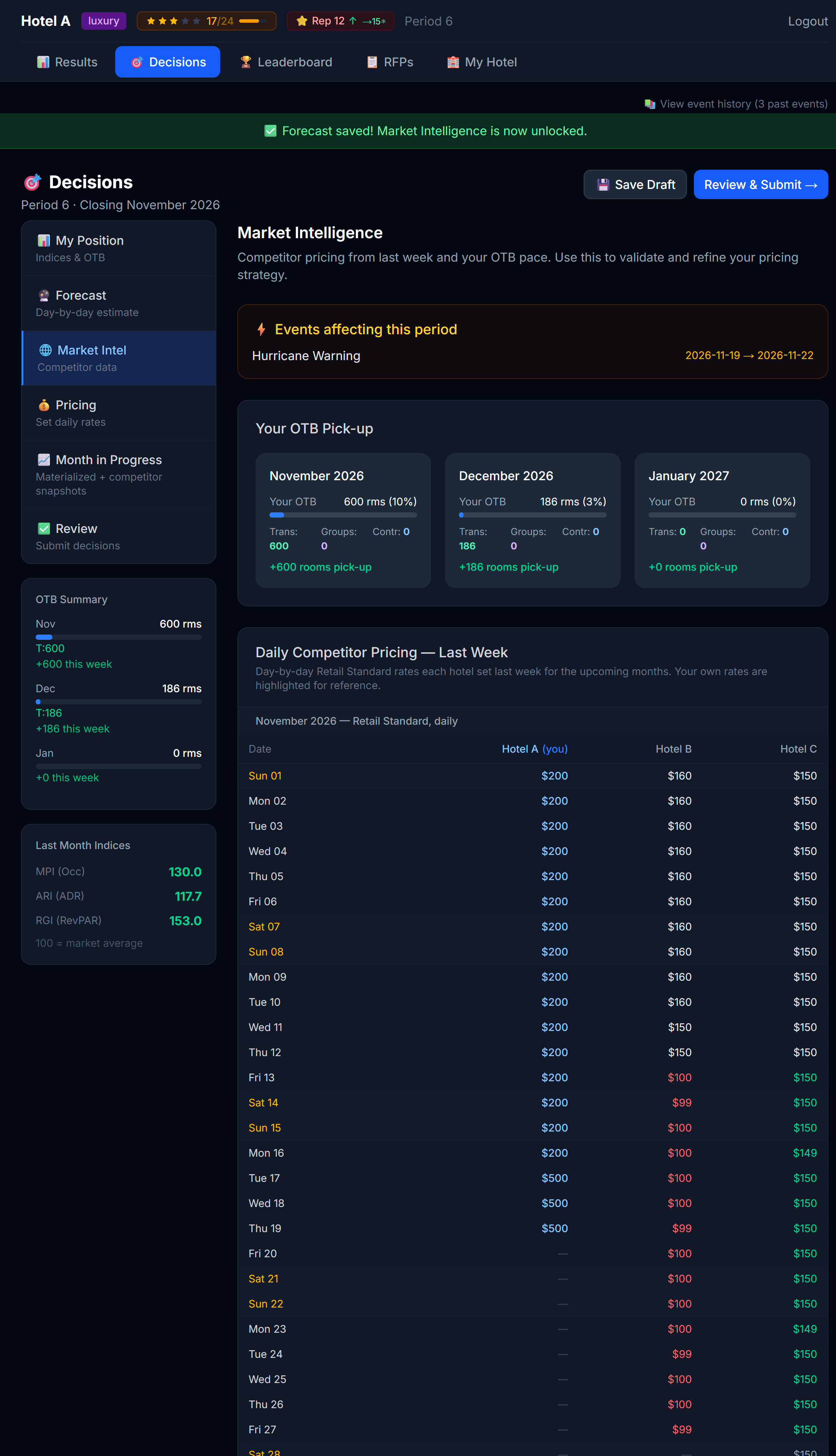 Market Intel shows competitor prices day-by-day. This tab may be locked in some simulations.
Market Intel shows you a daily price grid: for each day of the upcoming month, what each competitor is charging.
You can filter the grid by segment (Retail / Advance Purchase) and by room type (Standard / Premium), so you compare like-for-like rates. The default view is Retail · Standard.
Heads up: This tab is gated by your forecast. You must save the Forecast tab first to unlock it. Your professor may also disable the tab entirely — especially in early periods or in advanced scenarios. If you see a 🔒 banner, you'll still have last period's leaderboard, but not competitors' forward-looking prices.
What you do with it
Market Intel turns pricing from a guess into a positioning question:
- Am I more expensive than the median competitor? If yes, my product needs to justify the premium (better amenities, stronger brand, higher service score).
- Am I cheaper than the median? If yes, I should be confident that I'll fill — and ask whether I'm leaving money on the table.
- Is there a price war on weekends? Maybe I should price between the bottom two and the top two, not at one extreme.
Don't blindly match
A common rookie mistake: see a competitor charging $200 and immediately match them. That's not a strategy — that's an echo.
The right move is to ask why they're charging that:
- Are they a similar hotel type to you? If they're luxury and you're midscale, their $200 means something different than your $200 would.
- Are they known for high occupancy or low occupancy at that price? (Position tab tells you.)
- Are they trying to win volume, or are they confidently riding their brand?
- Which customer type are they chasing? A price built to win rate-driven Advance Purchase demand looks different from one built to win Retail guests on quality and brand.
4.4 — Market Research (the Compset)
The Market Intel tab can also include a Compset table: competitive intelligence on every hotel in your market — not just their prices, but what kind of product they're running.
Whether you see the compset, and how much of it, depends on your professor's configuration. There are two modes:
- Free mode — the compset is available to everyone at a tier the professor chose.
- Purchase mode — you must buy Market Research to unlock it. A purchase is one-time and the access stays with you, updating every period; there's also a small monthly update subscription that keeps the data fresh.
The three tiers
The tiers are cumulative — each one unlocks more, and a higher tier includes everything in the lower ones.
| Tier | What it adds |
|---|---|
| Level 1 | Each competitor's star rating (a precise decimal, e.g. 4.2 stars) and category |
| Level 2 | Adds each competitor's reputation band (High / Medium / Low) and the distribution channels they have active |
| Level 3 | Adds the amenities competitors offer and the marketing campaigns they've run (which campaign, and the period it started, e.g. P2) |
You buy Market Research on its own page — My Hotel → 🔎 Market Research — the same place you buy marketing. Each tier shows its one-time cost plus the monthly update (for example, $5,000 + $500/mo). You can only upgrade to a higher tier (no downgrade), and you can Cancel at any time; access then ends at the period close. The compset table here is read-only — when there's more to unlock, it shows a link that takes you straight to that page.
💡 Your Market Research level is a single setting for your hotel — whatever you unlock on the My Hotel page is exactly what you'll see here on Market Intel and on the Results screens (Chapter 6.4). There's nothing extra to configure on this tab; the compset just follows your purchase everywhere it appears.
Intra-period signals
Because the compset updates as the period unfolds, you may see arrows next to a competitor that flag a move already in motion:
- ↑ investing — a pending amenity that will raise their stars
- ↑ adding — they're activating a distribution channel this period
- ↑ launching — they're launching a marketing campaign this period
These let you catch a competitor's move before the period closes, instead of finding out after the fact.
What it costs you
Market Research is a real cost. It appears on your P&L on the Marketing line, as a Market Research sub-line. Treat spend on intel the way you'd treat any other spend: buy it only when the edge it gives you is worth the price.
💡 The compset turns "what is everyone doing?" from a guess into a purchased signal. Buy the tier that matches the decision you're trying to make — for example, Level 3 if you're deciding whether to match a competitor's amenities or campaign.
Putting the three sub-tabs together
A useful exercise every period:
- Open Position. Write down one sentence: "Last period I ___."
- Open Forecast. Commit your view, day by day. Then write down one sentence: "Next month I expect to ___." Save (this also unlocks Market Intel).
- Open Market Intel. Write down one sentence: "My competitors look like they're going to ___."
- Now open Pricing with those three sentences in mind.
The order matters: commit your forecast before you peek at competitor prices. Otherwise you'll just unconsciously match them and learn nothing.
Next
→ Chapter 5: Setting Prices and Inventory (Decisions — Pricing tab)
5 Setting Prices and Inventory
This is the chapter you'll come back to most often. The Pricing sub-tab on the Decisions page is where you make the call that drives every other number — what to charge.
The pricing grid
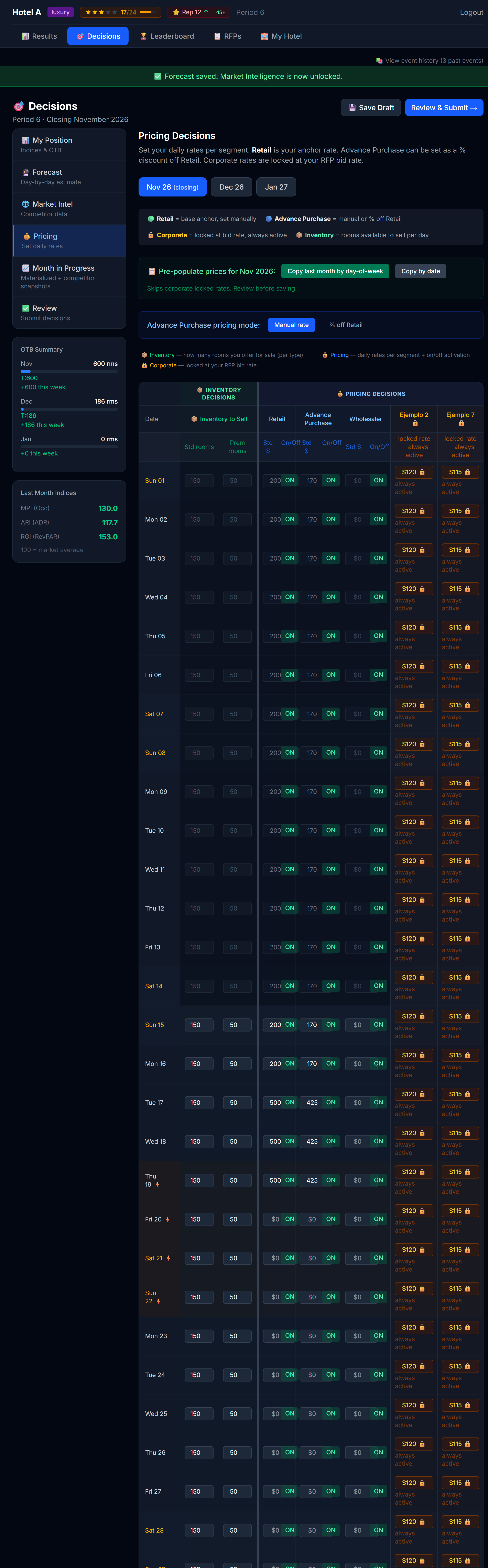 The pricing table. Inventory decisions on the left, pricing decisions on the right, separated by a vertical spine.
The table has one row per day of the upcoming month. The columns split into two clear domains, separated by a 4-pixel vertical divider:
| Domain | Columns |
|---|---|
| Inventory | Standard rooms available, Premium rooms available |
| Pricing | Standard rate, Premium rate, by-segment rates (if your sim uses them) |
This split is important. Inventory and pricing are two different decisions:
- Pricing: what you charge
- Inventory: how many rooms you make available at that price
You can do clever things by treating them separately — for example, holding back a few premium rooms even on a strong day so that when corporate guests walk up at the last minute you have somewhere to put them.
The Day OTB column
Next to each date the grid shows a "Day OTB" column — a small bar plus a rooms-booked / rooms-available count for that day. It turns amber when the day is compressing (roughly 80%+ booked). Use it to price against each day's pace: a full day is a signal to push rate, an empty day a signal to stimulate it.
Pre-populate from last month
You don't have to type 30 numbers every period. The Pricing tab has a Pre-populate action that copies prices from a previous month into the current month.
Two modes:
- By Date — Oct 5 → Nov 5 (same calendar day)
- By Day-of-Week — first Monday of Oct → first Monday of Nov
Day-of-week is usually better. Hotels behave on a weekly cycle (weekends ≠ weekdays), and matching weekdays to weekdays preserves that rhythm.
After pre-populating, you tweak.
How to think about price
The simulator's demand model isn't going to be revealed to you in detail — figuring out the right price is part of the learning. But here are the directional truths every successful hotel-team uses:
1. Demand responds to price
Lower price → more demand. Higher price → less demand. This is true at every hotel type, every season, every day. What changes is how strongly demand responds — and that's something you learn by experimenting.
2. Demand also responds to your product
Price is only half the equation. Two hotels charging the same $180 won't get the same demand if one has a spa and the other doesn't. Your amenities, your reputation, your service score, the channels you sell on — all of these are part of what guests are evaluating.
💡 Implication: You can charge more if your product is better. Don't price like a budget hotel if you've built a luxury one.
3. The market matters
How you price relative to your competitors matters more than your absolute number. If everyone else charges $200 and you charge $180, you look like a deal. If everyone else charges $160 and you charge $180, you look expensive.
The Market Intel tab is exactly where you check this.
4. There's a diminishing return on quality
If your service score, reputation, amenities, and channel mix are already excellent, paying for more of each only helps a little. Save the money. If those are weak, fixing them is one of the highest-return moves you can make.
Standard vs Premium rooms
Most hotels have two room types: Standard and Premium. They're priced separately and have separate inventory.
Pricing them
Each segment in the grid has three controls: a Std $ rate, a Prem $ rate, and an On/Off toggle.
- Standard rate = your floor offering
- Premium rate = should clearly be higher (otherwise nobody books standard)
You set premium prices in one of two ways — and you can mix them:
- Markup (the easy default). In the Pricing toolbar above the grid is a "Premium: +25%" menu button. Click it to open a small popover with the markup % field and an "Apply to all cells" action; set the percentage and apply to fill every Prem $ box at that markup. Even if you leave Prem $ boxes blank, on save they're auto-filled at this markup — so your premium rooms always have a sellable rate.
- Per-cell override. Type a number straight into any Prem $ box to set that day's premium rate by hand. A typed value always wins over the markup for that cell.
The same toolbar also holds "Pre-populate" (covered above) and, when your sim uses Advance Purchase, an "AP: Manual / % off Retail" menu that switches how you enter the AP rate.
A common heuristic: premium is 20–40% above standard. Higher in luxury hotels, narrower in budget. Tune to taste.
💡 If you never touch premium pricing, your premium rooms still sell at the default +25% markup — but tuning it, especially on peak days, is easy points.
Inventory: when to hold back
By default, all your rooms are available every day. You can hold some back by lowering the "available" number.
When does that make sense?
- Peak days where you expect to sell out anyway — hold a few premium rooms for last-minute walk-ups who pay top dollar
- High-value bookings expected — if you know a corporate group is bidding, leave room for them
- Maintenance / blocked rooms — if rooms are physically unusable
Most of the time, you should release everything. Holding back inventory you didn't need to costs you bookings.
Inventory, groups/contracts, and overbooking
The inventory number you set is the total rooms you offer for sale that day, not just transient. Two things to understand:
- Your awarded group and contract RFPs already consume rooms that day. Those are taken out of your inventory first; transient (retail, advance purchase, corporate) sells what's left. The grid shows a 🔗 marker with how many rooms you have committed each day.
- Example: you set 200 available and have 60 committed to groups/contracts → transient sells up to 140. Leave room for your RFPs when you set inventory.
- Overbooking: if you set inventory above your physical capacity, you're deliberately selling more rooms than you have. It's a revenue-management bet: you capture extra bookings counting on some guests cancelling or not showing up. Nothing stops you from doing this — it's a risk you're allowed to take.
- The risk: if cancellations and no-shows don't cover the oversell, more guests arrive than you have physical rooms, and you have to relocate ("walk") them. A walk always means a guest arrived at your door with a valid reservation and there was no physical room left for them — the comparison is always against your actual, physical room count, never against whatever "available" number you released for sale.
- The simulator warns you on screen when you set inventory above physical.
What a walk actually costs you
Every walked room costs you in two separate ways:
- A P&L cost, folded into your Total OpEx as an "Overbooking Penalty" line. Your simulation runs in one of two modes (your professor sets this — check the Pricing legend or ask if you're unsure which applies to you):
- Flat mode — a fixed dollar amount per walked room, regardless of your market.
- Realistic mode — a market-based cost per walked room: roughly what it costs to book that guest into a comparable hotel for the night (at a premium) plus a fixed goodwill payment, so the penalty scales with how expensive your market is.
- Either way, it's a real cost that shows up the period the walk happens.
- A reputation hit — every walked room costs you 0.5 reputation points, applied when the period publishes. This isn't something your professor can turn off or tune away; it's the guaranteed cost of walking a guest, on top of whatever the P&L penalty costs you.
Overselling can still be a smart bet when your cancellation and no-show history supports it — but go in knowing both costs are real, and that the reputation cost lands regardless of which P&L mode your simulation uses.
Per-segment pricing (if your sim has this)
Some simulations turn on per-segment pricing — you can charge different rates to different guest segments (retail, advance purchase, corporate, etc.).
When this is on, you'll see extra columns in the pricing grid. The most common pattern:
| Segment | Typical pricing approach |
|---|---|
| Retail | Your headline / rack rate. The highest. |
| Advance Purchase | A discount off retail (e.g. 10–15%). Books early, doesn't cancel. |
| Corporate (negotiated) | A pre-agreed rate from a contract. Usually set when you accept an RFP. |
| Custom segments | Whatever your professor configured |
Advance Purchase can be entered either as a fixed price or as a "% off Retail". Either way, when you submit, the engine stores a fixed price.
Advance Purchase is non-refundable — price it accordingly
In some simulations, Advance Purchase is a true "non-refundable" fence: a guest who books AP and later cancels doesn't get a refund — your hotel retains 100% of that revenue. (Compare that with a no-show on a flexible rate, where you keep the standard 50%.) You'll see a note about this right in the Pricing legend when the fence is active.
That's exactly why AP guests accept a discount in exchange: they're giving up flexibility, and the industry-standard trade is pricing AP 10 to 15 percent below your flexible rate. Price it much closer to retail and you're not offering a real incentive; price it much further below and you're leaving money on the table for a segment that was going to book anyway.
The Excel round trip — decisions in a spreadsheet
If your professor has turned this on, the global Decisions header carries an Excel (📗) download button and an upload (⬆) button. They're available on any step — you no longer have to be on the Pricing tab. The idea is the same: do your pricing and inventory work in a familiar spreadsheet instead of the on-screen grid, then bring it back into the simulator.
The workbook covers the whole period, with several sheets:
| Sheet | What's on it |
|---|---|
| Instructions | How to fill the workbook out, in plain language. |
| My Position | Your STR indices, OTB by month, and special events. Informative and locked. |
| Market Intel | Your competitor set (gated by your Market Research level) plus the last published competitor prices. Informative and locked. |
| Pricing + Inventory (one per open month) | One sheet for each of the three open months, each holding the full grid — Day OTB (info), Inventory Std/Prem, and per segment a Std $, a Prem $ (override; blank = auto markup), and an Active YES/NO flag. Corporate segments show a locked rate. Each month sheet has one Premium markup % cell. |
| Forecast | All three months. Total, Occ% and Est. Rev are live Excel formulas that recalculate as you type. |
The flow:
- Download the workbook. It's generated in your chosen UI language (EN/ES).
- Edit in Excel. Only the yellow cells are editable. A blank Prem $ cell fills at the month's markup on save; leave any other cell empty and it means "keep whatever is currently saved" for that field — you only touch the cells you're changing.
- Upload the file back. The simulator validates everything and shows you a preview of every change, plus any errors, before anything is applied. Nothing is written to your hotel until you confirm the preview.
- Confirm. It's all-or-nothing — either the whole set of changes applies, or none of it does.
A few hard rules:
- Only the yellow cells are editable. Locked cells (My Position, Market Intel, corporate rates, and grey rows) can still be selected and referenced in your own formulas — you just can't change their values.
- Grey rows are pace-locked days — already materialized in an earlier pass, so you can't change them (same rule as the on-screen grid).
- You may add your own analysis sheets — extra tabs you insert are ignored on upload, so use the workbook as scratch space freely.
- The upload only works while the period is open — before the submission deadline, before your professor locks editing, and before the period is published. Try it after any of those and it's rejected.
- Don't restructure the template. Don't insert or delete rows or columns within the existing sheets, and don't rename the sheets. The structure is how the simulator knows what it's reading — change it and the whole upload gets rejected. (Adding your own separate sheets is fine, per above.)
💡 Think of the Excel round trip as an alternate input method, not a different set of rules. Everything you learned about pricing logic, inventory holdback, and per-segment rates in this chapter still applies — you're just typing it into cells instead of an on-screen grid.
Decisions are locked server-side, not just in the UI
Pricing, inventory, and forecast saves — including the Excel upload above — are enforced by the server, not only by graying out the screen. Once the submission deadline passes, once your professor locks editing, or once the period is published, any attempt to save is rejected outright (you'll see an error rather than a silent failure). Don't rely on a stale tab that hasn't refreshed — if the deadline has passed, the server will say no even if your screen still looks editable.
Locked cells in pace mode
If your simulation uses pace mode, days that have already been "processed" in earlier passes appear locked — marked with a 🔒 and grayed out — and you can no longer change them. The results for those days are final.
 Past pace chunk days are locked. Hover for a tooltip explaining why.
This is intentional. Once bookings have been allocated for a day, the price for that day is set in stone. You can only change pricing for upcoming days.
Saving and submitting
There are two distinct actions:
| Action | What it does |
|---|---|
| Save (per tab) | Stores your changes server-side. You can come back later. Nothing has been committed for the period yet. |
| Submit Final (Review & Submit tab) | Tells the engine: "These are my final decisions for the period." You can re-submit until the professor locks editing. |
Save often. Submit when you're sure.
The save confirmation
Every Save and Submit action now opens a confirmation popup built into the simulator itself — it's not your browser's confirm/alert dialog. It covers both the Forecast tab and the Pricing tab, as well as Submit Final and Resubmit. The flow is simple: you click Save, the popup asks you to confirm, you confirm, and it saves.
- If the save fails, the popup stays open and shows you the exact error, so you can try again. Nothing silently fails.
- If the save succeeds, the page reloads from the server so what you see on screen is exactly what was stored — that reload is your proof it went through.
Why this exists: students had occasionally believed a forecast or price was saved when a server error had actually dropped it. This popup removes the doubt — you confirm on purpose, and you always see the saved-from-server state afterward.
💡 If you were ever unsure a save "took", this is the fix — wait for the reload and check that the values on screen are exactly what you entered.
Review & Submit. The 🏨 banner reminds you to also configure My Hotel before submitting.
Three important warnings on Submit Final
Unbid open RFPs — if there's an open RFP you haven't placed a bid on, the simulator will warn you with a modal. You can dismiss and submit anyway, but it's the engine asking "are you sure you want to skip this?"
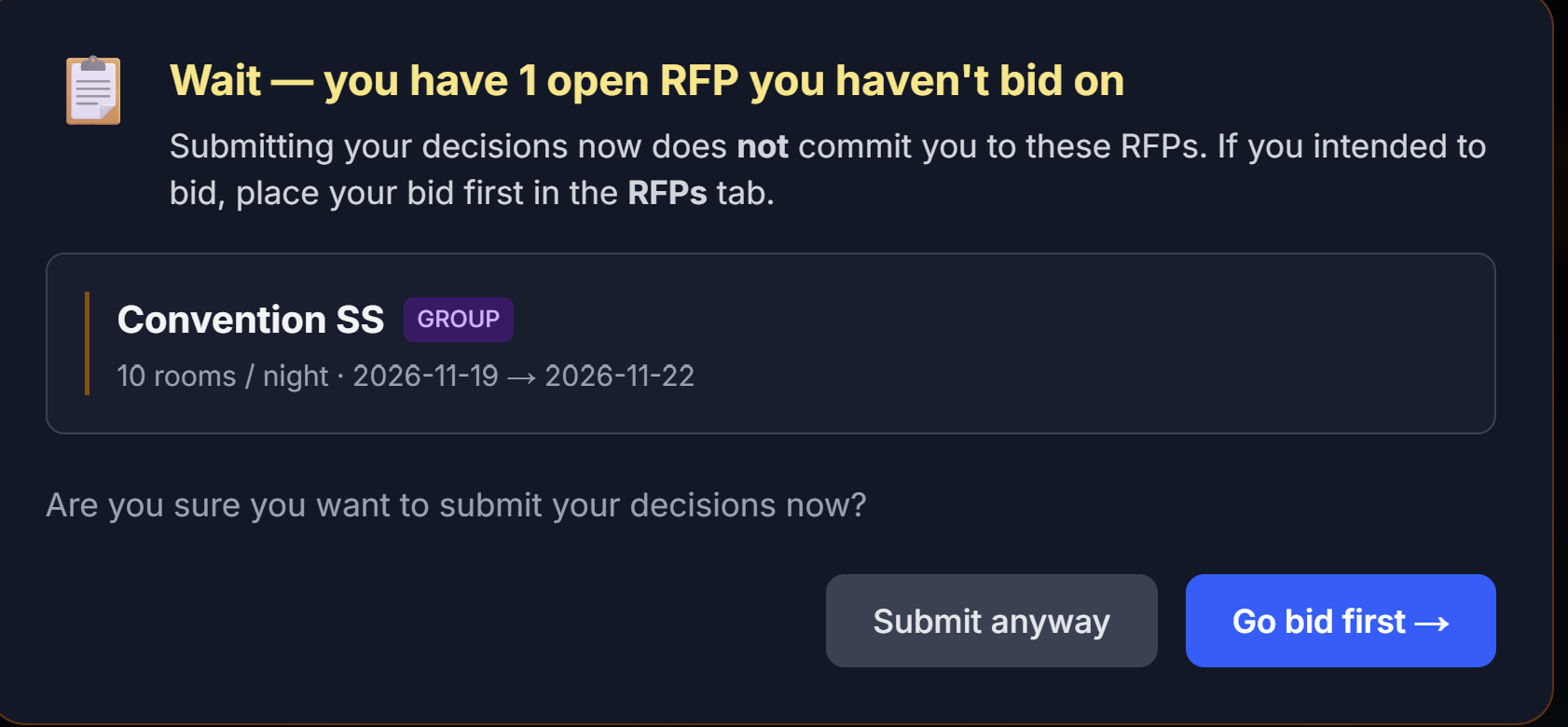 The unbid-RFP nag modal. Read it before clicking through.
My Hotel not configured — there's a banner asking whether you also reviewed your My Hotel decisions for the period.
Review check — when you submit, the simulator quickly reviews your decisions and warns you if it spots gaps: days with no price set, an incomplete forecast, or inventory above your room capacity. You can go back and fix the issue, or submit anyway if it's intentional. Treat it as a safety net, not a blocker — but a ten-second scan of that list has saved many teams from an accidental $0 night.
Iterating
Pricing is an iterative skill, not a one-shot decision. The strongest students:
- Read Position, Forecast, Market Intel (Chapter 4)
- Make a first pass at prices
- Sleep on it — literally, come back the next day
- Adjust based on second look
- Submit
You'll get faster at it with each period.
Next
→ Chapter 6: Reading Your Results
6 Reading Your Results
After your professor runs and publishes a period, you have access to a full breakdown of what actually happened. This is where learning compounds.
Results live in four tabs, so your own numbers never get tangled up with market data or competitor intel:
| Tab | What's there |
|---|---|
| General Results | Your headline P&L, your STR indices, your owner KPI cards, and the Performance Trend chart — the executive view (6.1) |
| Daily Results | The detailed day-by-day breakdown and OTB (on-the-books) for upcoming months (6.2–6.3) |
| Market Intel | How the market looks — the competitor pricing grid and the Compset, with your compset first (6.4) |
| Month in Progress | The open period day by day, if your sim uses pace mode (6.5) |
There's also a ⬇ Download Excel button available on every one of these screens (6.6).
6.1 The P&L Summary
Your headline page is the P&L Summary — a full profit & loss for the published period.
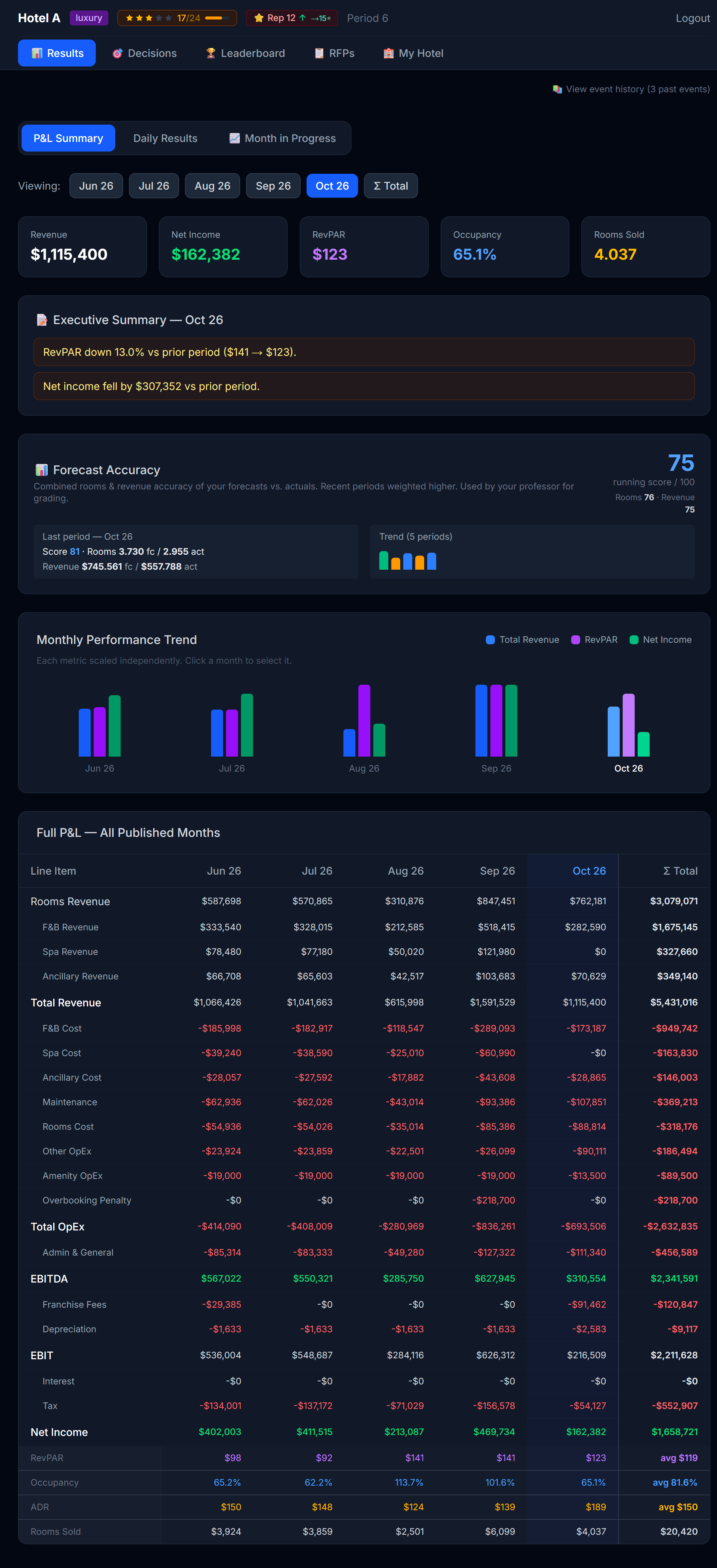 The P&L summary. Read top-to-bottom — revenue, then costs, then profit.
The structure
| Section | What's in it |
|---|---|
| Revenue | Room revenue (split by segment + room type) + amenity revenue |
| Variable costs | Distribution channel commissions, marketing, walk-cost penalties |
| Operating costs | Maintenance, rooms cost, other OpEx, amenity OpEx, brand / loyalty fees |
Marketing is its own line now. It used to be folded into Other OpEx; it's now broken out as a Marketing line with two sub-lines beneath it:
| Sub-line | What it is |
|---|---|
| Campaigns | What your marketing campaigns cost this period (one-time launch + monthly) |
| Market Research | What you spent on the Compset (Chapter 4) — the intel you bought about competitors |
So when you buy Market Research, you can see exactly what it cost you, right next to what it bought you. | Financial items | Loan interest, revolver interest (if used), reserve contributions | | Bottom line | Operating profit, then Pre-tax profit |
What to look for, in order
- Total revenue — did you hit your forecast? If under, was it occupancy (volume) or ADR (price)?
- Channel costs — what % of revenue went to commissions? If it's climbing, your OTA mix is heavy.
- Marketing — did the campaigns pay for themselves? You won't always know immediately — Baseline campaigns build over time.
- Operating profit — your headline number. This is what counts toward your competitive ranking.
- Pre-tax profit — after financial items (interest, reserve). The number that drives your cash position.
A losing month isn't wasted — tax relief
If your hotel loses money in a month, that loss isn't thrown away: it accumulates as a tax credit. In later profitable months, your taxes are reduced until the accumulated losses are used up. When that happens, your P&L shows a "Tax relief applied (prior losses)" line, so you can see the relief working in your favor.
This mirrors how real companies treat Net Operating Losses — a bad month still hurts, but it softens your tax bill down the road. It's one more reason not to panic after a rough period: recover your profitability and part of that pain comes back to you as lower taxes.
STR Indices — how you compare to the market
On the Results page you also see your STR Indices for the selected period: three benchmark scores that tell you how you did versus the market (all hotels combined), not just in absolute terms.
| Index | What it is | 100 means |
|---|---|---|
| MPI — Market Penetration | Your Occ% ÷ market Occ% × 100 | You filled at the market's rate |
| ARI — Average Rate Index | Your ADR ÷ market ADR × 100 | You charged the market's average price |
| RGI — Revenue Generation | Your RevPAR ÷ market RevPAR × 100 | You earned the market's average per available room |
Above 100 = ahead of the comp set; below 100 = behind. RGI matters most — it blends price and occupancy, so it's the truest "did I win?" score. A hotel can post a high ARI (premium pricing) but a low MPI (empty rooms) and land at a mediocre RGI.
💡 A note on the math: occupancy and RevPAR always divide by your hotel's physical room count — the real, fixed capacity of your property — times the days in the period. Closing rooms for maintenance or holding inventory back doesn't shrink that denominator, so you can't inflate your RevPAR just by releasing fewer rooms for sale.
💡 You also get a live STR inside Month in Progress (6.4), computed over the days closed so far — so you can see how you're tracking vs the market before the month ends.
Owner KPI cards — how the business is really doing
Below your STR indices, General Results also shows a row of owner KPI cards. These are private to your team — no competitor ever sees your version of these, and you never see theirs. Hover any card for a tooltip with its exact definition; the short version:
| KPI | What it measures |
|---|---|
| TRevPAR (Total Revenue per Available Room) | Every revenue stream — rooms, F&B, spa, any other ancillary income — divided by your available room-nights. Broader than RevPAR because it counts more than just the room sale. |
| GOPPAR (Gross Operating Profit per Available Room) | Your EBITDA divided by available room-nights. This is profitability, not just revenue — a hotel can have a strong TRevPAR and a weak GOPPAR if costs are out of control. |
| CPOR (Cost Per Occupied Room) | Your total operating costs plus admin, divided by occupied rooms. Lower is more efficient — you're running a leaner operation per room you actually sell. |
| Flow-through | How much of a change in revenue turned into a change in EBITDA versus the prior period. A healthy flow-through is typically 35 to 60 percent — meaning a good chunk of extra revenue drops to the bottom line instead of being eaten by costs. There's no flow-through number on your very first period, or on a lifetime/all-periods aggregate, since it needs a prior period to compare against. |
These four cards round out the picture your P&L and STR indices already give you: TRevPAR and GOPPAR tell you about the whole business (not just rooms), CPOR tells you about cost discipline, and flow-through tells you whether your recent decisions are actually compounding into profit.
The Performance Trend chart
Below the KPI cards sits the Performance Trend chart — a line chart that replaces the old bar-chart view of your monthly numbers. From Period 1 onward it always plots two lines for whichever KPIs your professor has enabled: your own hotel and "CompSet (mercado)", the whole market's average, STR-style.
For owner KPIs specifically (TRevPAR, GOPPAR, CPOR, flow-through), the chart only ever draws your own-hotel line — there's no market average to compare against, because those numbers are private to each team and nobody's individual profit is ever shown to a rival.
Your professor may also turn on up to two optional layers:
- Direct competitors (your pick). If enabled, you'll get a mandatory pop-up the first time you open any page in the simulator, asking you to choose at least 3 direct competitors from the market. You can't dismiss it without confirming a selection, and once you confirm, the choice is final for the rest of the simulation — choose thoughtfully, based on who you actually consider your competitive set. Once confirmed, the chart adds one extra line: the average of the competitors you picked. You still never see any single rival's individual numbers, only the average of your chosen group.
- Direct competitors (simulator's pick). Your professor can also turn on a second line, labeled something like "El simulador considera que tus competidores directos son: X, Y, Z" — the simulator's own suggested set of direct competitors for your hotel (which your professor can review and edit before publishing). This is separate from your own pick above; you may see one, both, or neither depending on what your professor has enabled.
Together, these let you read your trend two ways: against the whole market, and against the specific rivals you (or the simulator) think matter most.
6.2 Daily Breakdown — the granular view
The Closed Month tab on Daily Results shows every day of the period, side by side.
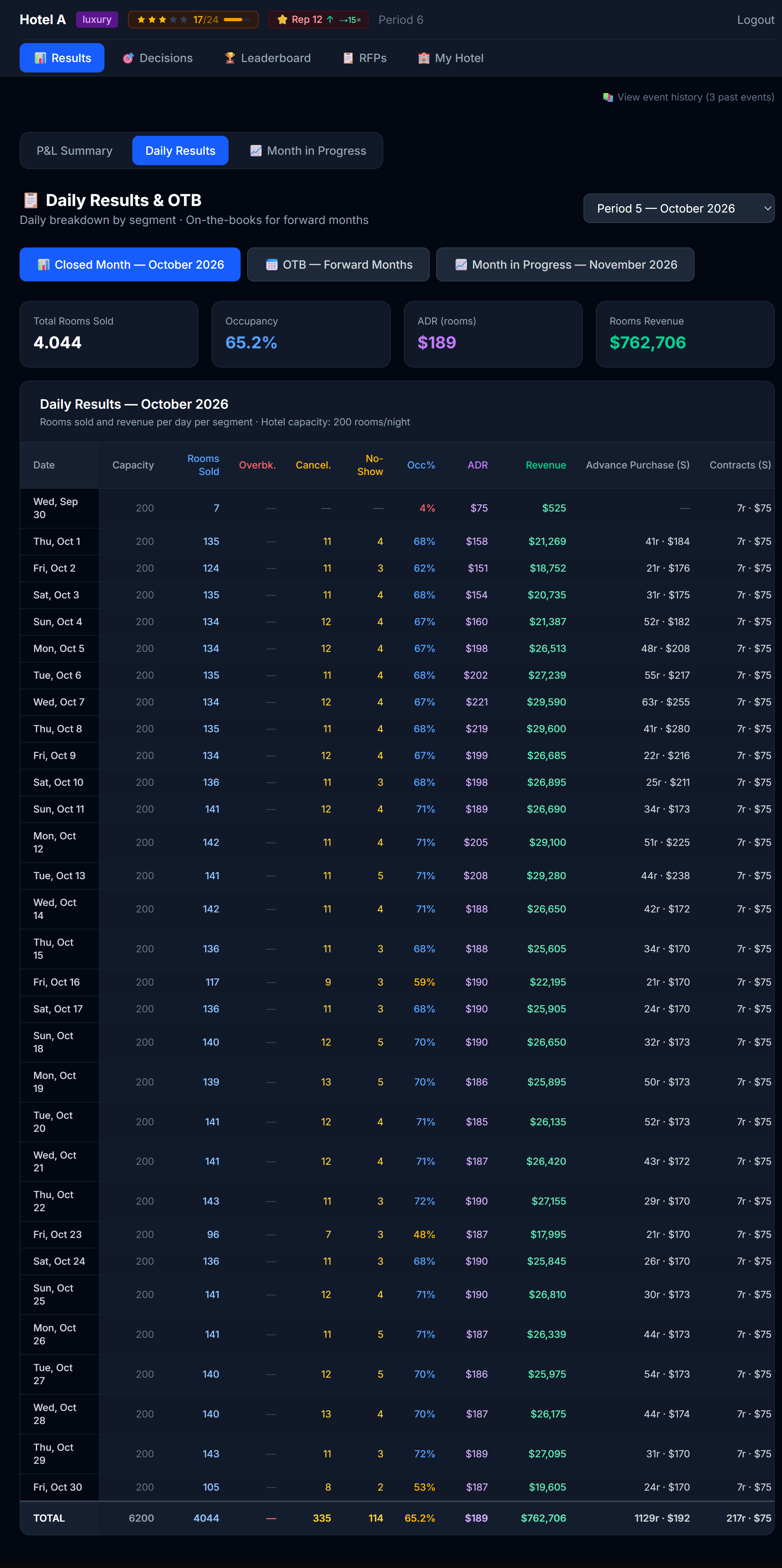 Every day, every column. The detail view.
Two controls sit above the table:
- A metric toggle — Rooms Sold / ADR / Revenue — that switches what every cell shows. One metric at a time, so the table stays readable.
- A ▸ Segments button that expands or collapses the per-segment detail. Collapsed (the default) you see only the summary columns; expanded you also get one column per segment.
Everything is split by room type: a blue (S) marks Standard, a purple (P) marks Premium.
In Rooms mode the columns (left to right) are:
| Column | What it tells you |
|---|---|
| Date / DOW | The day |
| Físico S / P (Physical) | Your physical Standard and Premium rooms — real capacity, fixed |
| Disp. S / P (Available) | The transient rooms you released that day, per room type. Turns red ⚠ if you sold more than your physical of that type (you oversold/overbooked) |
| Per-segment columns (when expanded) | Retail, Advance Purchase, Corporate, Groups, Contracts — each split (S)/(P) |
| Std total / Prem total | Rooms sold by room type, summed across every segment |
| Overbk. / Cancel. / No-Show | Walked guests (sold beyond physical), cancellations, no-shows |
| Occ% | Sold ÷ physical capacity, capped at 100% |
| Total | Total rooms sold that day |
In ADR and Revenue modes the inventory and operational columns hide (an average rate or a revenue figure has no "inventory"), and every remaining cell — per segment, Std total, Prem total, Total — shows the average rate or the revenue instead. So you can read your rate mix and your revenue mix by room type with the same toggle.
The four diagnostic questions
For each day where something looked off, ask:
- Did I sell out? (occupancy = 100%) → I underpriced. Estimate how much I left on the table.
- Did I overbook? → I priced much too low, or I held back too little inventory. Walk-cost penalties show up on the P&L.
- Did I sit half-empty? (occupancy < 50%) → I overpriced or my product is too weak for the market that day.
- Did my ADR collapse? → Too many low-segment bookings (AP / corporate) vs higher-paying retail. Maybe I should have priced retail higher to push the mix up.
💡 The diagnostic happens at the day level, not the month level. A month with 75% occupancy could be 30 days of 75% or 15 days at 100% and 15 days at 50% — wildly different stories. Always drill in.
6.3 OTB — forward visibility
The OTB (On-The-Books) tab shows you bookings already on the books for future months — meaning corporate contracts, group blocks, and advance-purchase bookings that have been confirmed but not yet "stayed."
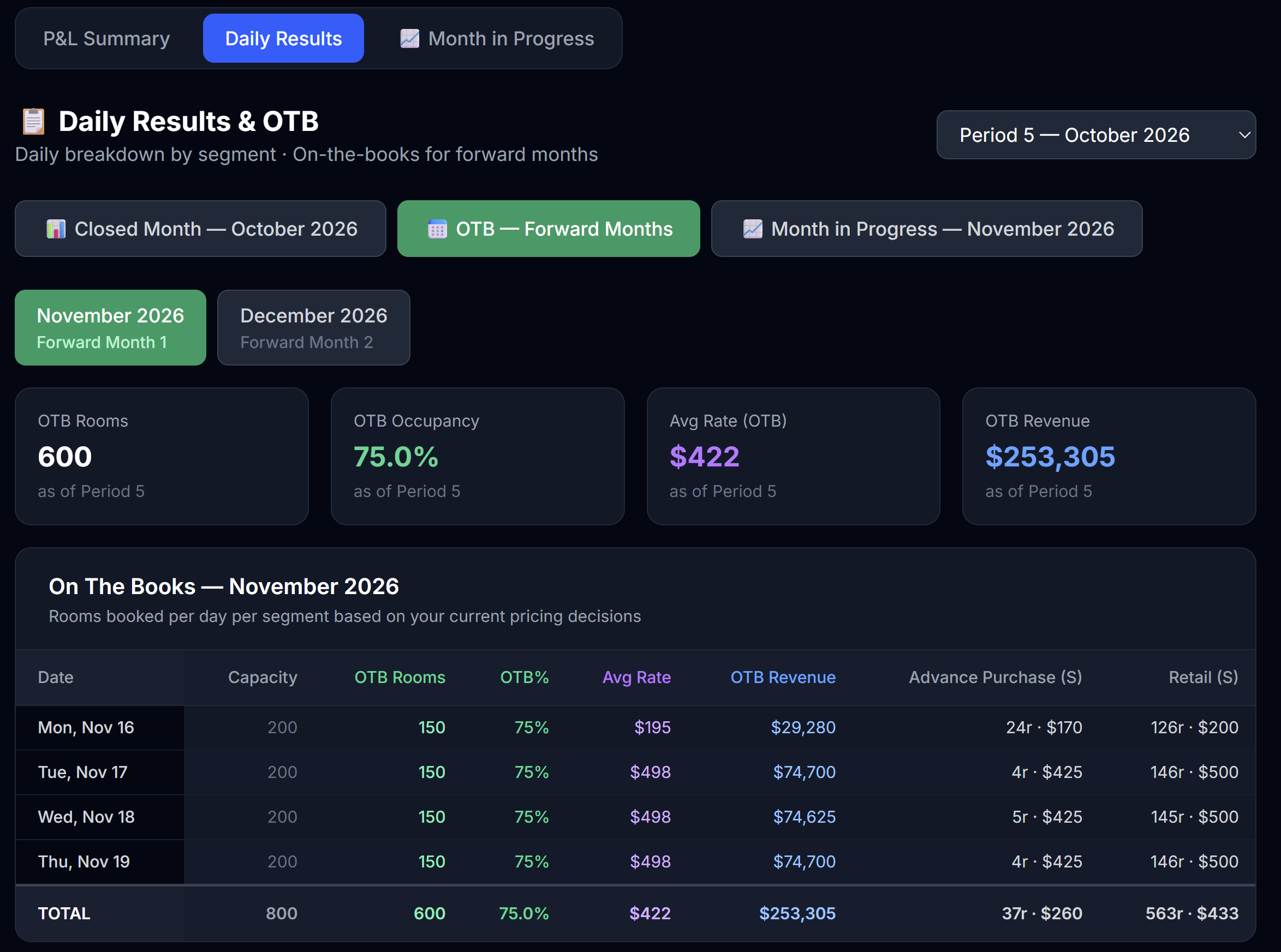 OTB for upcoming months. Useful for forward planning.
This matters for two reasons:
- Capacity planning — if you already have 200 OTB rooms for a Friday in 3 months, you can't sell those rooms again on the open market. The Forecast tab on Decisions surfaces these OTB numbers next to your forecast cells; seeing the same numbers here helps you sanity-check your forecasts.
- Strategy validation — large OTB means your corporate / group strategy is working. Empty OTB means you should consider bidding more aggressively on RFPs.
6.4 Market Intel — the market around you
The Market Intel tab keeps everything about your competitors in one place, separate from your own results. The Compset comes first on this tab — it's the intelligence you paid for, so it leads — followed by your STR indices and the competitor pricing grid:
- The Compset — competitive intelligence on every hotel: stars (shown as a precise decimal, e.g. 4.2), and — depending on the Market Research tier you've unlocked — reputation, distribution channels, amenities, and the marketing campaigns they've run. How much you see depends on what you bought; see Chapter 4 (4.4) for how Market Research and the tiers work. Whatever level you've unlocked here is the same level you see on Decisions — buy once, and it's visible everywhere the compset shows up.
- Your STR indices (MPI / ARI / RGI) for the period — the same benchmark scores described in 6.1, surfaced here because they're fundamentally a vs-the-market read.
- Competitor pricing — a daily grid of what each hotel is charging. You can filter it by segment (Retail / Advance Purchase) and room type (Standard / Premium); it opens on Retail · Standard. Your column is highlighted, and cells are tinted green/red versus the competitors' average so an over- or under-priced day jumps out.
💡 Stars here are fractional: a hotel at 4.2 stars is meaningfully different from one at 4.8. Read the decimal, not just the rounded star count — it tells you how much product quality separates you from a rival.
6.5 Month in Progress (pace mode only)
If your simulation uses pace mode, there's a third tab: Month in Progress.
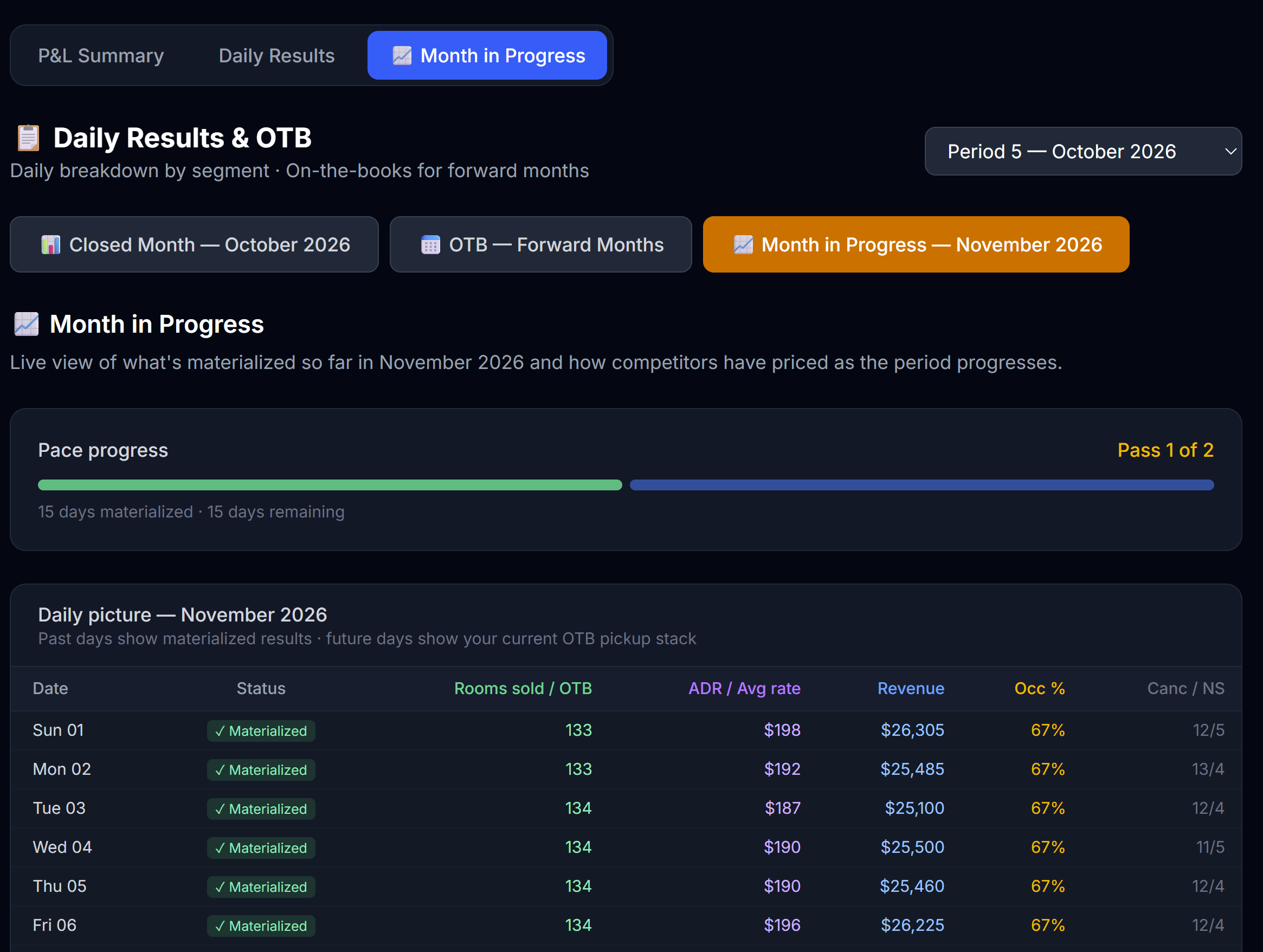 Month in Progress shows partially-run periods with the days that have closed so far.
It shows the open period day by day — closed days with real materialized results, open days with your current on-the-books (OTB) pickup. Three things to use here:
- Live STR indices (MPI / ARI / RGI) computed over the days closed so far — your standing vs the market mid-month, before the period publishes. They move as more days close, and aren't final until the month closes.
- The daily split by room type (Std / Prem) and, behind the ▸ Segments toggle, by segment — so you can see exactly where demand is landing as the month builds, on both closed and OTB days.
- Competitor pricing — each hotel's latest rate per day, filterable by segment and room type (defaults to Retail · Standard).
It's the same Month in Progress view as on the Decisions page (covered in Chapter 7) — surfaced in both places for convenience. Use it between pace passes to spot competitor moves and adjust your remaining days.
6.6 Download to Excel
At the top of every one of the four results screens — General Results, Daily Results, Market Intel, and Month in Progress — there's a ⬇ Download Excel button. It generates a clean, well-structured workbook so you can analyze your numbers your own way — pivot tables, charts, your own formulas.
The workbook has one sheet per table:
| Sheet | What's in it |
|---|---|
| Read me | A glossary explaining every term (ADR, RevPAR, OTB, occupancy, no-show, etc.). |
| P&L | Your full Profit & Loss for every published month side by side, plus a cumulative total and the operating KPIs (including TRevPAR, GOPPAR, CPOR, and flow-through). |
| STR Indices | MPI / ARI / RGI per period — how you compare to the market (100 = at market). Includes a live "in progress" row for the open period. |
| Daily Results | The selected period's daily breakdown: physical vs available rooms, every segment (rooms and revenue), Std/Prem sold, occupancy, ADR, and totals. |
| Month in Progress | If a pace period is open, the live day-by-day picture, now split by segment and by room type (Std / Prem): closed days with real results, open days with your current OTB pickup. |
| Competitor Pricing | If a pace period is open, each hotel's latest rate per day, grouped into blocks by segment (Retail, Advance Purchase) and room type (Standard, Premium) — how the market is pricing as the month unfolds. |
| Compset | The competitive intelligence you've unlocked via Market Research: stars, and (by tier) reputation, channels, amenities, and campaigns. "Locked" cells need a higher tier. |
| OTB (forward) | All your forward bookings on the books, by day and segment. |
| Forecast Accuracy | Your forecast score for every published period, split into rooms and revenue. |
Scope: the Daily Results and OTB sheets cover the period selected in the dropdown; the P&L and Forecast sheets cover all published periods so you can see trends. Want another period's daily detail? Switch the dropdown and download again.
6.7 Cross-period analysis
The most powerful learning comes from looking at multiple periods side by side. The fastest route is the Excel download above — its P&L sheet already lays every published month next to each other. From there:
- Chart your operating profit, occupancy, and ADR across the months
- Watch the trends — operating profit climbing? Occupancy slipping? ADR stalling?
Trends matter more than any single period.
What to do with what you learn
Reading results without acting on them is wasted time. Before you close the Results tab, write yourself one note: "Next period I will ___."
Examples:
- "Next period I will price weekends 10% higher — I sold out every Friday."
- "Next period I will activate one OTA — my channel mix is too narrow."
- "Next period I will upgrade my F&B amenity — service score is dragging."
- "Next period I will not run that one-shot promo — payback was negative."
Pin that note somewhere. Read it when the next period opens.
Next
→ Chapter 7: Month in Progress (pace mode) — skip if your sim doesn't use pace mode
7 Month in Progress (Pace Mode)
Skip this chapter if your professor isn't using pace mode. Most simulations don't.
Pace mode changes how a period is run. Instead of one big run that processes the entire month at once, the month is broken into chunks (usually 4–7 days each) and the engine processes one chunk at a time. Between chunks, you get a chance to look at what happened and adjust your prices for upcoming days.
It's closer to how revenue strategists actually work in the real world.
What you'll see when pace mode is on
Two new things appear on your screens:
- A "Month in Progress" tab on the Decisions page
- A "Month in Progress" tab on the Results page (identical content, surfaced in both places)
- Past-chunk days on the Pricing tab become locked (grayed out)
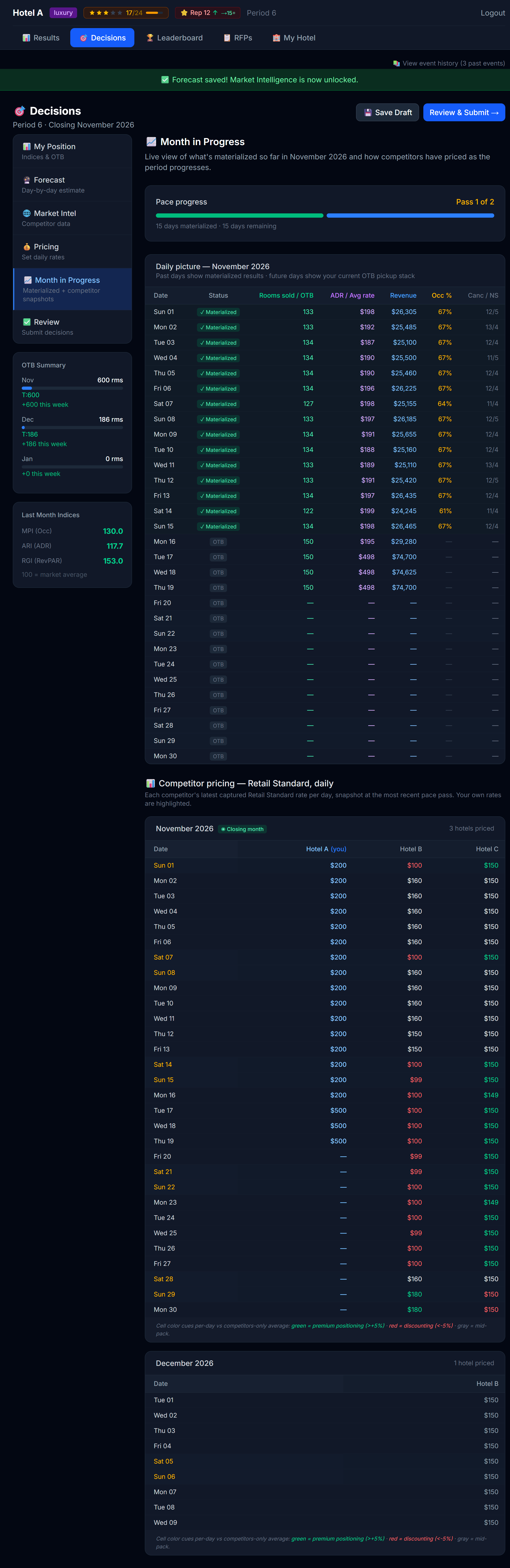 The Month in Progress view. Days already processed on the left, days still ahead on the right.
What the view shows
| Section | What's there |
|---|---|
| Pace timeline | A horizontal bar showing the month split into chunks. The chunks already run are filled; the ones still to come are empty. |
| Daily picture | A day-by-day grid of what happened so far — your actual rooms sold, your actual ADR, your actual revenue |
| Forward forecast | What's expected to happen on the days still ahead |
| Competitor pricing snapshots | What competitors charged in each past chunk (and what they're charging now, if Market Intel is unlocked) |
The single most important rule
You can only change prices for days that have NOT been processed yet.
Past days are sealed — their bookings are done. The Pricing tab grays out past-chunk days. The Pricing tab for future days remains fully editable until those days, too, get processed.
A past-chunk day, locked. Hover for the tooltip.
How to play pace mode well
Between every pass, ask three questions
- Did I sell out a past day? → I underpriced for that pattern. Raise prices on similar upcoming days.
- Did I sit half-empty? → I overpriced for that pattern. Lower prices on similar upcoming days.
- What did competitors just do? → If they raised, I have cover to raise too. If they discounted, I may need to defend share.
Don't panic-adjust
A common mistake: a hotel under-fills on a Tuesday, the student slashes Wednesday prices in a panic, then sells out on Wednesday at 30% below where they should have been. One bad day is not a trend. Wait for 2–3 data points before swinging hard.
Watch your transient OTB
The Decisions → Position / Market Intel sidebars show Transient OTB — bookings already on the books for upcoming days from advance-purchase guests. If those numbers are high for a future day, you have less elasticity (rooms are already partly committed). If they're low, you have full flexibility.
What "transient" means
A booking is called transient if it's not part of a corporate contract or group block — i.e., a regular guest who booked themselves. In pace mode, you'll see transient OTB columns alongside total OTB so you can separate "guests already coming" from "corporate room blocks already committed."
Pace mode and the Forecast tab
Forecast inputs for past-pace-chunk days are locked. You can read what you previously forecasted, but you can't change it — those days have already been processed against your committed forecast.
You can still edit the forecast cells for days that haven't been processed yet. As you learn from past chunks (e.g., "I systematically under-forecasted Saturdays"), use the upcoming-day forecast cells to course-correct.
When the final chunk runs
The last pace pass behaves like a normal "run period". After it, you see the full closed-month results just like a non-pace-mode simulation.
A worked example
Imagine a 30-day month split into 5 pace chunks of 6 days each:
Days 1–6   → ran in pass 1 → locked
Days 7–12  → ran in pass 2 → locked
Days 13–18 → ran in pass 3 → locked
Days 19–24 → still editable, will run in pass 4
Days 25–30 → still editable, will run in pass 5 (final)
After pass 3 publishes, you can see:
- Actual results for days 1–18 (the locked half)
- Current OTB and forecast for days 19–30 (the editable half)
You now adjust prices for days 19–30 based on what you learned in days 1–18.
Why pace mode is harder
Three reasons:
- You make more decisions — instead of one pricing pass per month, you make 3–5
- You react to partial information — you don't know how the month will end
- You can't undo a bad chunk — once a chunk is processed, those bookings are real
But pace mode is also closer to how real revenue strategy works, so the skills you build here transfer directly.
Next
→ Chapter 8: Responding to RFPs
8 Responding to RFPs
An RFP — Request for Proposal — is a corporate or group client asking the hotels in your city for a price quote on a block of rooms. RFPs are one of the highest-leverage decisions in the simulator, and learning to bid well separates the top hotels from the middle.
Two types
| Type | Who it's from | What they want |
|---|---|---|
| Corporate | A company (consulting firm, tech company, airline crew, etc.) | A negotiated nightly rate for repeated stays over a long window |
| Group | A wedding, conference, sports team, etc. | A block of rooms for a specific short window — sometimes one weekend |
Both work the same way in the bidding UI; the differences are in the RFP's parameters.
Group and contract blocks don't always fully materialize
Winning a group or contract RFP doesn't guarantee every room-night in the block actually gets used. Real groups and contracts have wash — some portion of the contracted block goes unused (attendees who don't show, a room block that was sized optimistically, and so on). Your on-the-books (OTB) numbers always show the full contracted block, but by the time the stay window arrives, some of it may not materialize.
Keep this in mind when you're bidding: a block that looks fully accretive on paper (every room-night filling space you'd otherwise sell empty) may leave a little of that space open after wash. Factor it into your displacement thinking rather than assuming 100% of a won block will show up and consume inventory.
Where to find them
Click the RFPs tab in the top navigation.
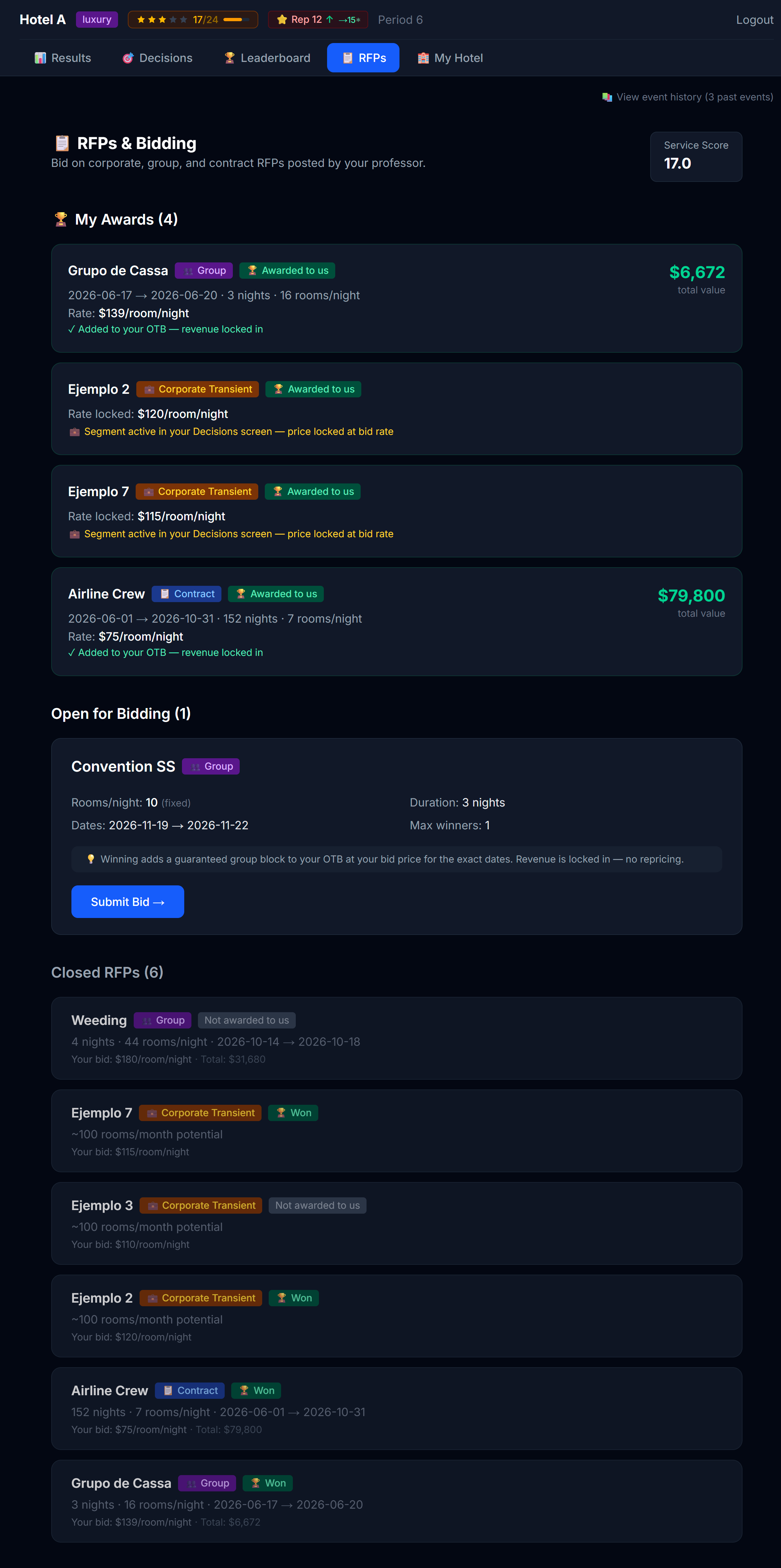 Open RFPs visible to you. Closed (already-decided) ones show separately.
Each RFP card shows you:
- Who is asking
- What they want (number of room-nights, type preference, window)
- The bid deadline (after which no more bids are accepted)
- Whether they've told you their budget cap or not
- Your bid status: ⏳ Not yet bid, ✅ Bid placed, 🏆 Won, ❌ Lost
Minimum service score
Some RFPs require a minimum service score. If your hotel's service score is currently below an RFP's minimum, the RFP card shows a notice telling you so — with your score and the required one side by side. You can't win that contract as you stand, but the fix is in your hands: invest in amenities (Chapter 3) to raise your service score and qualify before the bid deadline.
How to place a bid
Click Place Bid on the RFP card to expand the form.
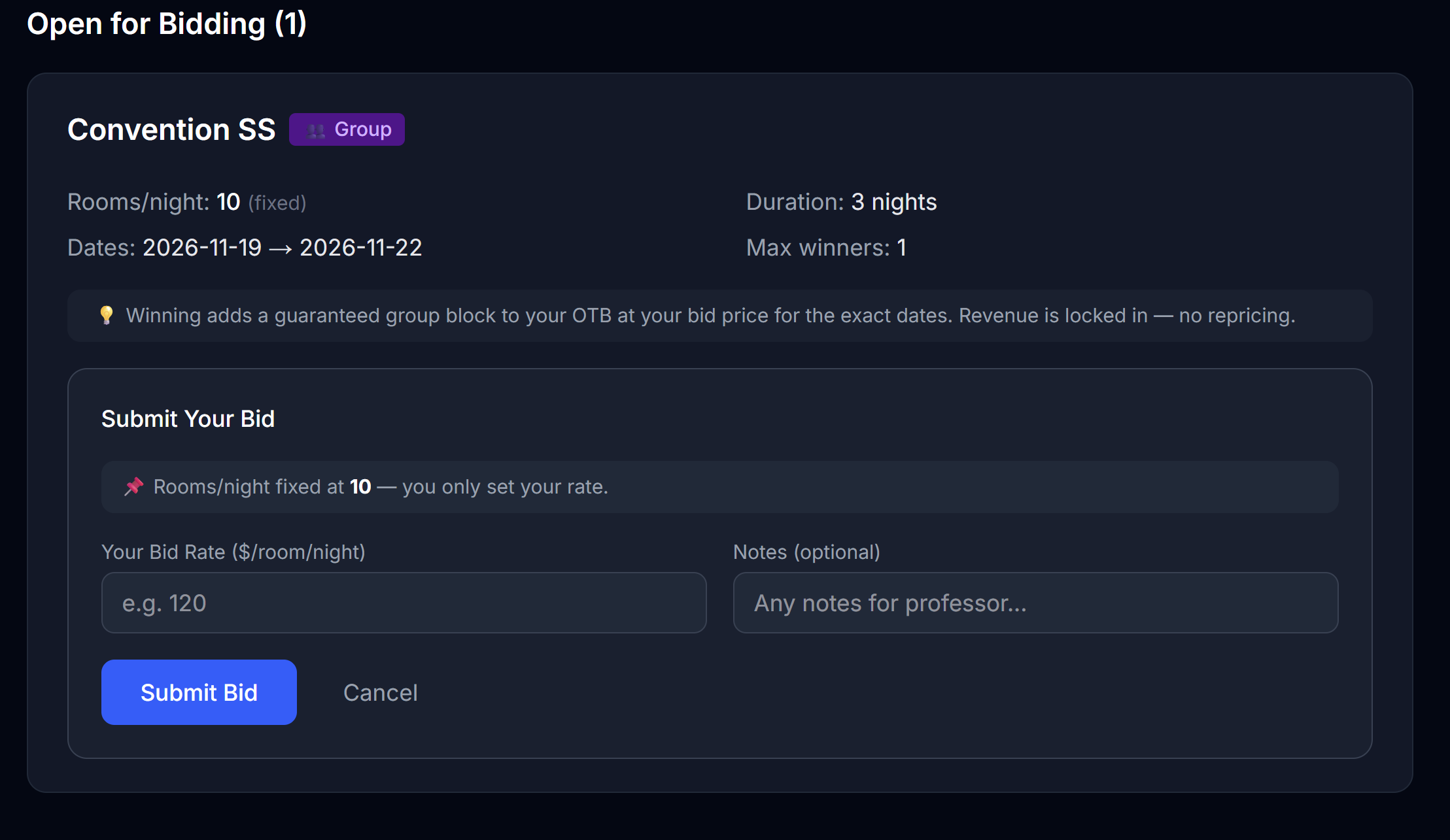 The bid form. Your price is the headline; the displacement panel (when shown) is the brain.
Fill in:
| Field | Notes |
|---|---|
| Bid price per night | Per room-night |
| Notes (optional) | What you'd say in a real cover letter — your sales pitch |
Click Submit Bid. Your bid is now visible to your professor, who will award the contract after the deadline.
The displacement panel (when shown)
If your professor has enabled displacement analysis for this RFP, a panel appears showing whether the bid would be good for your hotel:
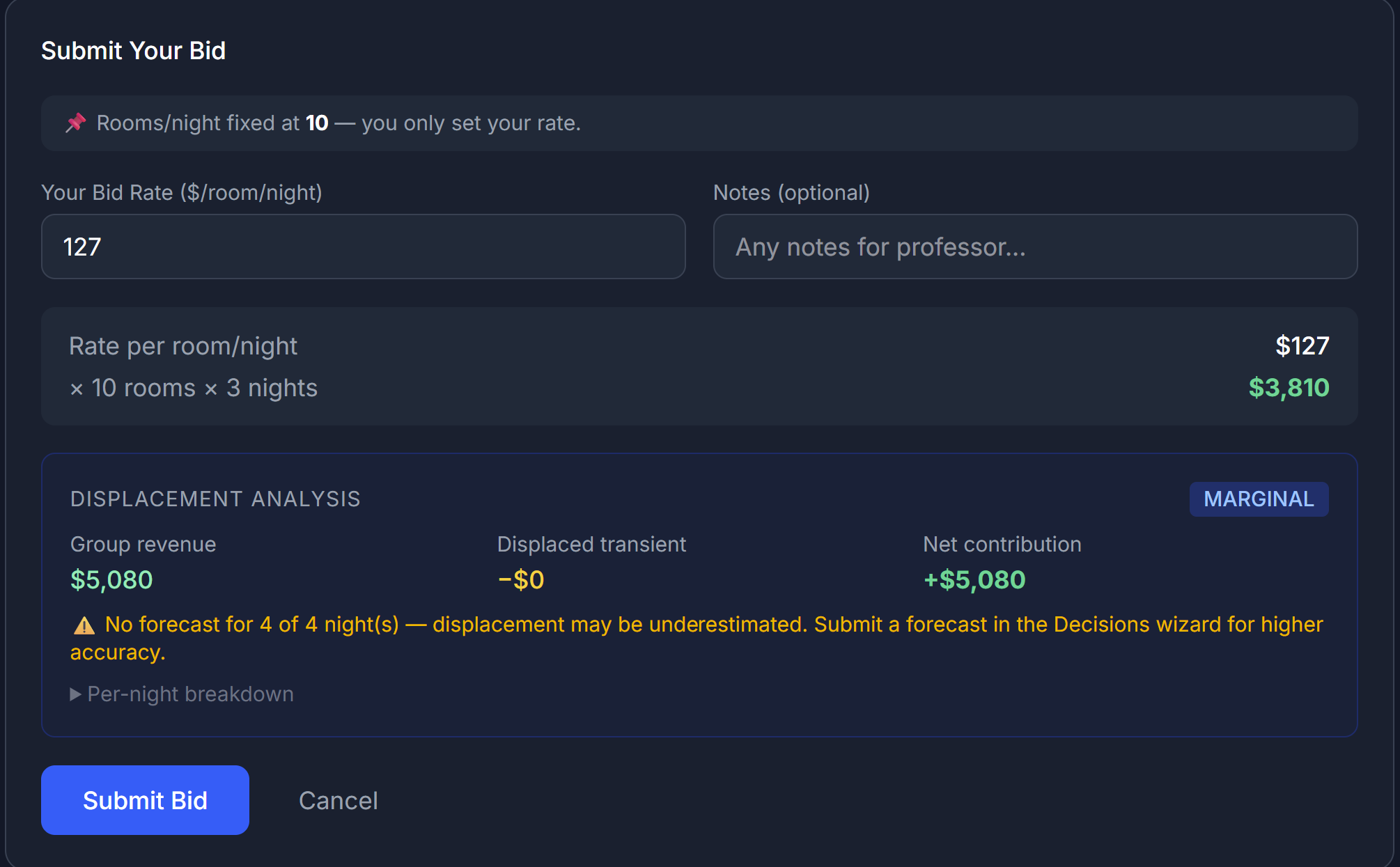 The displacement panel. Three verdicts: ACCRETIVE, MARGINAL, DILUTIVE.
The panel takes:
- The number of rooms the contract wants
- The price you've entered
- Your current forecast for that window (from the Forecast tab)
…and tells you:
| Verdict | What it means |
|---|---|
| 🟢 ACCRETIVE | The contract fills rooms that would otherwise sit empty. Bidding makes you money. |
| 🟡 MARGINAL | The contract displaces some retail bookings, but at a price still high enough to be worth it. Be thoughtful. |
| 🔴 DILUTIVE | The contract displaces retail bookings you would have gotten anyway at a higher price. You're trading good revenue for worse revenue. |
When the panel is hidden
Your professor may have turned off displacement analysis for this RFP. In that case you don't see the panel — you have to do the math in your head, or just decide based on your gut and your forecast. That's part of the lesson.
Bidding strategy in plain English
Three rules of thumb:
1. Bid when you have empty rooms to fill
If your forecast for the contract window shows lots of unsold capacity, an RFP is essentially "found money" — you'd rather have a guaranteed booking at $120 than nothing at $200.
2. Don't bid when you're already busy
If the window is your peak season and you expect to sell out at $300, accepting a contract at $180 displaces those higher-rate bookings. The math has to clear that bar.
3. Pricing matters more than you think
The professor (or the automated awarder, depending on simulation) usually picks the best bid, where "best" usually means "lowest price that still meets the requirements." But sometimes other factors are weighed — your hotel's star rating, fit with the corporate type, etc. Don't assume lowest always wins.
How long the contract lasts
Corporate contracts often run multiple periods — you commit to a price for, say, 6 months. That means:
- ✅ Predictable revenue for those periods
- ❌ Locked-in price even if market rates rise
This is real revenue strategy: you're trading optionality for certainty.
After you win
If you win an RFP, you'll see it in My Awards:
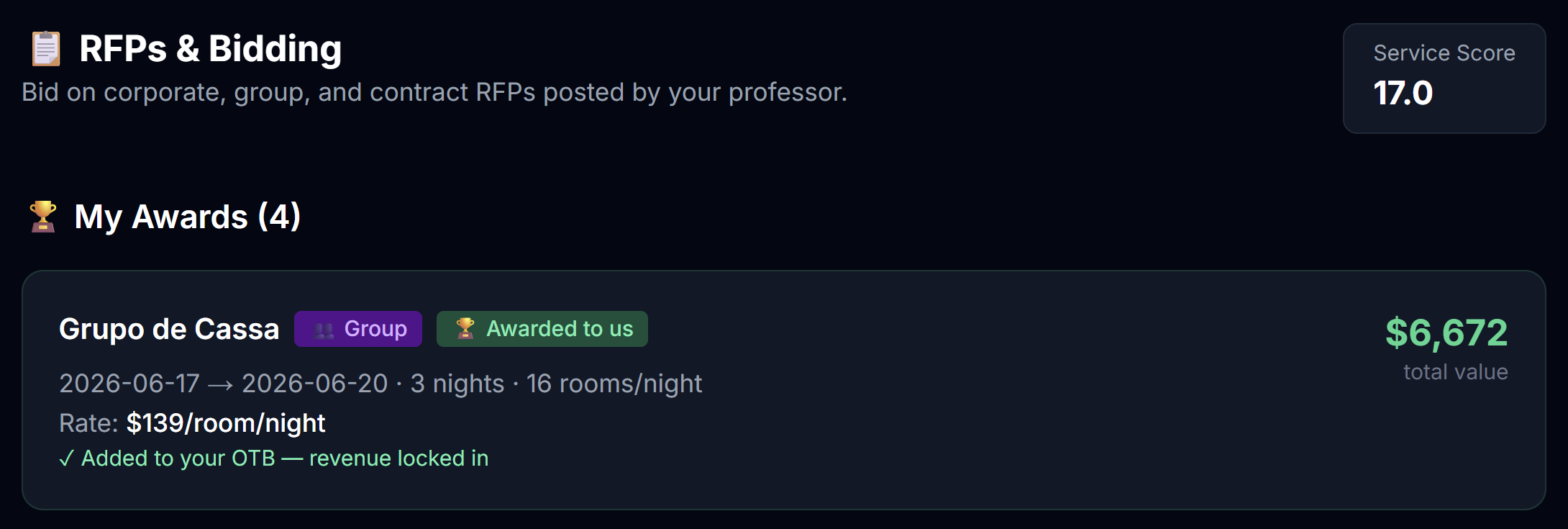 Your won contracts appear here with their terms.
Things that change automatically:
- A fixed price for that segment is locked into your pricing table for the contract window
- The contract's room-nights show up as OTB for the relevant months, at the full contracted amount
- Channel costs do NOT apply (these are direct contracts, not OTA bookings)
You don't have to do anything else. The contract guests just show up in your future periods — remembering that, per the wash note above, a group or contract block may show up at somewhat less than 100% of what OTB displays.
After you lose
You're back to your regular pricing strategy. No penalty for losing — the only cost was the time you spent thinking about it.
What if you don't bid at all?
If there's an open RFP and you don't bid, you'll get a warning when you submit your decisions:
The unbid-RFP warning. Lets you submit anyway after acknowledging.
You're allowed to skip an RFP intentionally — but the warning exists so you don't skip one by accident. Click through and submit if skipping is what you meant.
Next
→ Chapter 9: The Leaderboard
9 The Leaderboard
After each published period, the leaderboard updates. This is the page you'll either celebrate on or learn from.
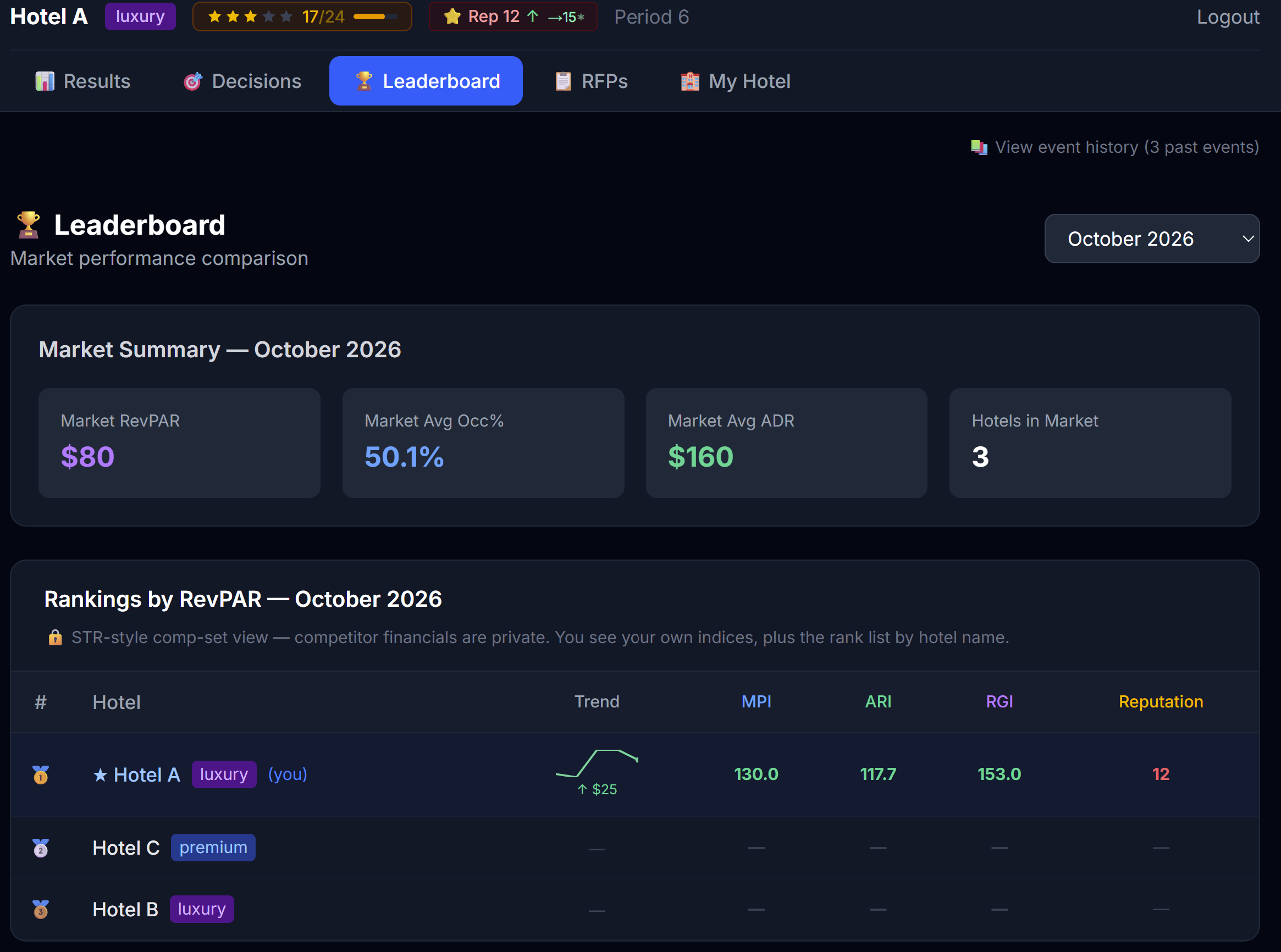 The student leaderboard. STR-style: you see your own numbers and competitor indices, not their dollar values.
What's actually shown
The leaderboard is built to mimic real-world hospitality industry reports (STR / Smith Travel Research). It deliberately:
| You see | You don't see |
|---|---|
| Your own occupancy, ADR, RevPAR, revenue | Your competitors' dollar/percentage values |
| Competitor names | Competitor amenities, marketing, brand |
| Your indices vs the market — Occupancy Index, ADR Index, RevPAR Index | Per-competitor breakdowns |
This is deliberate. In the real world, hotels don't know exactly what their competitors are selling or how much they're spending. They know aggregate market data.
How to read the three indices
Each index compares you to the average of your competitive set (typically hotels of your type).
| Index | What it means | What 100 means |
|---|---|---|
| MPI (Market Penetration Index) | Your occupancy vs the average | 100 = you're at average occupancy. Above 100 = you're getting more than your fair share of rooms sold. |
| ARI (Average Rate Index) | Your ADR vs the average | 100 = you're priced at average. Above 100 = premium-positioned. |
| RGI (Revenue Generation Index) | Your RevPAR vs the average | 100 = you're earning your fair share of revenue. Above 100 = winning. |
✅ RGI > 100 is the headline number. It means you're winning more revenue per available room than the average hotel in your set. That's the simplest definition of "doing well."
The three patterns
Hotels with MPI ≠ ARI usually fall into one of three patterns. Recognizing them helps you decide what to do next.
| Pattern | MPI | ARI | RGI | Strategy |
|---|---|---|---|---|
| Premium positioned | Below 100 | Above 100 | Likely above 100 | Selling fewer rooms but at higher rates. Hold the line. |
| Volume play | Above 100 | Below 100 | Sometimes above, sometimes below | Filling rooms at discount. Risky — protect mix. |
| Squeezed | Below 100 | Below 100 | Below 100 | Losing on both. Step back — what's broken? Product, brand, or pricing? |
| Dominant | Above 100 | Above 100 | Well above 100 | The rare both-and. Hard to sustain. |
Common mistakes
Chasing the leader's price
The leader's pricing is their answer to their product. If they have stronger amenities, brand, and reputation, their $220 isn't your $220. Match strategy, not number.
Optimizing the wrong index
Going hard on MPI (raising occupancy) by dropping price is easy but often nukes RGI. Going hard on ARI by raising price drops MPI fast and can torpedo RGI too. Optimize RGI. That's the integrated outcome.
Reading one period as a trend
One period of low RGI may just be bad luck (a competitor got an RFP, an event went the other way). Two periods is interesting. Three periods is a pattern. Don't change your whole strategy on a single data point.
What's NOT on the leaderboard
Things that matter for your hotel that the leaderboard doesn't show:
- Your operating profit (revenue minus all costs). RGI optimizes revenue, not profit. A high-RGI hotel that's burning cash on channel commissions and a money-losing brand isn't really winning.
- Your cash position — easily checked on the top bar pill.
- Your reputation and service score — long-term assets that compound.
Always read leaderboard alongside your full results, not in isolation.
Next
→ Chapter 10: Reputation & Service Score
10 Reputation & Service Score
These are the two slowest-moving and most powerful variables in the simulator. Both compound over many periods. Both are easy to ignore early. Both are very hard to recover once damaged.
The pills
You'll see both on the top bar.
From left to right: hotel name, type, stars, service score, reputation, period, cash.
| Pill | What it tracks |
|---|---|
| Service score | A measure of your hotel's operational quality right now, built from your amenity mix and brand affiliation |
| Reputation | Your long-term word-of-mouth score, built across many periods |
Both run on a 0–100 scale. Both are color-coded (red = poor, amber = average, green = strong).
Service score
Service score reflects the current period's operational quality — what you've built into the hotel.
What drives it
- Active amenities — each amenity you've installed contributes points to your service score. Higher tiers contribute more.
- Brand affiliation — joining a strong brand adds a service-score boost on top of your amenity base. Stronger brands give a bigger boost.
- Independent / own program — no brand boost. You're on your own amenity stack.
Where to tune it
My Hotel → Amenities (install or upgrade amenities) and My Hotel → Loyalty (affiliate with a brand) are the two levers.
How fast it moves
The new score takes effect once your new amenity comes online or your brand affiliation activates. The timing depends on the investment type (see chapter 3): a new amenity usually activates the next period, while an upgrade activates the same period. Once active, there's no slow ramp-up for service score itself (reputation, however, takes longer to react — see below).
What it impacts
- Guest satisfaction in the current period
- The trajectory of your reputation over time
- Your perceived quality vs competitors (the "package" guests are choosing among)
Reputation
Reputation moves slowly because it's an accumulation. Every period, the engine looks at how well your hotel performed (service score, guest experience, amenity quality, brand affiliation) and nudges your reputation up or down.
What drives it
| Driver | Direction |
|---|---|
| Service score | Strong → ↑ reputation, weak → ↓ |
| Amenity quality | Better amenities than your peer set → ↑ |
| Brand affiliation | A strong brand → small ↑ (brand standards lift your reputation floor) |
| Marketing — Baseline campaigns | Long-term brand-building campaigns → small ↑ over many periods |
| Overbooking penalties | Walks (selling rooms you don't have) → ↓ 0.5 points per walked room, applied when the period publishes |
| Forecast accuracy | A prior period's forecast score → small ↑ if you forecasted well, small ↓ if you missed badly — see below |
| Time | Slight decay each period (everything decays a little — keeps you working) |
Forecast accuracy feeds back into reputation
Your forecast score (Chapter 4.2) isn't just a personal report card — it has a small, real effect on reputation. If your forecast accuracy for a period lands below target, reputation takes a small hit; if it's excellent, reputation gets a small nudge upward. Either way, the effect lands with a one-period lag — it's the next published period's reputation that reflects how accurate last period's forecast was, not the same period you forecasted.
This is one more reason forecasting is a real skill, not busywork: it's not just informing your own pricing, it's quietly shaping your reputation trajectory a period later.
How fast it moves
Slowly. A single period's good performance nudges reputation by a small amount. It takes 4–6 periods of consistent strong performance to meaningfully move from "okay" to "strong."
This is by design. In the real world, hotel reputation builds over years, not weeks. The simulator compresses the timeline but preserves the dynamic.
What it impacts
- Guest choice — higher-reputation hotels capture a larger share of demand at any given price
- Pricing power — you can charge more without losing demand
- Resilience — strong-reputation hotels weather bad periods better
The pending-change preview
When you make a decision that will change service score or reputation but hasn't been run yet, the pill shows you a pending preview — an arrow indicating where the score is going.
For example, if you activate an Influencer campaign that will nudge reputation up by a few points:
⭐ Rep 64 → 68
This preview:
- Refreshes immediately when you commit a change (no page reload needed)
- Is a projection based on what the engine thinks will happen
- May differ slightly from the final actual value (other things move in parallel)
 A reputation pill showing a pending change (left: plain, right: projection arrow visible).
Why these matter for revenue
Two hotels with identical pricing strategies but different reputation and service scores will get very different results. The higher-rep, higher-service hotel:
- Gets more demand at the same price (more guests choose it)
- Can raise prices without losing as much demand
- Recovers faster from bad periods
The lower-rep, lower-service hotel:
- Must lean on lower prices to stay full
- Loses customers to higher-perceived competitors at the same price
- Compounds downward — fewer bookings → less revenue → less to invest in fixes
The strategic implication
In the first 2–3 periods, invest in reputation and service. By period 5+, you'll be playing a different game than the hotels that didn't.
This is the simulator's biggest hidden lever. Hotels that obsessively price-tune in period 1 but ignore amenities and brand-building usually peak in period 3, then fade. Hotels that build the underlying engine first start slower but dominate by period 6.
Practical playbook
| Period | Reputation / service focus |
|---|---|
| 1 | Install at least one amenity in each category appropriate for your hotel type. Build your service score baseline. |
| 2 | Pick a brand path: stay independent (cheap, slow) or commit to a brand (expensive upfront, big long-term payoff). |
| 3 | Start a Baseline marketing campaign (the long-build kind). |
| 4+ | Maintain. Watch for amenity replacement timing and brand renewal. Don't let your stack go stale. |
Next
→ Chapter 11: Strategy Tips (meta-advice for sustained competitive play)
11 Strategy Tips
This chapter is meta-advice. It doesn't reveal anything about the engine — instead it captures patterns observed across many cohorts of students playing this simulator. Use it as a checklist before each period.
The five most common mistakes
1. Pricing in a vacuum
The mistake: You decide "fair" prices for your hotel without checking what competitors are doing or what your forecast looks like.
Fix: Position → Forecast → Market Intel → then Pricing. In that order, every period.
2. Ignoring My Hotel after period 1
The mistake: You set up amenities and channels in period 1, then never revisit them. By period 5 your product is stale and your competitors have lapped you.
Fix: Block 5 minutes every period to review the My Hotel sub-tabs. Even if you don't change anything, you've made a conscious decision.
3. Reacting to one bad period
The mistake: You have a weak period 2 (low occupancy) and panic-discount in period 3. You sell out in period 3 but at a terrible ADR, and now your "discounted" reputation pulls you down for periods 4–5.
Fix: Two-period rule. Don't make a strategy change based on a single period. Wait until you see the pattern twice.
4. Skipping marketing
The mistake: Marketing feels expensive, so you skip it. Meanwhile a competitor runs a Baseline campaign for three periods and pulls ahead permanently.
Fix: Allocate a marketing budget every period, even a small one. Buzz for short-term gaps, Baseline for the long game.
5. Forgetting RFPs
The mistake: You don't bid on RFPs because they "feel separate" from your main strategy.
Fix: Treat RFPs as part of your pricing strategy. They fill rooms you wouldn't have filled, on dates you wouldn't have filled, with cash that doesn't pay channel commissions.
The strategic identity question
Before period 1, decide: what kind of hotel are you?
Pick one of these (or define your own — but commit):
| Identity | Profile |
|---|---|
| Premium positioned | Best amenities, strong brand, top service, premium pricing. RGI play. |
| Volume leader | Aggressive pricing, OTA-heavy distribution, big Buzz marketing. MPI play. |
| Corporate specialist | Bid on every RFP. Build the contract book first, retail second. |
| Direct-first | Minimize channel commissions. Strong direct site, strong loyalty, modest OTA mix. Margin play. |
Hotels that commit to one identity outperform hotels that try to do all four. The simulator rewards focus.
A useful weekly routine
Build this habit:
1. Open Position → write one sentence about last period
2. Open Forecast → write one sentence about next month
3. Open Market Intel → write one sentence about competitors
4. Open Pricing → make decisions consistent with those three sentences
5. Open My Hotel → quick scan, only change if there's a clear reason
6. Open RFPs → bid or consciously skip every open one
7. Submit
Total: 15-20 minutes per period once you're in rhythm.
Reading the Demand Factors panel
After each period your professor can show you a Demand Factors view that explains why your hotel got the result it got. Different professors expose this differently — some show it openly, some make you ask. If you can see it, study it. It's the single most learning-dense screen in the simulator.
Common scenarios
"I'm in last place after period 1"
Period 1 results are noisy. You may have over-priced for the actual demand, or your product (amenities, brand) needs work. Read your daily breakdown — was it under-occupancy or under-ADR? — and adjust ONE thing for period 2.
"I had a great period 1, but something went wrong in period 2"
Two common culprits:
- A competitor improved their product (added a spa, joined a strong brand) — check the leaderboard for changes
- You got complacent — same prices in a season where demand shifted
"I keep winning RFPs but my P&L is shrinking"
You're bidding too low. RFPs displace retail bookings that would have paid more. Use the displacement panel (if shown) and bid less aggressively.
"My cash is dropping but my revenue is fine"
Check your operating costs:
- Are you running too many ongoing marketing campaigns?
- Is your channel mix heavy on commission-charging OTAs?
- Did you over-invest in amenities and now carry too much ongoing OpEx?
- Are you paying a high franchise fee for a brand that's not lifting demand enough to justify it?
"My reputation is dropping and I don't know why"
Likely causes (in order of frequency):
- Weak amenity stack → low service score → drags reputation
- Overbooked rooms (walks) → reputation hits
- Independent and not running any Baseline marketing → no positive pressure to offset natural decay
- Brand mismatch — joined a luxury brand but you're a budget hotel
The 80/20 rule
If you do nothing else, do these three things every period:
- Read Position and write one sentence about the previous period
- Look at competitor pricing in Market Intel (if unlocked) before pricing yourself
- Bid on, or consciously skip, every open RFP
That alone will put you in the upper half of your class.
Next
→ Chapter 12: Financial Instruments (only if your sim has them enabled)
12 Financial Instruments
Skip this chapter if your professor hasn't enabled financial features. You can check by looking at the navigation: if you see a Financials tab in the top nav, this chapter applies. Otherwise, ignore.
When enabled, financial instruments turn the simulator into a more realistic cash-management game. You're not just running a hotel — you're running a business, with all the cash-flow stress that comes with it.
The instruments
| Instrument | What it is | When to use |
|---|---|---|
| Replacement Reserve | A required savings account that builds toward capital projects — and backstops new amenity investment when your budget falls short | Always — it's automatic |
| Revolving Credit Line (Revolver) | A short-term loan that auto-draws if your cash goes negative | When you're temporarily cash-strapped |
| Capital Injection | A request to your "owner" for more equity money | When you need long-term capital, not a temporary plug |
| Amenity Term Loan | Financing to complete an amenity you can't fully fund — it amortizes over a fixed term | When budget + reserve fall short of an upgrade you want now |
(Your professor enables each of these independently — you may see some, all, or none.)
The Financials page
 The Financials page — operating cash, reserve balance, revolver position, debt covenants.
Operating cash vs investment cash vs reserve
Three different "buckets":
| Bucket | What's in it | What it pays for |
|---|---|---|
| Operating cash | Profit accumulated from running the hotel | Day-to-day costs: amenity OpEx, channel commissions, marketing, maintenance, brand fees |
| Investment cash | Capital your professor seeded you with | Amenity CapEx, brand joining fees, large one-time investments |
| Replacement Reserve | A small percentage of revenue, auto-contributed each period | Replacing aging amenities when they need it |
Keep these straight. Mixing them up is the #1 financial mistake students make.
💡 On My Hotel → Info (Chapter 3.1), the "Total Available to Spend" figure is your investable funds: your accumulated weekly budget plus your Replacement Reserve (also called the FF&E reserve), combined into one number. That's your real spending power for amenities and other investments right now — not your day-to-day operating cash, which is a separate bucket that pays running costs.
Replacement Reserve — the automatic one
Every period, a small percentage of your revenue is automatically moved into a Replacement Reserve account. This isn't a choice — it's a covenant.
The reserve sits there earning a small return until you need to use it. You'd use it when an existing amenity reaches the end of its "useful life" and needs to be replaced.
You don't actively manage this. Just know it's there, slowly accumulating, and don't be alarmed when you see it on your P&L as a deduction from operating profit. When you invest in an amenity and your weekly budget alone doesn't cover it, the simulator automatically draws the rest from your reserve (it tells you how much) before ever offering a loan — so the reserve is your first backstop, not a last resort.
Amenity Term Loan — financing an upgrade
If your professor enables this, the Amenities tab shows a "🏦 Finance (loan)" button when your budget + reserve still can't cover an upgrade. The loan funds the shortfall and, unlike permanent debt, it amortizes: you pay interest on a declining balance and the principal is paid off over a fixed term (your professor sets it — e.g. 12 periods). Each period the interest on your P&L shrinks, and the balance on the Debt tab falls toward zero.
If Credit Standards are also on, the loan is underwritten first — your DSCR and LTV must clear the thresholds, or the request is denied (or approved at a higher rate). Weak operating results mean no easy debt, just like real life.
💡 Financing lets you move faster, but interest is a real cost on your P&L. Borrow when the upgrade pays for itself sooner than the interest costs you — not just because you can.
Revolver — the safety net
If your operating cash goes negative at the end of a period, the revolver automatically draws to bring you back to zero (or to your minimum cash floor, if you've set one).
You'll see this on your P&L as:
- Revolver draw: amount drawn
- Revolver interest: cost of the draw next period
Why it's a safety net (not a strategy)
Auto-drawing keeps you operational. But:
- The interest rate on revolver debt is higher than your operating margins
- A growing revolver balance signals to your covenants you're in trouble
- If you stay in revolver debt for many periods, your credit standards may downgrade — making future borrowing harder
💡 The revolver is fine for a one-period cash crunch. It's a red flag if you're still on it three periods later.
Capital Injection — the long-term option
If you need permanent capital — say, to fund a major amenity investment that the revolver can't cover — you can request a Capital Injection from your "owner" (your simulated equity backer).
You'll get a form to fill out:
- How much you want
- What you'll use it for
- Why it's worth the equity dilution
Approvals are not guaranteed. Your professor (acting as the owner) may say no, especially if your operating performance is weak or if you've already injected capital recently.
Credit standards — what they mean
The Financials page also shows your credit standards — DSCR (Debt Service Coverage Ratio) and LTV (Loan-to-Value).
You don't need to memorize these. The page tells you whether you're inside acceptable bands or in danger of a covenant breach. If you're in danger, fix it — by raising operating profit, paying down revolver, or both.
Ambient alerts
If your cash position becomes critical, you'll see:
- A pulse pill on your hotel layout (replaces or augments the normal cash pill)
- A banner at the top of decision pages
These are warnings, not blockers. You can still play normally — but you should treat them as urgent.
The strategic implication
Financial instruments add a layer of consequence to your operational decisions:
- Aggressive marketing spend → operating cash drops → revolver draw → interest expense → less margin
- Over-investing in amenities → investment cash depleted → can't buy the brand upgrade you needed → opportunity cost
- Under-investing → no growth → falling behind → tough cycle to break
The game becomes: make decisions that grow operating profit faster than your obligations grow.
Next
→ Chapter 13: FAQ & Troubleshooting
13 FAQ & Troubleshooting
A grab-bag of "things students actually ask." Skim once. Come back as a reference when stuck.
Login & access
I forgot my hotel password
You can request a reset directly from the login page:
- Click Hotel Team on the landing page
- Click the small Forgot password? link below the "Enter Hotel Dashboard" button
- Enter your simulation ID and hotel name. You can optionally add a short message (e.g. "we've been locked out since yesterday")
- Submit. Your professor receives an email notifying them of the request.
- Your professor will set a new password and share it with you (usually within a few hours, depending on their schedule)
You don't see the new password until your professor sends it to you — the simulator never emails passwords directly to students. That's by design: your professor is the security checkpoint for your team's credentials.
💡 If you still know your current password and just want to change it, you don't need your professor: use the Team Password card on My Hotel → Info (see Chapter 3).
My simulation ID isn't working
Triple-check the spelling — they're often long alphanumeric codes. Copy-paste from the email your professor sent if you can.
Wrong hotel name error
The hotel name is case-sensitive. "Grand Plaza" ≠ "grand plaza" ≠ "Grand-Plaza". Match exactly.
Editing decisions
Why are my inputs grayed out?
One of two reasons:
- The current period is closed (your professor has run it).
- Your professor has locked editing — even though the period is technically open.
Look for the 🔒 banner at the top of the page; it'll tell you which.
My professor unlocked editing but I still can't edit
Hard-refresh the page (Ctrl/Cmd + Shift + R). The lock state is cached and sometimes stale.
I made a change, navigated away, came back, and it's gone
You forgot to click Save on the tab. Each tab saves independently. There is no auto-save.
Can I copy-paste prices across days?
The Pricing tab has a Pre-populate action that copies from a previous month, either by date or by day-of-week. Use day-of-week when possible — it preserves the weekly rhythm of your pricing.
Why won't a past pace-mode day let me edit?
Because it's already been processed. Pace mode locks past chunks. You can only edit days that haven't been run yet.
Pricing
What's the "right" price?
There is no single right price. The right price is the one that lines up with:
- Your forecast for that day
- What competitors are charging (Market Intel)
- Your hotel's product strength (amenities, brand, reputation, channels)
- Your strategic identity (premium / volume / corporate / direct)
Read Chapter 5 carefully and run your first period as an experiment.
My ADR went down even though I raised prices. What?
Check your segment mix. If you got a lot of advance-purchase bookings (which pay a discount off retail), your blended ADR drops even though your retail rate went up. This is normal.
Why did I get walked (overbooked)?
You sold more rooms than you had available. This happens when:
- You priced very aggressively and demand exceeded your inventory cap
- You didn't reduce your "available inventory" on a peak day
- Your forecast was off and the actual demand was much higher
Walks are penalized (walk-cost in your P&L) and hurt reputation slowly. Avoid by holding inventory back on expected peak days.
What does a walk actually cost me?
Two things, every time, on every walked room: a dollar penalty on your P&L (folded into Total OpEx as the Overbooking Penalty line — the exact amount depends on which cost mode your simulation uses, either a flat dollar figure or a market-based one) and a fixed 0.5-point reputation hit, applied when the period publishes. See Chapter 5 for the full breakdown of both cost modes, and Chapter 10 for how the reputation hit fits into your longer-term reputation trend.
My Excel upload was rejected. Why?
The most common causes, in order of likelihood:
- You inserted, deleted, or reordered rows or columns, or renamed a sheet. The template's structure has to stay exactly as downloaded — the upload can't make sense of a restructured file.
- You tried to upload after the deadline passed, after your professor locked editing, or after the period published. The server enforces this even if your screen still looks editable — try refreshing to confirm the period's state.
- You typed something invalid into a yellow cell (like text where a number was expected). The preview screen will show you the exact error before anything is applied — read it, fix the cell, and re-upload.
Remember: an empty yellow cell means "keep what's already saved," not zero — you only need to fill in the cells you're actually changing.
Why did part of the market not buy anything this period?
This is expected behavior, not a bug. The market isn't a captive audience — Retail, Advance Purchase, and corporate guests each have their own price sensitivity, and if a meaningful chunk of the market (not just you) prices too aggressively, some demand simply walks away rather than book at a bad price. Check your own pricing against Market Intel first; if you're in line with (or below) the market and still seeing soft demand, it may be a market-wide pricing issue, not just yours.
RFPs
I bid but didn't win. Why?
The professor (or auto-awarder) chose another bid. Usually that means another hotel bid lower or had a better fit. You can ask your professor for feedback; sometimes they'll share why.
I won but my P&L looks worse than expected
You may have bid too low and displaced higher-revenue retail bookings. Use the displacement panel (if your professor enables it) on your next bid.
Can I withdraw a bid?
Before the deadline, yes — just edit and resubmit (or delete). After the deadline, no.
The displacement panel doesn't appear for this RFP
Your professor disabled it for this specific RFP. You'll have to estimate displacement yourself based on your forecast.
Results
I picked my direct competitors — can I change them later?
No. If your professor has turned on the direct-competitors layer of the Performance Trend chart, the pop-up asking you to choose at least 3 direct competitors is a one-time, final decision for the rest of the simulation. Take your time on it the first time it appears — think about who you genuinely compete with, not just who's convenient — because there's no changing the selection afterward.
My results don't match my decisions
A few common causes:
- You didn't click Submit Final. Your decisions were saved but never "committed" — the engine used your previous period's prices as a fallback.
- Your professor unpublished and re-ran the period with different inputs. Ask them.
- You misread a number — re-check the daily breakdown.
Why is my occupancy capped at 100%?
The simulator caps displayed occupancy at 100% even when you were overbooked, because >100% looks weird in a chart. The "Overbooked" column shows the excess.
Forecast variance — what is the percentage?
Some simulations show a forecast-vs-actual accuracy score. It's an MAPE (Mean Absolute Percentage Error) — lower is better, meaning your forecasts were close to reality.
Marketing & Channels
My marketing campaign is active but I don't see a difference
Marketing has different timing:
- Buzz campaigns show effects within 1 period.
- Baseline campaigns build slowly over 3+ periods.
- One-shot campaigns are a single boost — if you don't see it the same period, something's off.
Also: campaigns add to your "package" but don't override pricing. A weak product with a strong campaign still has a weak product.
Should I activate every available channel?
No. Each additional channel has diminishing returns and comes with commission costs. 2–4 channels is usually optimal. Read Chapter 3.4.
Direct says "always on" — can I turn it off?
No. Your own website is always available, free of commission. There's no reason to want to turn it off.
Reputation & Service Score
Why is my reputation dropping?
Common reasons (in order):
- Weak amenity stack → low service score → drags reputation
- Overbookings → walk penalties
- Independent + no marketing → no positive pressure
- Brand mismatch — joined a brand that doesn't fit your hotel type
How do I raise reputation fast?
You can't, by design. Reputation builds slowly. Be patient. Run Baseline marketing, strengthen your amenity stack, consider joining a stronger brand. Wait 3+ periods.
The pending arrow on my reputation pill — is that locked in?
It's a projection of what the engine thinks will happen based on your committed decisions. The actual published value may differ slightly because other moving parts (other hotels, events) influence the final number.
My Hotel
I invested in a new amenity but see no effect this period
That's expected. A new amenity (the first tier in a category) starts counting the next period by default: its service score and revenue show up then, not the period you buy it (this models build lead time). An upgrade of something you already run, by contrast, pays off the same period. Initial-setup amenities activate immediately. See chapter 3 for details. (Your professor can tune these timings.)
I upgraded my amenity but didn't lose revenue that period
Correct, and that's by design: on an upgrade, the old tier keeps producing revenue until the new one comes online, so there's never a "gap month." If your revenue looked off, ask your professor to check your hotel-view.
Switching brands — is there a penalty?
Yes. There's a joining fee for the new brand and often an exit penalty from the old one. The Loyalty tab shows you both before you commit.
Can I be "independent" then later join a brand?
Yes. You can change brand path each period if you can afford the switching cost.
Pace mode
Why are some of my Forecast cells grayed out?
They're for days in past pace chunks. Once a day has been processed, your forecast for that day is sealed against actuals — you can read what you forecasted, but you can't change it. Use it as a learning signal for the days you can still edit.
How do I know which chunk we're in?
Open Decisions → Month in Progress. The pace timeline shows you visually which chunks are done and which are still ahead.
Technical
The page is acting weird / something looks broken
- Hard-refresh (Ctrl/Cmd + Shift + R)
- Log out and back in
- Try a different browser
- If still broken, message your professor with a screenshot
Can I use this on mobile?
The simulator is built for desktop. It will load on mobile but the pricing grids and tables don't fit well. Use a laptop or tablet in landscape.
Does my data save if I close the tab?
Only if you clicked Save first. Always Save before closing.
Where to learn more
- Chapter 4 — Reading the market
- Chapter 5 — Setting prices
- Chapter 9 — The leaderboard
- Chapter 10 — Reputation & service score
- Chapter 11 — Strategy tips
Ask your professor too — they have access to the full picture of your hotel and can answer "why" questions the simulator can't.
Good luck. Have fun. And remember: the goal isn't to win the simulation — it's to learn how to think like a revenue strategist.