The My Hotel tab is where your hotel becomes yours. You'll spend significant time here in the first 2–3 periods, then return only occasionally once your hotel is dialed in.
There are up to six sub-tabs across the top: Info, Amenities, Loyalty, Channels, Marketing, and — when your professor sells competitive intelligence — Market Research (3.6). Some of these only appear when your professor has turned the matching feature on.
Concept primer: why this tab matters
Two hotels can charge the same price per night and get very different demand. Why? Because guests don't just compare prices — they compare the whole package:
- Does this hotel have a pool? A spa? A fitness center? → Amenities
- Will I earn points I can use later? → Loyalty
- Can I even find this hotel on Booking.com / Expedia / through my company travel agent? → Channels
- Have I heard of this hotel? Is it trending right now? → Marketing
- Does the place feel well-run? → Service score (driven by your amenity mix and your brand affiliation)
Each lever you pull in My Hotel shapes the "package" guests are comparing. Stronger package = more demand at any given price. The exact magnitude of the effect is hidden from you on purpose — figuring it out through experimentation is part of the simulation.
3.1 Info — your hotel's identity at a glance
The Info sub-tab is your hotel's profile page. It's mostly read-only — a place to confirm who you are and how much you have to spend.
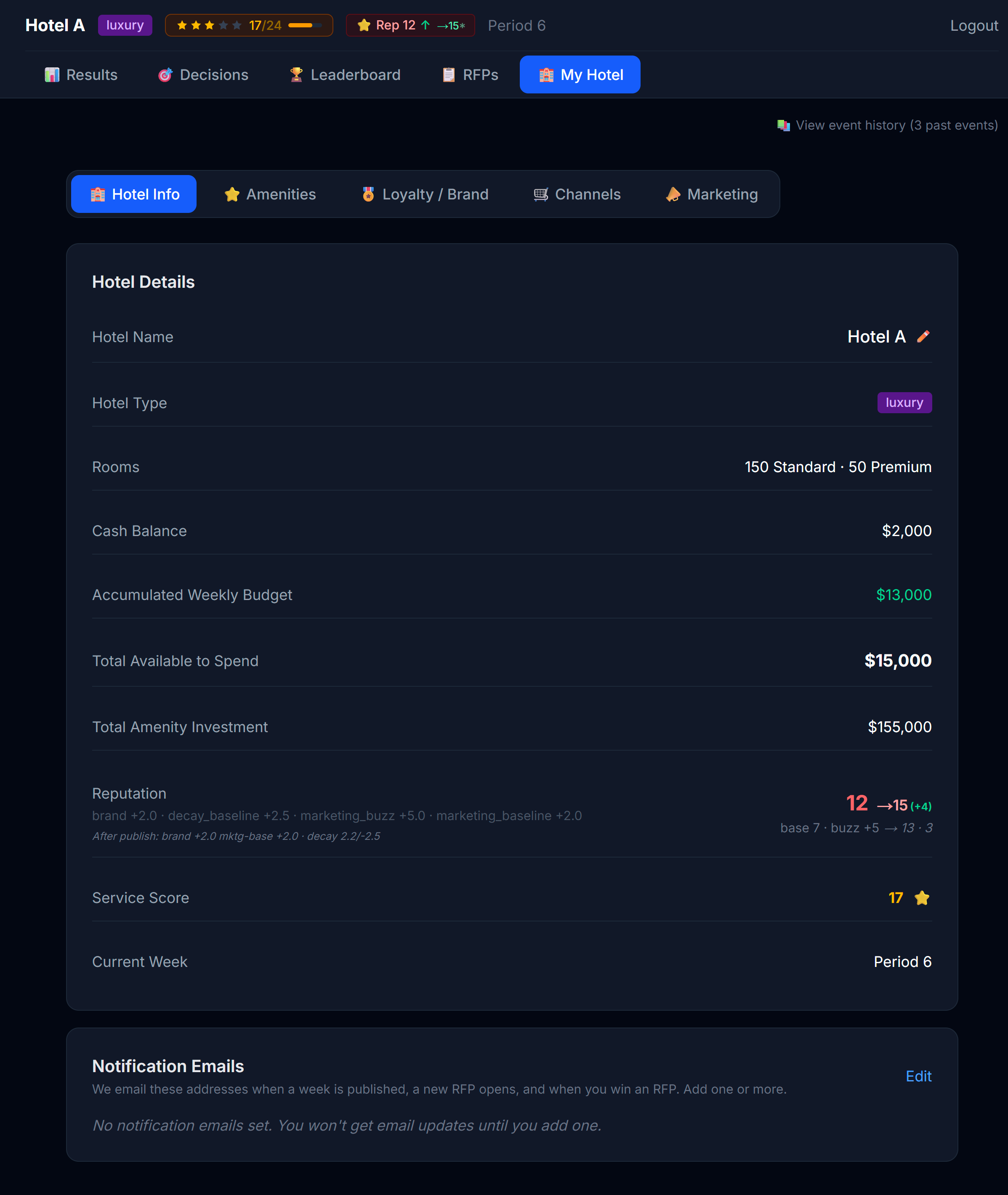 The Info tab. Identity on top, financial summary below.
What's shown:
| Field | What it tells you |
|---|---|
| Hotel name | Editable — click ✏️ to rename your hotel (see the note below before you do) |
| Hotel type | Read-only — Economic / Premium / Luxury, earned by the amenities you build (see 3.2) |
| Rooms | Standard count + Premium count |
| Cash balance | Your operating cash — pays day-to-day costs |
| Accumulated Weekly Budget | Extra cash drip-fed from operations, available to invest |
| Total Available to Spend | Your investable funds — your accumulated weekly budget plus your FF&E reserve, combined. This is your full spending power for amenities and other investments right now. |
| Total Amenity Investment | How much CapEx you've sunk into amenities so far |
No decisions are made here. The Info tab is a dashboard, not a control panel. The "decisions" that shape your hotel happen on the other four sub-tabs (Amenities, Loyalty, Channels, Marketing).
⚠️ Renaming changes your login. Your hotel name is also the name you type at login. If you rename the hotel, every member of your team must sign in with the new name from then on — typed exactly as written, capitalization included. Tell everyone before you change it.
The Team Password card
The Info tab also has a Team Password card, where your team can change its own password:
- You must enter your current password to confirm the change.
- The new password must be at least 8 characters.
- There is one shared login per hotel, so the new password applies to the whole team. The old one stops working immediately — tell every member right away.
If your team loses the password entirely, use "Forgot password?" on the login page. Your professor is notified and will respond with your credentials — nothing is reset automatically, so allow some time for the reply.
💡 Service score and reputation aren't directly editable from any tab. They're outcomes of decisions you make elsewhere — primarily through Amenities and Loyalty. See Chapter 10 for how they're built.
3.2 Amenities — the physical product
Amenities are the things your guests can use: a pool, a spa, a restaurant, a fitness center, a business center, a kids' club, etc. Each amenity is grouped into a category, and each category has a ladder of tiers:
F&B:    None → Café → Restaurant → Restaurant + Bar → Fine Dining
Spa:    None → Basic Spa → Full Wellness Center
Pool:   None → Outdoor Pool → Rooftop Pool with Bar
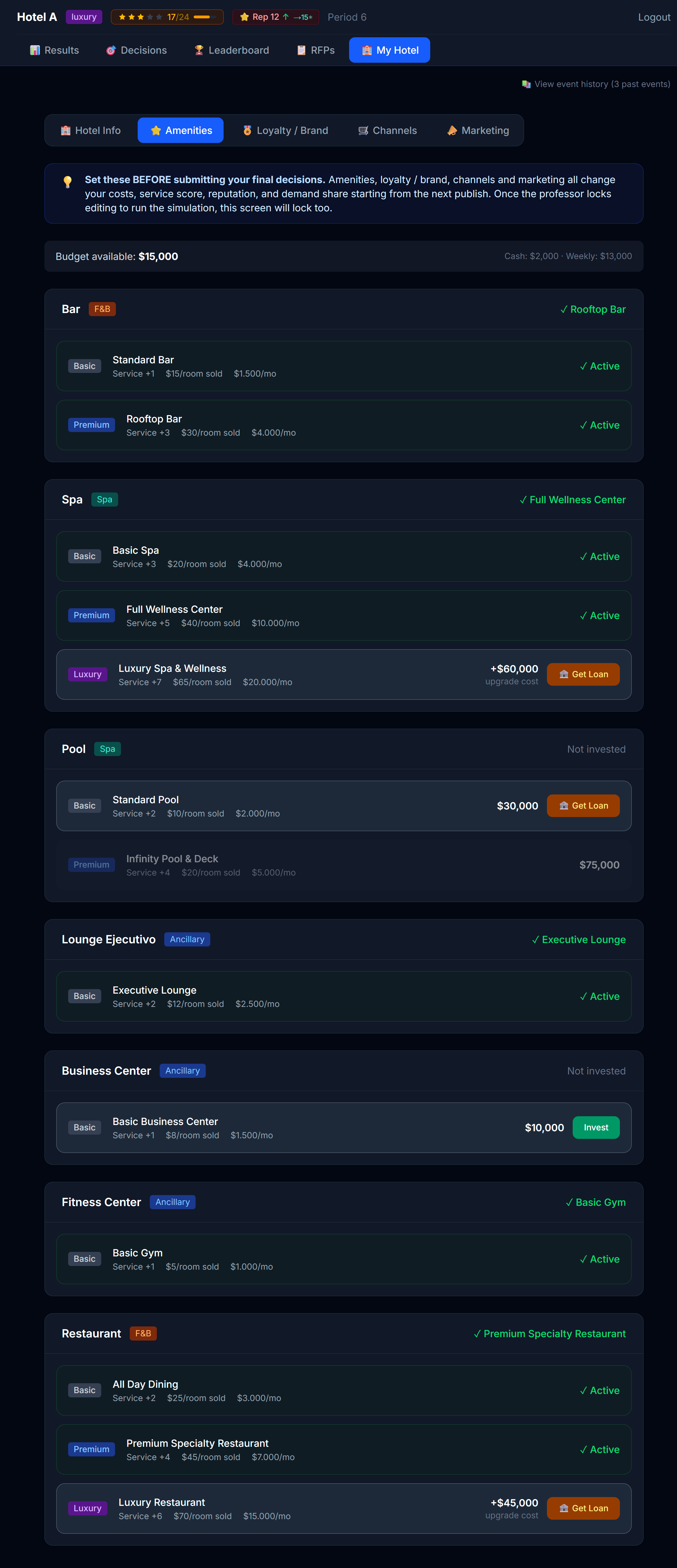 Amenities categories with current tier highlighted.
Your amenities decide your hotel class
Your hotel class — Economic, Premium, or Luxury — isn't assigned to you. You earn it by building the right amenities. A higher class unlocks stronger brand flags (3.3) and lets you charge more.
At the top of the Amenities tab a "Path to [next class]" panel shows exactly what you still need to reach the next class up:
- A checklist with one line per category — e.g. Spa — needs Basic Spa or higher — each marked ✓ (met) or ○ (still missing), plus an "X of Y requirements met" counter.
- A higher tier in a category also counts: if a requirement asks for a Basic Spa and you own a Full Wellness Center, that requirement is already met.
- Each amenity row also carries a "Required for Premium / Luxury" badge, so while you shop you can see which investments move you up a class.
Your class updates automatically as soon as you own every required amenity — there's nothing to submit. (The operating benefit of those amenities, such as service score and revenue, starts counting per the activation timing below.) Once you reach Luxury (the top class), the panel simply confirms it.
Investing vs operating
Amenities come with two kinds of cost:
| What it is | When you pay it | |
|---|---|---|
| CapEx (capital expenditure) | One-time cost to install or upgrade | Once, at the moment you commit |
| OpEx (operating expenditure) | Ongoing monthly cost to run | Every period the amenity is active |
The Amenities tab shows you both before you commit.
⚠️ Money you spend here comes out of your investment cash pool, not your operating cash. Marketing and channel costs come from operating cash. Don't confuse the two.
When your investment takes effect
An amenity doesn't pay off the exact instant you buy it. Its benefit (service score, the amenity's revenue, and its OpEx) starts counting like this (your professor can tune these timings in the configuration):
| Investment type | When it activates (default) | Why |
|---|---|---|
| Initial setup | Immediately | Your hotel opens with its initial build. |
| New install (first tier in a category) | The next period | Building a restaurant or spa from scratch takes time before it opens. |
| Upgrade (raising the tier of something you already run) | The same period (instant) | Renovating what you already have is quick. |
Plan around it: if you want a new amenity to land in a specific month, install it the period before. An upgrade, by contrast, pays off the same month.
Upgrading is cleaner than installing
That's why upgrading is usually more efficient than installing from scratch: an upgrade comes online right away (by default), and even if your professor sets a delay, the old tier keeps producing revenue until the new one takes over. There's never a "gap month" where you lose spa revenue.
When you should invest
Amenities are most useful when they match what your guest mix wants. A business hotel doesn't need a kids' club. A resort needs a pool. Check the Demand Factors panel (you'll learn about it from your results) for clues about what your current guests value.
3.3 Loyalty / Brand — joining a brand or staying independent
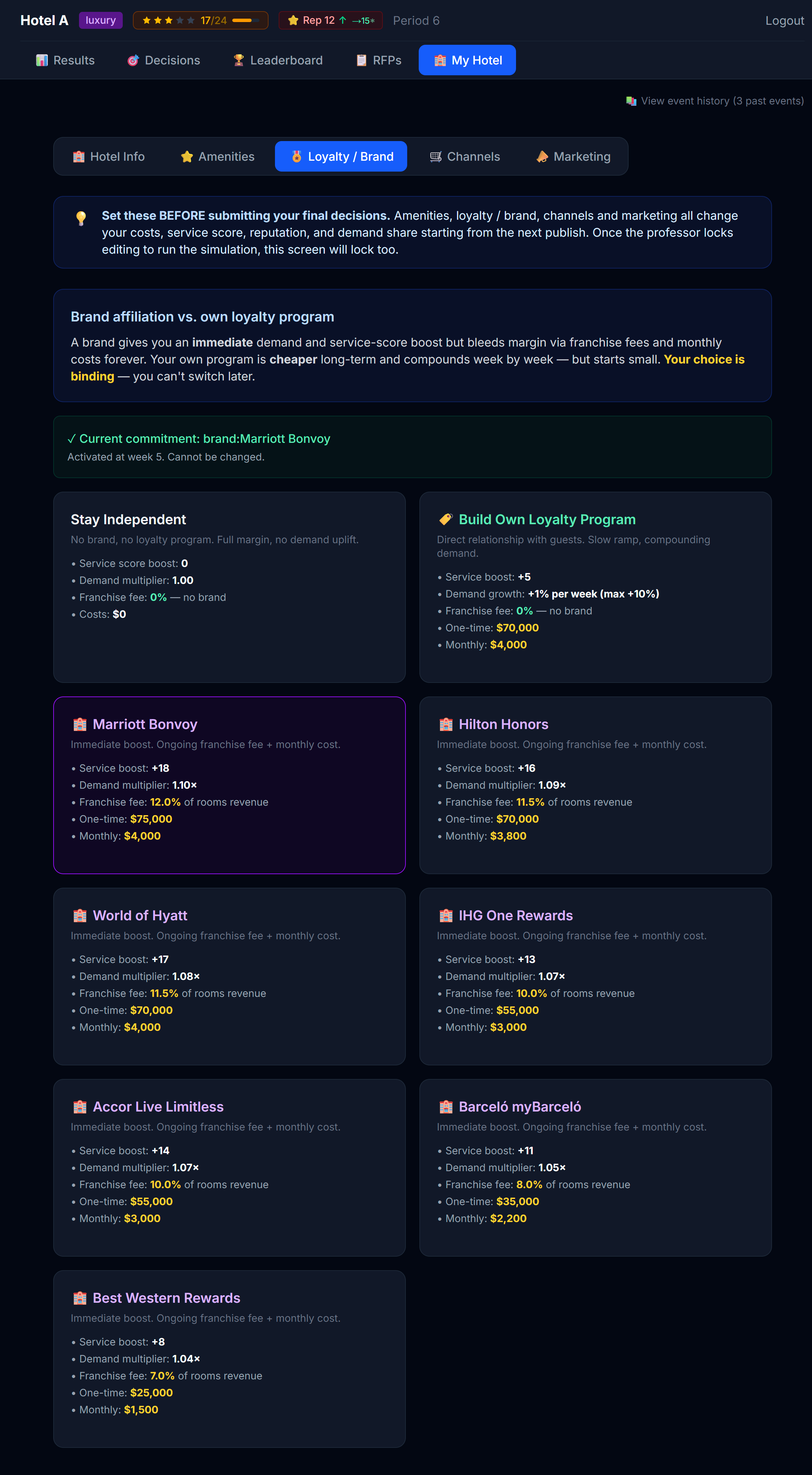 Three paths: independent, your own program, or a major brand flag.
| Path | What it is |
|---|---|
| Independent | No program. Maximum flexibility, lowest fixed cost, but no loyalty-driven repeat demand. |
| Own program | You build your own. Moderate cost, slow build-up, you keep all the upside. |
| Major brand | You fly a well-known flag. Ongoing franchise fee + monthly cost, but you tap into a global loyalty program and a prestigious brand from day one. |
Two things drive how much demand a brand brings you, and you'll see both on each card as simple ratings:
- Program reach — how big the parent loyalty program's membership base is (shared by all of that program's hotels).
- Brand prestige — how strong that specific flag is in the market.
A stronger program and a stronger flag mean more demand — but usually a higher franchise fee. That trade-off is the decision.
Brands are limited — you pitch for them
Brands aren't first-come-first-served:
- One hotel per flag. Only a single hotel in the market can fly each flag.
- Class-locked. You only see the flags that fit your hotel's class (economic, premium, or luxury).
- You pitch. Choose a flag, write a short pitch (why your hotel deserves it), and submit. If you're the only one who wants it, it's granted. If another team wants the same flag, your professor decides who gets it — your pitch is what they read.
- If you're not awarded a flag, pick another available one. Once a flag is awarded to you it's binding for the rest of the simulation.
💡 Loyalty pays off over time, not instantly. Don't expect your first month with a new brand to be transformative — the advantage compounds over several periods. And don't wait too long to pitch: the best flags get claimed.
3.4 Channels — where you sell
Your rooms have to be visible somewhere for guests to book them. The Channels tab shows you all the distribution channels available in your simulation, split into:
- Active — channels you're selling on right now
- Available — channels you could activate
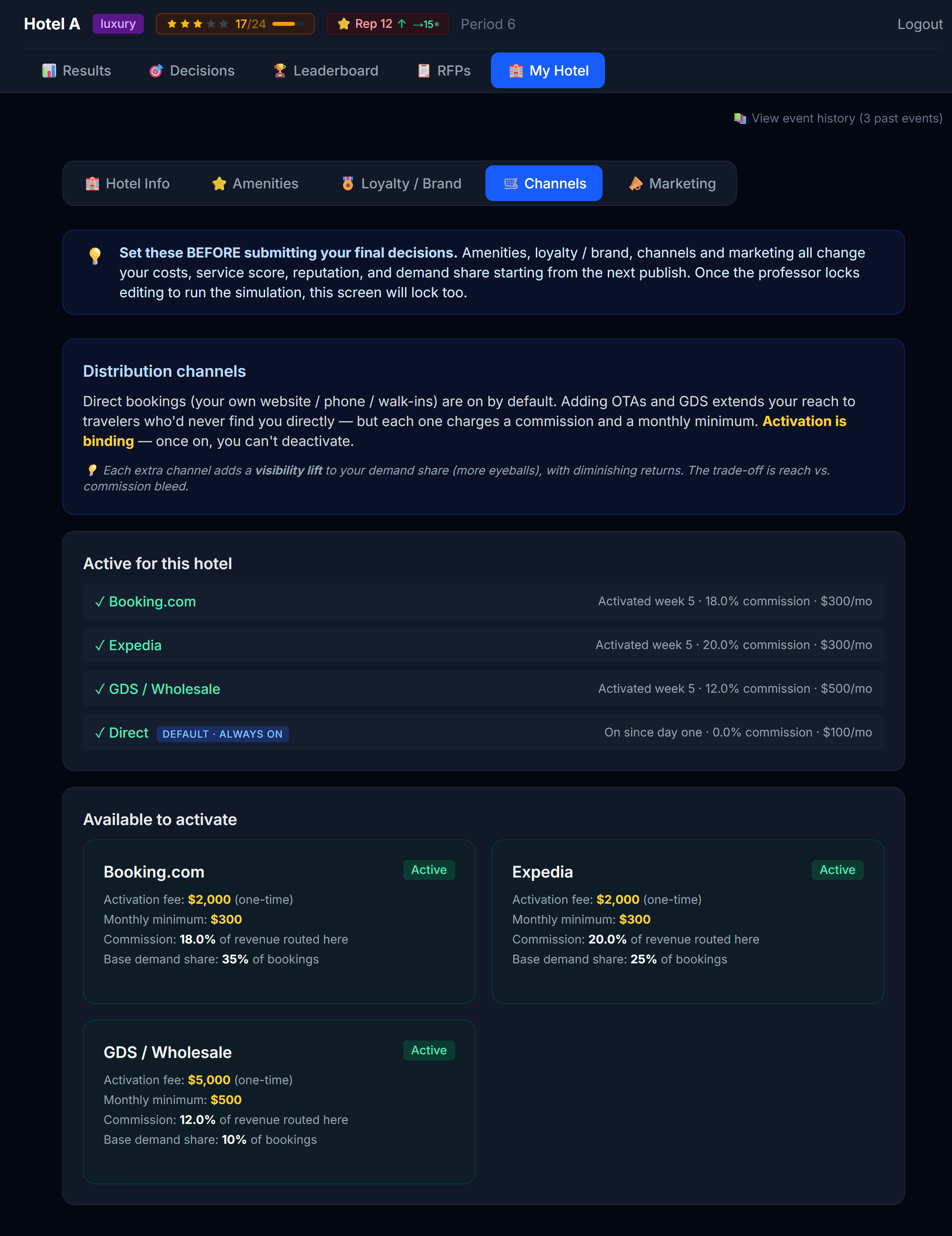 Active list on top, available list below. Direct is always on.
Direct is free and always on
Your own website ("Direct" channel) is always active and never costs commission. Treat it as your home base.
Adding OTAs gets you visibility, but...
Activating Booking.com or Expedia puts you in front of millions of guests — but every booking through that channel takes a commission cut. You're trading margin for volume.
There's another subtlety: each additional channel you activate gives you less extra visibility than the last one. The second OTA helps a lot. The fourth one barely moves the needle. The first OTA, on the other hand, often pays for itself.
This is a "diminishing returns" curve. You can see it on the channel cards — each one has a "visibility lift" badge that shows how much it would add to your visibility if activated, given everything else you have on.
Commission tiers
Channels often have commission rates that depend on volume. The "Standard" tier is what you pay until your monthly booking volume on that channel crosses a threshold; after that you pay the "Premium" (lower) rate. The tab shows you both rates and the threshold.
3.5 Marketing — buzz and baseline
The Marketing tab is the most underused part of My Hotel for first-time players. It shouldn't be.
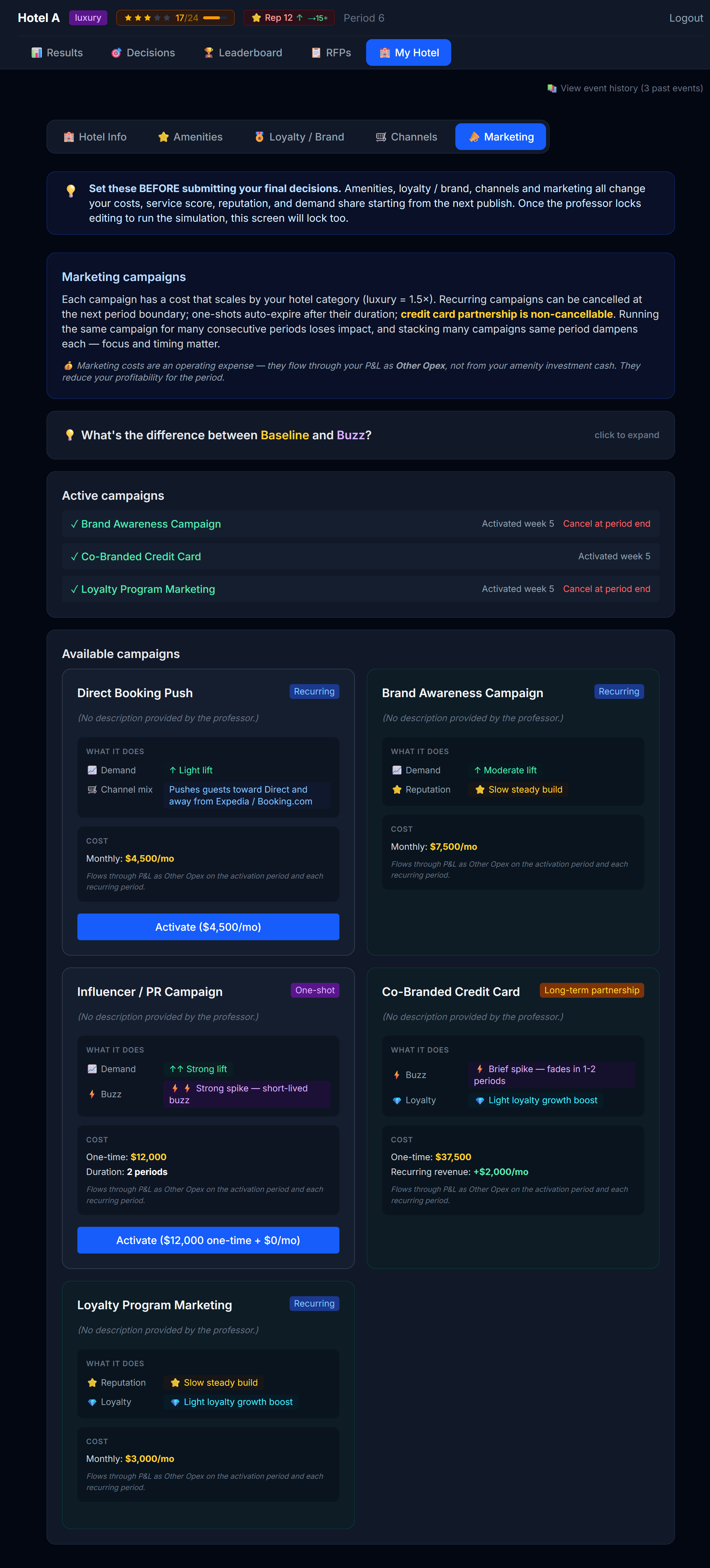 Campaigns with their categories: Buzz vs Baseline, ongoing vs one-shot.
Concept: Buzz vs Baseline
Marketing campaigns fall into two big buckets:
| Bucket | What it does | When the effect arrives |
|---|---|---|
| Buzz | Short-term spike in demand or visibility — promo codes, flash sales, influencer pushes | This month or next |
| Baseline | Long-term brand-building — corporate sponsorships, magazine features, sustainability certifications | Slowly, over many months — but it sticks |
A healthy marketing plan mixes both. Buzz handles immediate booking gaps; Baseline grows the floor under your hotel's demand permanently.
There's also a distinction between ongoing campaigns (paid for monthly while active) and one-shot campaigns (single payment, single boost).
Loyalty-powered campaigns (need a program)
Two campaigns only unlock once you have a loyalty program:
- Co-Branded Credit Card — you partner with a bank and sell points/miles onto a card. It's a big upfront deal with a small monthly servicing cost, but it pays recurring miles revenue every month (scaled to your hotel's size and class) and steadily grows your loyalty base. It's permanent — it cannot be cancelled. Requires your own loyalty program (a brand runs its own card, so branded hotels don't launch a second one).
- Loyalty Program Marketing — promotions to your members that speed up enrollment. Requires a loyalty program (your own, or a brand).
This is why building your own program can be powerful: it's slow and costly at first, but it lets you capture the credit-card economics and compound your demand over the simulation — with no franchise fees.
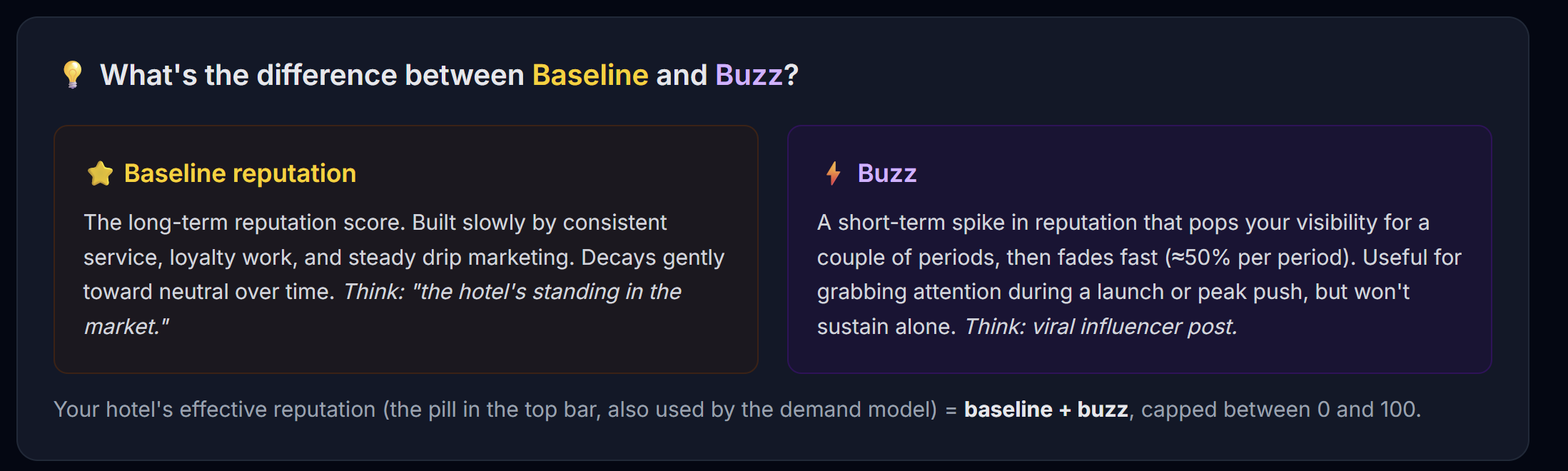 The expandable explainer at the top of the Marketing tab walks through the buckets in more detail.
Activating a campaign
Click Activate. You'll get a confirmation modal that summarizes:
- Total cost (one-time + recurring)
- Which bucket it belongs to
- When the effect kicks in
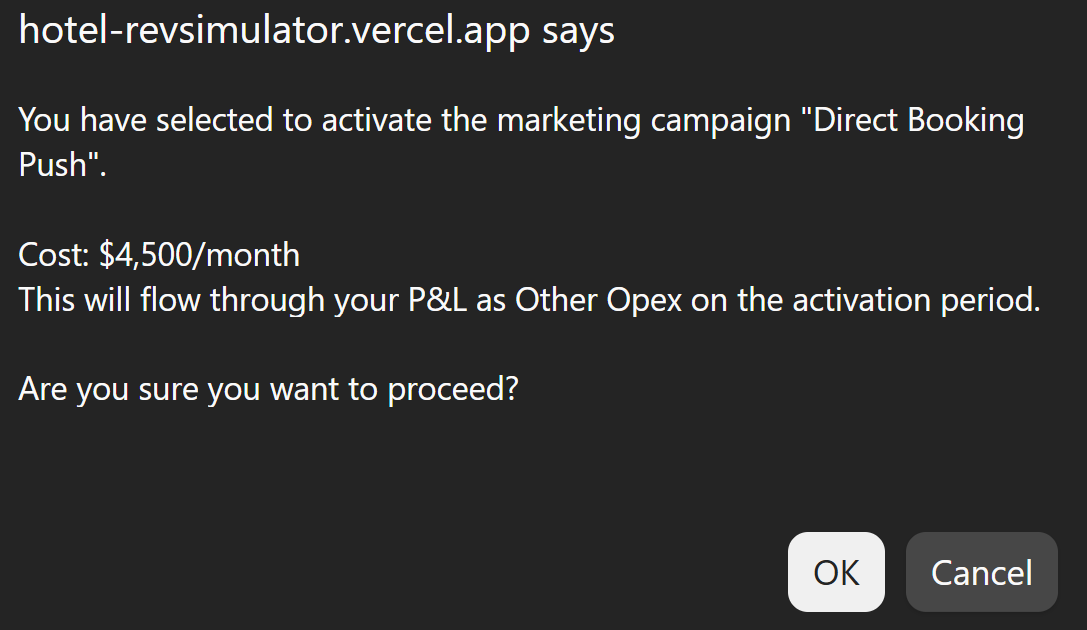 Every campaign activation goes through a confirmation step. Read it before clicking Yes.
⚠️ Campaign costs come from your operating cash, not investment cash. They reduce your operating profit each period.
3.6 Market Research — buying competitive intelligence
This sub-tab appears only when your professor sells Market Research. It's where you buy the Compset — intelligence about every other hotel in your market. (What each tier reveals, and how to use it, is covered in Chapter 4.4.)
The page shows your current level and three cumulative tiers, each with what it unlocks and its cost:
- Level 1 — competitors' star ratings and category
- Level 2 — adds reputation band and the distribution channels they run
- Level 3 — adds their amenities and the marketing campaigns they've launched
Each purchase is a one-time unlock that keeps updating every period, plus a small monthly update subscription. You can only upgrade to a higher tier, and you can Cancel anytime (access runs to the end of the current period).
⚠️ Like marketing, Market Research is an operating cost — it flows through your P&L on the Marketing line as a Market Research sub-line, not from your investment cash. What you unlock shows up in the Market Intel compset on both your Decisions and Results screens.
3.7 Strategic investments (if your professor enables this)
This section only applies if your professor enables it — usually only in the final period. When it's on, a Strategic investments card appears in My Hotel. When it's off, you won't see it at all.
Strategic investments let you spend your investable cash on one big move to reshape your hotel for the home stretch. You pick one of:
| Move | What it does |
|---|---|
| Light renovation | Boosts your service score and reputation. Takes effect from the next pace pass. |
| Deep renovation | A bigger boost to service and reputation — but a slice of your rooms is out of service during construction, so you sell fewer rooms while it happens. |
| Expansion | Builds more Standard and/or Premium rooms — permanent extra capacity. Especially valuable heading into a high-demand month, where the constraint is how many rooms you have to sell. |
| Standard→Premium conversion | Shifts your room mix toward Premium, moving capacity into the higher-ADR room type. |
⚠️ The decision window closes once the first pace pass of the period runs — so decide early. It's also a final decision and asks for double confirmation; once you commit, you can't undo it.
💡 Timing depends on how the month runs. When the period runs in pace phases, renovations and conversion take effect from the next pass, deep renovation and expansion from the second, and deep renovation puts rooms out of sale during the first phase (construction). When the period runs in a single pass (the whole month at once), every move takes effect immediately for the full month and deep renovation has no construction downtime. The card always shows the wording that applies to the current period, so trust what it says on screen.
How to think about it
The two families of move do different jobs, and the point is to choose deliberately:
- Renovations lift your product. A higher service score and reputation raise the demand you get at a given price — guests value the hotel more, so you can hold rate or fill more rooms without cutting it.
- Expansion lifts your capacity. More rooms only pays off when demand would otherwise overflow your room count — a peak month where you'd sell out. In a soft month, extra empty rooms just add cost.
- Conversion re-mixes what you already have toward the higher-ADR room type.
You should be able to justify the expected return on whichever move you pick — or your reasoned choice not to invest at all. That justification is the exercise. Spending investable cash on capacity you can't fill, or on product polish in a hotel that's already excellent, is how you lose the return.
When you're done
When you've adjusted everything you want on the My Hotel tab, click Save on each sub-tab you changed. Then go to the Decisions tab — you're ready to start thinking about prices.
Next
→ Chapter 4: Reading the Market (Decisions tab — Position, Forecast, Market Intel)