Pricing without first reading the market is gambling. The first three sub-tabs of the Decisions page exist to make sure you don't gamble.
Concept: the market distinguishes customer types
Before you open any of the three sub-tabs, hold onto one idea: the market isn't one undifferentiated pool of demand. It's made of different customer types, and each one shops for a hotel room differently:
- Advance Purchase guests chase rate. They booked early specifically because they found a good price, and price is the main thing moving them.
- Retail guests weigh quality, brand, and reputation. Price still matters, but a stronger amenity mix, a recognized flag, and a solid reputation can win them over even at a higher rate.
- Corporate guests travel on per diem. Their company sets a budget ceiling per night, so they're shopping inside a band, not chasing the single cheapest room in town.
That means your price positioning per segment matters as much as your overall level. A price that's a smart move for Advance Purchase demand might be the wrong move for Retail demand, and a per diem-driven corporate traveler doesn't respond to either lever the way the other two do.
There's a second, sharper implication: the market is no longer fully captive. If every hotel in the market overprices at once, part of the demand simply doesn't buy that day — those guests walk away rather than accept a bad deal, the same way real travelers do. You can't assume that raising your price just reshuffles who books where; if the whole market gets greedy, total demand can shrink.
| Sub-tab | What it tells you |
|---|---|
| Position | What just happened — your last period's results and how you compared |
| Forecast | What YOU think will happen — your day-by-day prediction of how much transient demand you'll capture, at what rate. Saving this also unlocks Market Intel. |
| Market Intel | What your competitors are charging — competitor pricing across the upcoming month |
Open these in order. Don't skip to Pricing without looking.
4.1 Position — what just happened
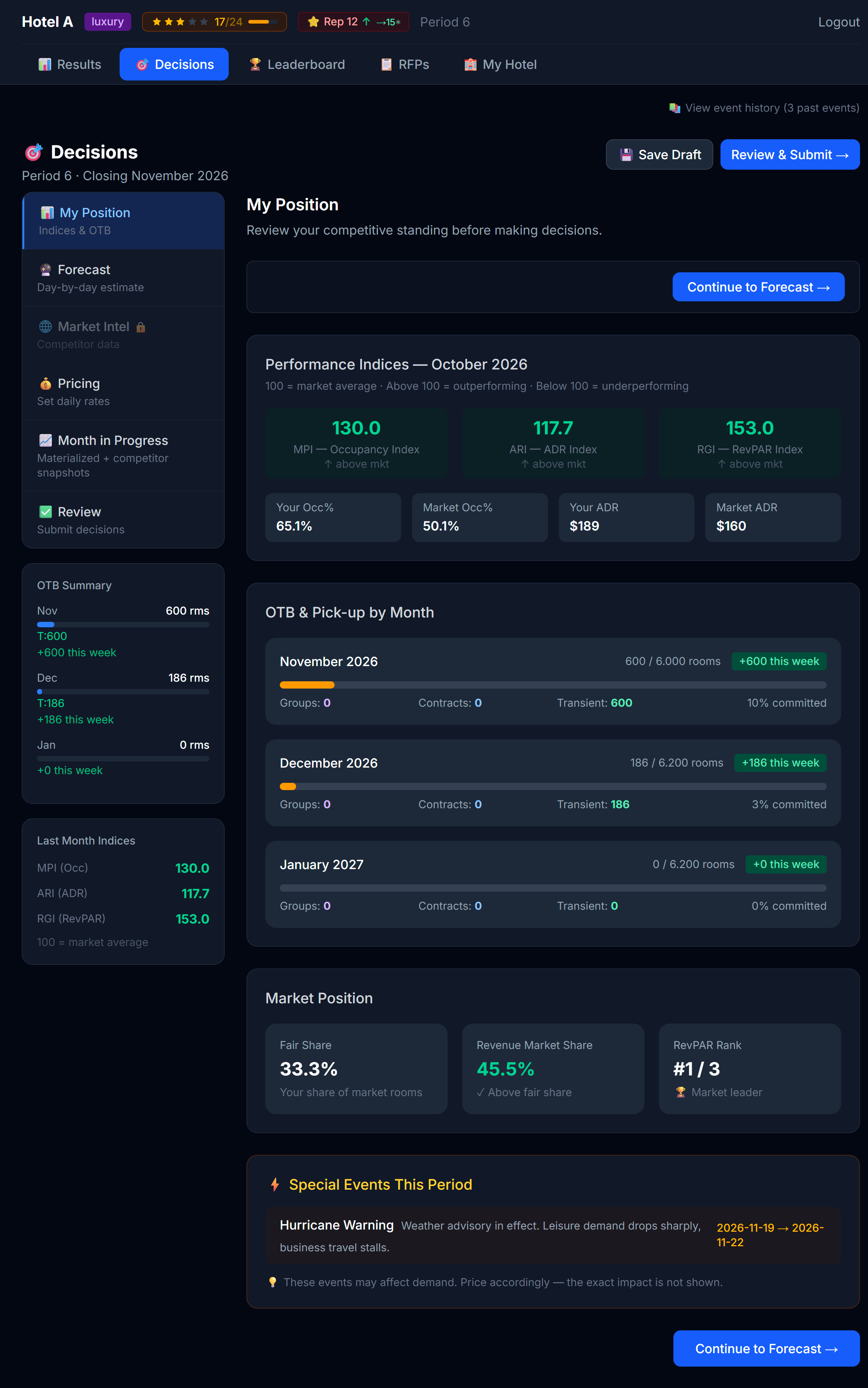 The Position tab is your debriefing room.
Position shows you the last published period through several lenses:
- Your KPIs — occupancy, ADR (average daily rate), RevPAR (revenue per available room), total revenue
- Leaderboard snippet — where you ranked vs competitors on the headline KPIs
- Competitive intel notes — who pushed prices up, who discounted, who hit/missed occupancy
Reading this sub-tab is not optional. The strongest pricing decisions are reactions to recent market behavior, not abstract theory.
Questions to ask while reading Position
- Did I sell out any nights? If yes, I priced too low on those nights.
- Did I have ≥20% rooms empty? If yes, I priced too high — or my product (amenities/marketing) is too weak for that price.
- Did competitors at my type get higher occupancy than me? What were they charging?
- Did the leader at my type clearly win on a specific strategy (high price + high occupancy = strong brand; low price + max occupancy = aggressive discounter)?
4.2 Forecast — what YOU think will happen
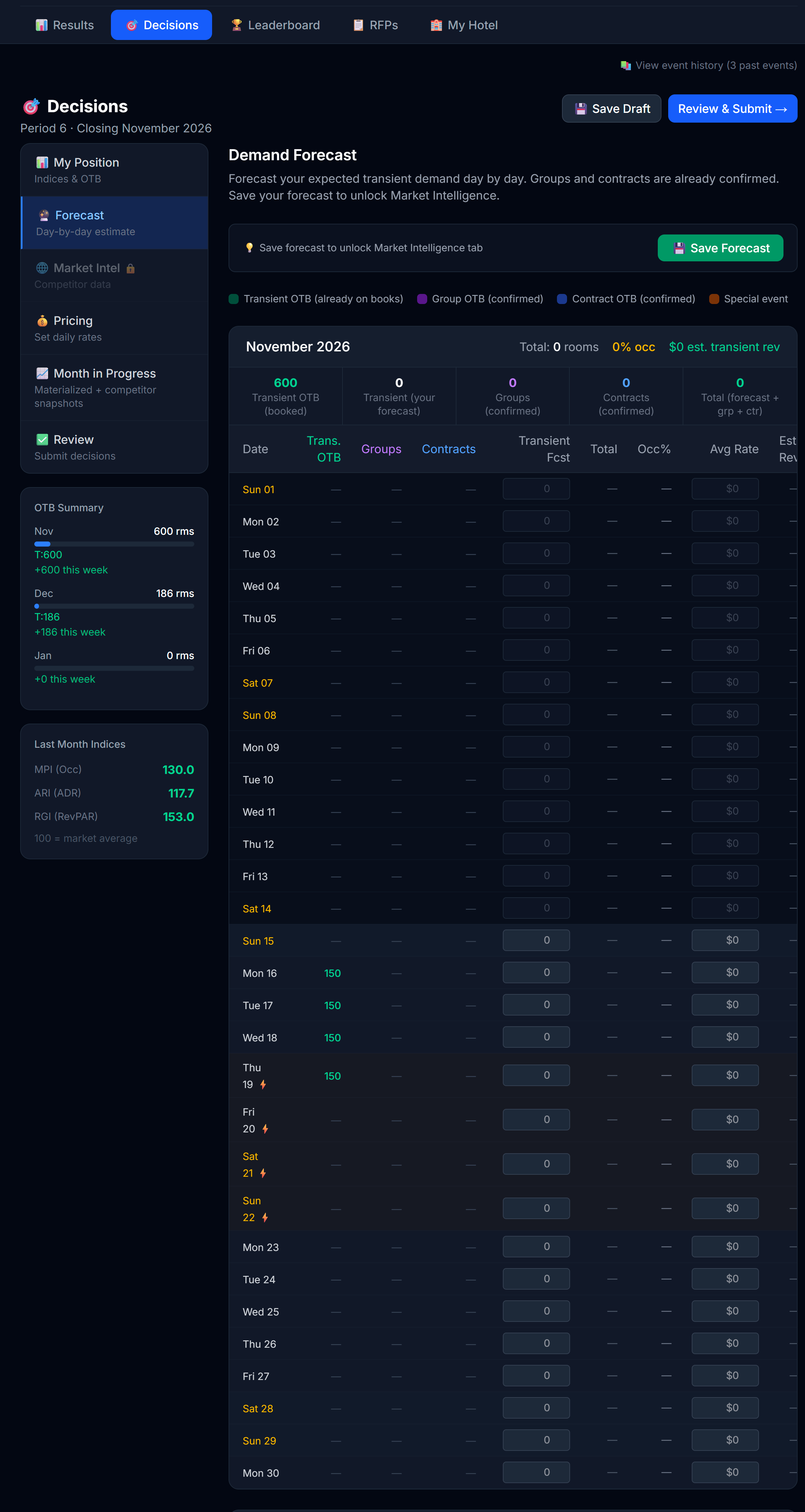 The Forecast tab. Day-by-day cells where you commit to how many transient rooms you expect to sell, at what rate.
The Forecast tab is not a place where the simulator tells you the future. It's the opposite — it's where you predict your own performance, day by day, for the upcoming month.
For each day you enter two numbers:
| Input | What it means |
|---|---|
| Expected transient rooms | How many rooms you expect to sell that day to walk-in / OTA / direct guests (i.e., not group or contract bookings) |
| Expected rate | The average daily rate you expect to capture on those rooms |
The tab also shows you context you can use while forecasting:
- Transient OTB — bookings already on the books from past advance-purchase guests
- Group OTB — confirmed group blocks already on those days
- Contract OTB — confirmed corporate contract room-nights already committed
- Special events — any events your professor flagged for that period
You don't have to forecast groups and contracts — they're already confirmed. You only forecast the transient piece, because that's the part you control with pricing and distribution.
Why this matters
Three reasons forecasting is a real skill (and why your professor makes you do it):
- It forces you to commit a view. Setting prices without first writing down "I expect to sell X rooms at $Y" is gambling. Forecasting makes you think.
- It unlocks Market Intelligence. Once you save your forecast, the Market Intel tab opens up so you can see what competitors are charging. This is intentional: you commit your view first, then test it against the market.
- Your accuracy is measured. After the period publishes, the simulator computes how close your forecast was to reality (a MAPE — Mean Absolute Percentage Error). Forecast accuracy is a real KPI in revenue strategy.
How to forecast well
Use the OTB and event context plus what you learned in Position (4.1) to anchor your numbers. Useful questions:
- What did this hotel do on a similar day last month? (Position tab)
- Is this day a weekend, weekday, holiday? Weekend rates and demand typically run higher.
- Is there a special event flagged? If so, expect a demand bump (size depends on the event).
- How much transient demand do I have OTB already? That's your floor — the rest is what you expect to layer on at pricing.
- What rate did I average for the same day pattern previously? Use it as a starting anchor.
Peak vs trough days — read them from your OWN forecast
After you've filled in the grid, scan it. The days where your forecasted transient is highest are your expected peaks; the days where it's lowest are your expected troughs.
- Your expected peaks → consider raising prices, holding back premium inventory, not discount-marketing
- Your expected troughs → consider lowering prices, fully releasing inventory, leaning into Buzz marketing
💡 If your forecast says "I'll sell 80 rooms at $200 on Saturday" but your pricing says $150 — something's off. Either you under-priced (and should raise) or you over-forecasted (and should re-think). The two views need to agree.
4.3 Market Intel — what competitors are charging
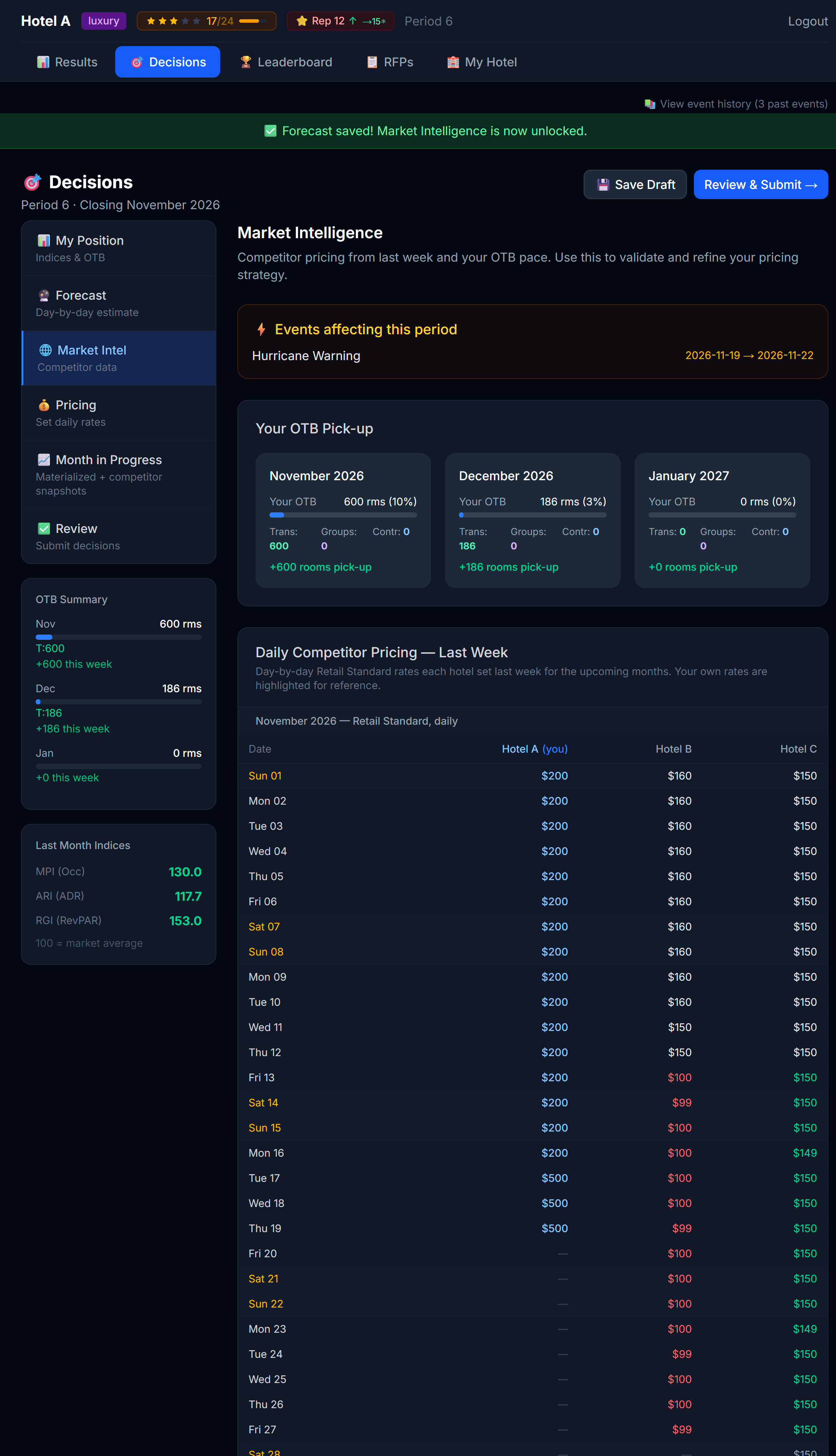 Market Intel shows competitor prices day-by-day. This tab may be locked in some simulations.
Market Intel shows you a daily price grid: for each day of the upcoming month, what each competitor is charging.
You can filter the grid by segment (Retail / Advance Purchase) and by room type (Standard / Premium), so you compare like-for-like rates. The default view is Retail · Standard.
Heads up: This tab is gated by your forecast. You must save the Forecast tab first to unlock it. Your professor may also disable the tab entirely — especially in early periods or in advanced scenarios. If you see a 🔒 banner, you'll still have last period's leaderboard, but not competitors' forward-looking prices.
What you do with it
Market Intel turns pricing from a guess into a positioning question:
- Am I more expensive than the median competitor? If yes, my product needs to justify the premium (better amenities, stronger brand, higher service score).
- Am I cheaper than the median? If yes, I should be confident that I'll fill — and ask whether I'm leaving money on the table.
- Is there a price war on weekends? Maybe I should price between the bottom two and the top two, not at one extreme.
Don't blindly match
A common rookie mistake: see a competitor charging $200 and immediately match them. That's not a strategy — that's an echo.
The right move is to ask why they're charging that:
- Are they a similar hotel type to you? If they're luxury and you're midscale, their $200 means something different than your $200 would.
- Are they known for high occupancy or low occupancy at that price? (Position tab tells you.)
- Are they trying to win volume, or are they confidently riding their brand?
- Which customer type are they chasing? A price built to win rate-driven Advance Purchase demand looks different from one built to win Retail guests on quality and brand.
4.4 — Market Research (the Compset)
The Market Intel tab can also include a Compset table: competitive intelligence on every hotel in your market — not just their prices, but what kind of product they're running.
Whether you see the compset, and how much of it, depends on your professor's configuration. There are two modes:
- Free mode — the compset is available to everyone at a tier the professor chose.
- Purchase mode — you must buy Market Research to unlock it. A purchase is one-time and the access stays with you, updating every period; there's also a small monthly update subscription that keeps the data fresh.
The three tiers
The tiers are cumulative — each one unlocks more, and a higher tier includes everything in the lower ones.
| Tier | What it adds |
|---|---|
| Level 1 | Each competitor's star rating (a precise decimal, e.g. 4.2 stars) and category |
| Level 2 | Adds each competitor's reputation band (High / Medium / Low) and the distribution channels they have active |
| Level 3 | Adds the amenities competitors offer and the marketing campaigns they've run (which campaign, and the period it started, e.g. P2) |
You buy Market Research on its own page — My Hotel → 🔎 Market Research — the same place you buy marketing. Each tier shows its one-time cost plus the monthly update (for example, $5,000 + $500/mo). You can only upgrade to a higher tier (no downgrade), and you can Cancel at any time; access then ends at the period close. The compset table here is read-only — when there's more to unlock, it shows a link that takes you straight to that page.
💡 Your Market Research level is a single setting for your hotel — whatever you unlock on the My Hotel page is exactly what you'll see here on Market Intel and on the Results screens (Chapter 6.4). There's nothing extra to configure on this tab; the compset just follows your purchase everywhere it appears.
Intra-period signals
Because the compset updates as the period unfolds, you may see arrows next to a competitor that flag a move already in motion:
- ↑ investing — a pending amenity that will raise their stars
- ↑ adding — they're activating a distribution channel this period
- ↑ launching — they're launching a marketing campaign this period
These let you catch a competitor's move before the period closes, instead of finding out after the fact.
What it costs you
Market Research is a real cost. It appears on your P&L on the Marketing line, as a Market Research sub-line. Treat spend on intel the way you'd treat any other spend: buy it only when the edge it gives you is worth the price.
💡 The compset turns "what is everyone doing?" from a guess into a purchased signal. Buy the tier that matches the decision you're trying to make — for example, Level 3 if you're deciding whether to match a competitor's amenities or campaign.
Putting the three sub-tabs together
A useful exercise every period:
- Open Position. Write down one sentence: "Last period I ___."
- Open Forecast. Commit your view, day by day. Then write down one sentence: "Next month I expect to ___." Save (this also unlocks Market Intel).
- Open Market Intel. Write down one sentence: "My competitors look like they're going to ___."
- Now open Pricing with those three sentences in mind.
The order matters: commit your forecast before you peek at competitor prices. Otherwise you'll just unconsciously match them and learn nothing.
Next
→ Chapter 5: Setting Prices and Inventory (Decisions — Pricing tab)