This is the chapter you'll come back to most often. The Pricing sub-tab on the Decisions page is where you make the call that drives every other number — what to charge.
The pricing grid
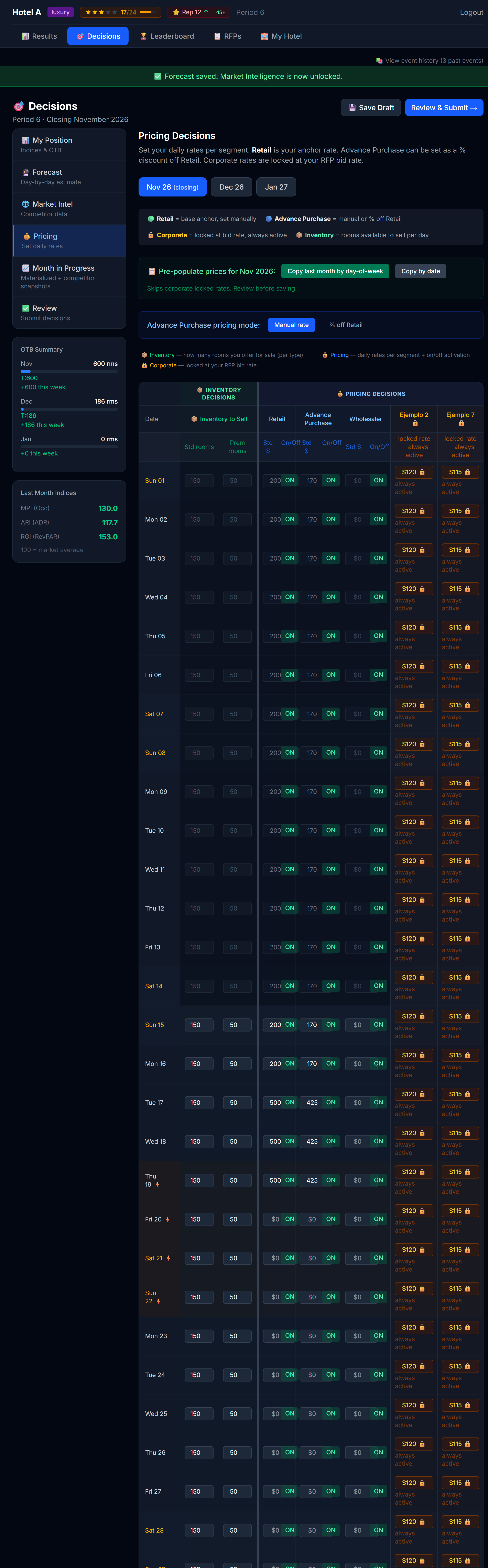 The pricing table. Inventory decisions on the left, pricing decisions on the right, separated by a vertical spine.
The table has one row per day of the upcoming month. The columns split into two clear domains, separated by a 4-pixel vertical divider:
| Domain | Columns |
|---|---|
| Inventory | Standard rooms available, Premium rooms available |
| Pricing | Standard rate, Premium rate, by-segment rates (if your sim uses them) |
This split is important. Inventory and pricing are two different decisions:
- Pricing: what you charge
- Inventory: how many rooms you make available at that price
You can do clever things by treating them separately — for example, holding back a few premium rooms even on a strong day so that when corporate guests walk up at the last minute you have somewhere to put them.
The Day OTB column
Next to each date the grid shows a "Day OTB" column — a small bar plus a rooms-booked / rooms-available count for that day. It turns amber when the day is compressing (roughly 80%+ booked). Use it to price against each day's pace: a full day is a signal to push rate, an empty day a signal to stimulate it.
Pre-populate from last month
You don't have to type 30 numbers every period. The Pricing tab has a Pre-populate action that copies prices from a previous month into the current month.
Two modes:
- By Date — Oct 5 → Nov 5 (same calendar day)
- By Day-of-Week — first Monday of Oct → first Monday of Nov
Day-of-week is usually better. Hotels behave on a weekly cycle (weekends ≠ weekdays), and matching weekdays to weekdays preserves that rhythm.
After pre-populating, you tweak.
How to think about price
The simulator's demand model isn't going to be revealed to you in detail — figuring out the right price is part of the learning. But here are the directional truths every successful hotel-team uses:
1. Demand responds to price
Lower price → more demand. Higher price → less demand. This is true at every hotel type, every season, every day. What changes is how strongly demand responds — and that's something you learn by experimenting.
2. Demand also responds to your product
Price is only half the equation. Two hotels charging the same $180 won't get the same demand if one has a spa and the other doesn't. Your amenities, your reputation, your service score, the channels you sell on — all of these are part of what guests are evaluating.
💡 Implication: You can charge more if your product is better. Don't price like a budget hotel if you've built a luxury one.
3. The market matters
How you price relative to your competitors matters more than your absolute number. If everyone else charges $200 and you charge $180, you look like a deal. If everyone else charges $160 and you charge $180, you look expensive.
The Market Intel tab is exactly where you check this.
4. There's a diminishing return on quality
If your service score, reputation, amenities, and channel mix are already excellent, paying for more of each only helps a little. Save the money. If those are weak, fixing them is one of the highest-return moves you can make.
Standard vs Premium rooms
Most hotels have two room types: Standard and Premium. They're priced separately and have separate inventory.
Pricing them
Each segment in the grid has three controls: a Std $ rate, a Prem $ rate, and an On/Off toggle.
- Standard rate = your floor offering
- Premium rate = should clearly be higher (otherwise nobody books standard)
You set premium prices in one of two ways — and you can mix them:
- Markup (the easy default). In the Pricing toolbar above the grid is a "Premium: +25%" menu button. Click it to open a small popover with the markup % field and an "Apply to all cells" action; set the percentage and apply to fill every Prem $ box at that markup. Even if you leave Prem $ boxes blank, on save they're auto-filled at this markup — so your premium rooms always have a sellable rate.
- Per-cell override. Type a number straight into any Prem $ box to set that day's premium rate by hand. A typed value always wins over the markup for that cell.
The same toolbar also holds "Pre-populate" (covered above) and, when your sim uses Advance Purchase, an "AP: Manual / % off Retail" menu that switches how you enter the AP rate.
A common heuristic: premium is 20–40% above standard. Higher in luxury hotels, narrower in budget. Tune to taste.
💡 If you never touch premium pricing, your premium rooms still sell at the default +25% markup — but tuning it, especially on peak days, is easy points.
Inventory: when to hold back
By default, all your rooms are available every day. You can hold some back by lowering the "available" number.
When does that make sense?
- Peak days where you expect to sell out anyway — hold a few premium rooms for last-minute walk-ups who pay top dollar
- High-value bookings expected — if you know a corporate group is bidding, leave room for them
- Maintenance / blocked rooms — if rooms are physically unusable
Most of the time, you should release everything. Holding back inventory you didn't need to costs you bookings.
Inventory, groups/contracts, and overbooking
The inventory number you set is the total rooms you offer for sale that day, not just transient. Two things to understand:
- Your awarded group and contract RFPs already consume rooms that day. Those are taken out of your inventory first; transient (retail, advance purchase, corporate) sells what's left. The grid shows a 🔗 marker with how many rooms you have committed each day.
- Example: you set 200 available and have 60 committed to groups/contracts → transient sells up to 140. Leave room for your RFPs when you set inventory.
- Overbooking: if you set inventory above your physical capacity, you're deliberately selling more rooms than you have. It's a revenue-management bet: you capture extra bookings counting on some guests cancelling or not showing up. Nothing stops you from doing this — it's a risk you're allowed to take.
- The risk: if cancellations and no-shows don't cover the oversell, more guests arrive than you have physical rooms, and you have to relocate ("walk") them. A walk always means a guest arrived at your door with a valid reservation and there was no physical room left for them — the comparison is always against your actual, physical room count, never against whatever "available" number you released for sale.
- The simulator warns you on screen when you set inventory above physical.
What a walk actually costs you
Every walked room costs you in two separate ways:
- A P&L cost, folded into your Total OpEx as an "Overbooking Penalty" line. Your simulation runs in one of two modes (your professor sets this — check the Pricing legend or ask if you're unsure which applies to you):
- Flat mode — a fixed dollar amount per walked room, regardless of your market.
- Realistic mode — a market-based cost per walked room: roughly what it costs to book that guest into a comparable hotel for the night (at a premium) plus a fixed goodwill payment, so the penalty scales with how expensive your market is.
- Either way, it's a real cost that shows up the period the walk happens.
- A reputation hit — every walked room costs you 0.5 reputation points, applied when the period publishes. This isn't something your professor can turn off or tune away; it's the guaranteed cost of walking a guest, on top of whatever the P&L penalty costs you.
Overselling can still be a smart bet when your cancellation and no-show history supports it — but go in knowing both costs are real, and that the reputation cost lands regardless of which P&L mode your simulation uses.
Per-segment pricing (if your sim has this)
Some simulations turn on per-segment pricing — you can charge different rates to different guest segments (retail, advance purchase, corporate, etc.).
When this is on, you'll see extra columns in the pricing grid. The most common pattern:
| Segment | Typical pricing approach |
|---|---|
| Retail | Your headline / rack rate. The highest. |
| Advance Purchase | A discount off retail (e.g. 10–15%). Books early, doesn't cancel. |
| Corporate (negotiated) | A pre-agreed rate from a contract. Usually set when you accept an RFP. |
| Custom segments | Whatever your professor configured |
Advance Purchase can be entered either as a fixed price or as a "% off Retail". Either way, when you submit, the engine stores a fixed price.
Advance Purchase is non-refundable — price it accordingly
In some simulations, Advance Purchase is a true "non-refundable" fence: a guest who books AP and later cancels doesn't get a refund — your hotel retains 100% of that revenue. (Compare that with a no-show on a flexible rate, where you keep the standard 50%.) You'll see a note about this right in the Pricing legend when the fence is active.
That's exactly why AP guests accept a discount in exchange: they're giving up flexibility, and the industry-standard trade is pricing AP 10 to 15 percent below your flexible rate. Price it much closer to retail and you're not offering a real incentive; price it much further below and you're leaving money on the table for a segment that was going to book anyway.
The Excel round trip — decisions in a spreadsheet
If your professor has turned this on, the global Decisions header carries an Excel (📗) download button and an upload (⬆) button. They're available on any step — you no longer have to be on the Pricing tab. The idea is the same: do your pricing and inventory work in a familiar spreadsheet instead of the on-screen grid, then bring it back into the simulator.
The workbook covers the whole period, with several sheets:
| Sheet | What's on it |
|---|---|
| Instructions | How to fill the workbook out, in plain language. |
| My Position | Your STR indices, OTB by month, and special events. Informative and locked. |
| Market Intel | Your competitor set (gated by your Market Research level) plus the last published competitor prices. Informative and locked. |
| Pricing + Inventory (one per open month) | One sheet for each of the three open months, each holding the full grid — Day OTB (info), Inventory Std/Prem, and per segment a Std $, a Prem $ (override; blank = auto markup), and an Active YES/NO flag. Corporate segments show a locked rate. Each month sheet has one Premium markup % cell. |
| Forecast | All three months. Total, Occ% and Est. Rev are live Excel formulas that recalculate as you type. |
The flow:
- Download the workbook. It's generated in your chosen UI language (EN/ES).
- Edit in Excel. Only the yellow cells are editable. A blank Prem $ cell fills at the month's markup on save; leave any other cell empty and it means "keep whatever is currently saved" for that field — you only touch the cells you're changing.
- Upload the file back. The simulator validates everything and shows you a preview of every change, plus any errors, before anything is applied. Nothing is written to your hotel until you confirm the preview.
- Confirm. It's all-or-nothing — either the whole set of changes applies, or none of it does.
A few hard rules:
- Only the yellow cells are editable. Locked cells (My Position, Market Intel, corporate rates, and grey rows) can still be selected and referenced in your own formulas — you just can't change their values.
- Grey rows are pace-locked days — already materialized in an earlier pass, so you can't change them (same rule as the on-screen grid).
- You may add your own analysis sheets — extra tabs you insert are ignored on upload, so use the workbook as scratch space freely.
- The upload only works while the period is open — before the submission deadline, before your professor locks editing, and before the period is published. Try it after any of those and it's rejected.
- Don't restructure the template. Don't insert or delete rows or columns within the existing sheets, and don't rename the sheets. The structure is how the simulator knows what it's reading — change it and the whole upload gets rejected. (Adding your own separate sheets is fine, per above.)
💡 Think of the Excel round trip as an alternate input method, not a different set of rules. Everything you learned about pricing logic, inventory holdback, and per-segment rates in this chapter still applies — you're just typing it into cells instead of an on-screen grid.
Decisions are locked server-side, not just in the UI
Pricing, inventory, and forecast saves — including the Excel upload above — are enforced by the server, not only by graying out the screen. Once the submission deadline passes, once your professor locks editing, or once the period is published, any attempt to save is rejected outright (you'll see an error rather than a silent failure). Don't rely on a stale tab that hasn't refreshed — if the deadline has passed, the server will say no even if your screen still looks editable.
Locked cells in pace mode
If your simulation uses pace mode, days that have already been "processed" in earlier passes appear locked — marked with a 🔒 and grayed out — and you can no longer change them. The results for those days are final.
 Past pace chunk days are locked. Hover for a tooltip explaining why.
This is intentional. Once bookings have been allocated for a day, the price for that day is set in stone. You can only change pricing for upcoming days.
Saving and submitting
There are two distinct actions:
| Action | What it does |
|---|---|
| Save (per tab) | Stores your changes server-side. You can come back later. Nothing has been committed for the period yet. |
| Submit Final (Review & Submit tab) | Tells the engine: "These are my final decisions for the period." You can re-submit until the professor locks editing. |
Save often. Submit when you're sure.
The save confirmation
Every Save and Submit action now opens a confirmation popup built into the simulator itself — it's not your browser's confirm/alert dialog. It covers both the Forecast tab and the Pricing tab, as well as Submit Final and Resubmit. The flow is simple: you click Save, the popup asks you to confirm, you confirm, and it saves.
- If the save fails, the popup stays open and shows you the exact error, so you can try again. Nothing silently fails.
- If the save succeeds, the page reloads from the server so what you see on screen is exactly what was stored — that reload is your proof it went through.
Why this exists: students had occasionally believed a forecast or price was saved when a server error had actually dropped it. This popup removes the doubt — you confirm on purpose, and you always see the saved-from-server state afterward.
💡 If you were ever unsure a save "took", this is the fix — wait for the reload and check that the values on screen are exactly what you entered.
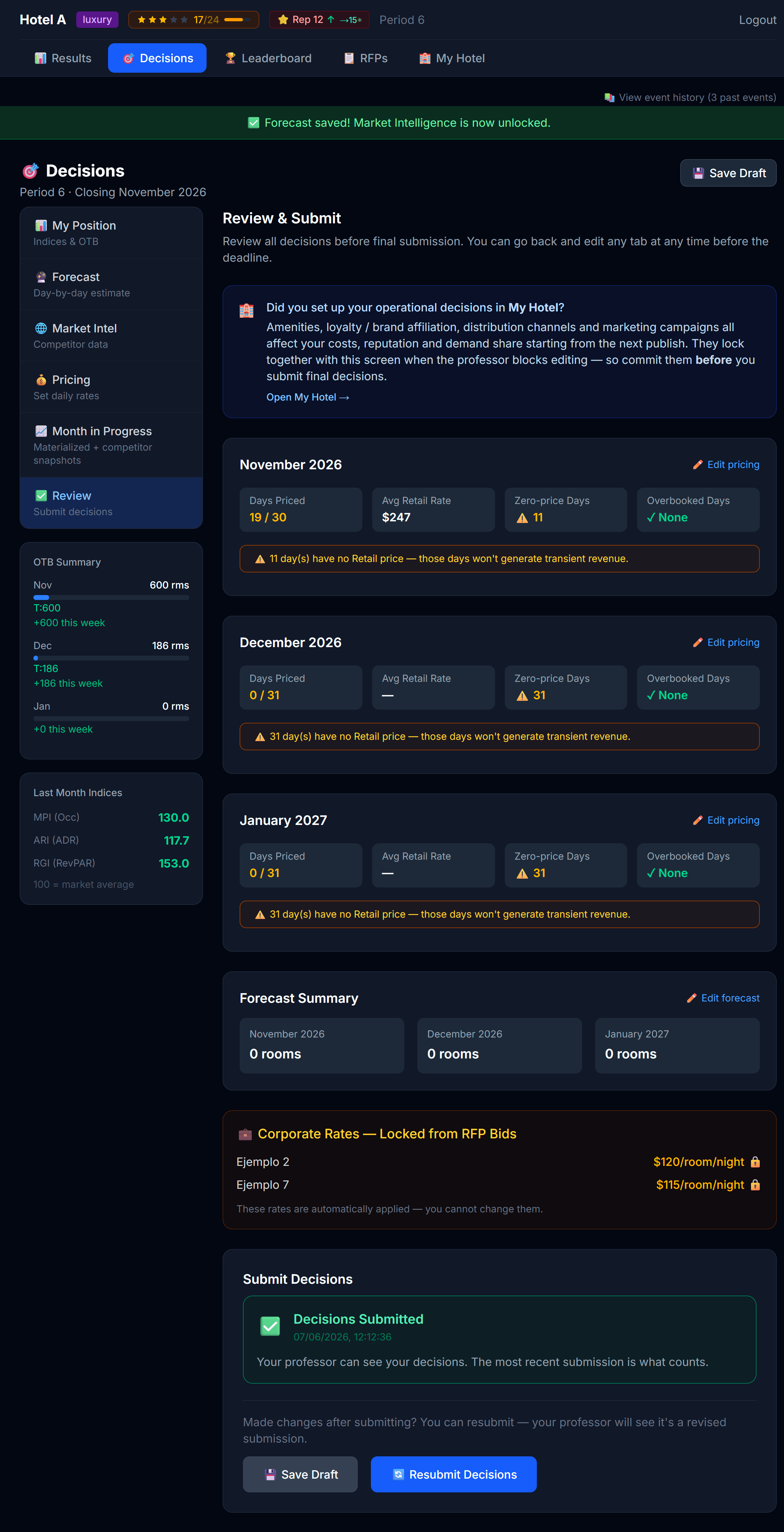 Review & Submit. The 🏨 banner reminds you to also configure My Hotel before submitting.
Three important warnings on Submit Final
Unbid open RFPs — if there's an open RFP you haven't placed a bid on, the simulator will warn you with a modal. You can dismiss and submit anyway, but it's the engine asking "are you sure you want to skip this?"
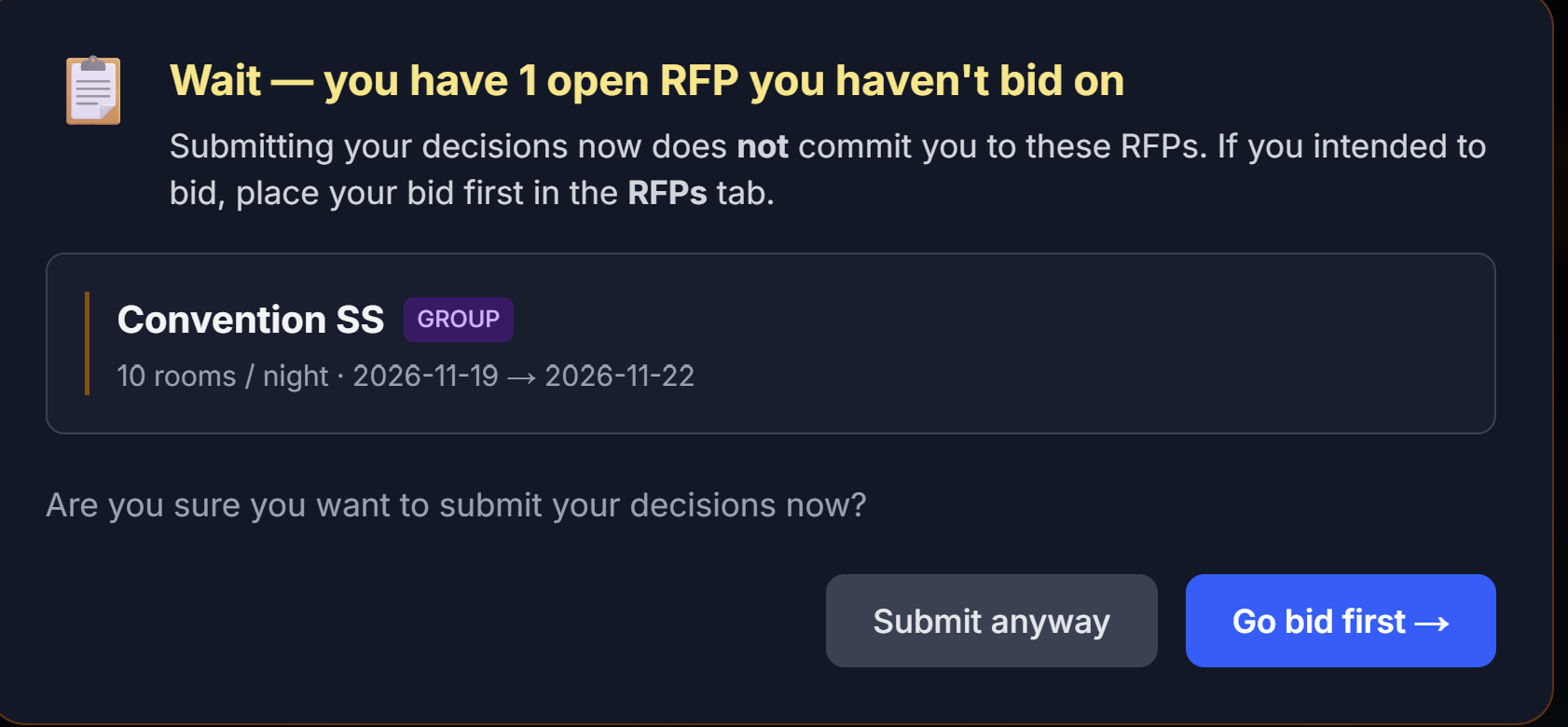 The unbid-RFP nag modal. Read it before clicking through.
My Hotel not configured — there's a banner asking whether you also reviewed your My Hotel decisions for the period.
Review check — when you submit, the simulator quickly reviews your decisions and warns you if it spots gaps: days with no price set, an incomplete forecast, or inventory above your room capacity. You can go back and fix the issue, or submit anyway if it's intentional. Treat it as a safety net, not a blocker — but a ten-second scan of that list has saved many teams from an accidental $0 night.
Iterating
Pricing is an iterative skill, not a one-shot decision. The strongest students:
- Read Position, Forecast, Market Intel (Chapter 4)
- Make a first pass at prices
- Sleep on it — literally, come back the next day
- Adjust based on second look
- Submit
You'll get faster at it with each period.
Next
→ Chapter 6: Reading Your Results