Skip this chapter if your professor isn't using pace mode. Most simulations don't.
Pace mode changes how a period is run. Instead of one big run that processes the entire month at once, the month is broken into chunks (usually 4–7 days each) and the engine processes one chunk at a time. Between chunks, you get a chance to look at what happened and adjust your prices for upcoming days.
It's closer to how revenue strategists actually work in the real world.
What you'll see when pace mode is on
Two new things appear on your screens:
- A "Month in Progress" tab on the Decisions page
- A "Month in Progress" tab on the Results page (identical content, surfaced in both places)
- Past-chunk days on the Pricing tab become locked (grayed out)
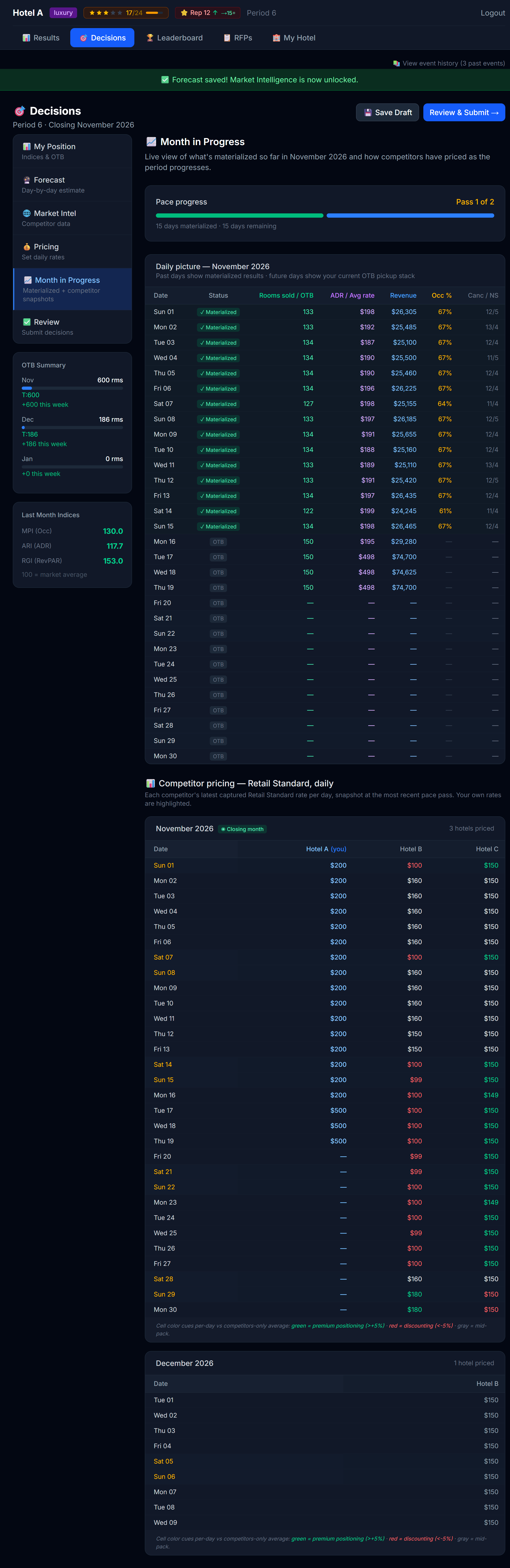 The Month in Progress view. Days already processed on the left, days still ahead on the right.
What the view shows
| Section | What's there |
|---|---|
| Pace timeline | A horizontal bar showing the month split into chunks. The chunks already run are filled; the ones still to come are empty. |
| Daily picture | A day-by-day grid of what happened so far — your actual rooms sold, your actual ADR, your actual revenue |
| Forward forecast | What's expected to happen on the days still ahead |
| Competitor pricing snapshots | What competitors charged in each past chunk (and what they're charging now, if Market Intel is unlocked) |
The single most important rule
You can only change prices for days that have NOT been processed yet.
Past days are sealed — their bookings are done. The Pricing tab grays out past-chunk days. The Pricing tab for future days remains fully editable until those days, too, get processed.
 A past-chunk day, locked. Hover for the tooltip.
How to play pace mode well
Between every pass, ask three questions
- Did I sell out a past day? → I underpriced for that pattern. Raise prices on similar upcoming days.
- Did I sit half-empty? → I overpriced for that pattern. Lower prices on similar upcoming days.
- What did competitors just do? → If they raised, I have cover to raise too. If they discounted, I may need to defend share.
Don't panic-adjust
A common mistake: a hotel under-fills on a Tuesday, the student slashes Wednesday prices in a panic, then sells out on Wednesday at 30% below where they should have been. One bad day is not a trend. Wait for 2–3 data points before swinging hard.
Watch your transient OTB
The Decisions → Position / Market Intel sidebars show Transient OTB — bookings already on the books for upcoming days from advance-purchase guests. If those numbers are high for a future day, you have less elasticity (rooms are already partly committed). If they're low, you have full flexibility.
What "transient" means
A booking is called transient if it's not part of a corporate contract or group block — i.e., a regular guest who booked themselves. In pace mode, you'll see transient OTB columns alongside total OTB so you can separate "guests already coming" from "corporate room blocks already committed."
Pace mode and the Forecast tab
Forecast inputs for past-pace-chunk days are locked. You can read what you previously forecasted, but you can't change it — those days have already been processed against your committed forecast.
You can still edit the forecast cells for days that haven't been processed yet. As you learn from past chunks (e.g., "I systematically under-forecasted Saturdays"), use the upcoming-day forecast cells to course-correct.
When the final chunk runs
The last pace pass behaves like a normal "run period". After it, you see the full closed-month results just like a non-pace-mode simulation.
A worked example
Imagine a 30-day month split into 5 pace chunks of 6 days each:
Days 1–6   → ran in pass 1 → locked
Days 7–12  → ran in pass 2 → locked
Days 13–18 → ran in pass 3 → locked
Days 19–24 → still editable, will run in pass 4
Days 25–30 → still editable, will run in pass 5 (final)
After pass 3 publishes, you can see:
- Actual results for days 1–18 (the locked half)
- Current OTB and forecast for days 19–30 (the editable half)
You now adjust prices for days 19–30 based on what you learned in days 1–18.
Why pace mode is harder
Three reasons:
- You make more decisions — instead of one pricing pass per month, you make 3–5
- You react to partial information — you don't know how the month will end
- You can't undo a bad chunk — once a chunk is processed, those bookings are real
But pace mode is also closer to how real revenue strategy works, so the skills you build here transfer directly.
Next
→ Chapter 8: Responding to RFPs